
A small shop owner opens an email from the acquirer asking for proof of PCI compliance. There's a terminal on the counter, customers tap and go, and nobody writes card numbers down. It'd be easy to assume the provider handles everything.
That assumption is where most shops get caught. PCI compliance isn't one certificate that covers the whole shop. It's a scoping decision first: work out which systems touch card data, shrink that list as far as possible, then prove the remaining controls are in place. Do that in the right order and the paperwork gets much shorter.
PCI DSS is the Payment Card Industry Data Security Standard. Any business that accepts, stores, processes or transmits card data must show compliance, usually by completing a self-assessment questionnaire (SAQ).
The right SAQ depends on setup, not shop size. Answer three questions in order. How is the card read, by tap, dip, key-in or online? Does POS software run on a device connected to the internet? Is card data stored electronically anywhere?
PCI SAQ types by payment setup
| SAQ type | Who it fits | Typical shop setup |
|---|---|---|
| SAQ A | Card-not-present merchants with all payment functions fully outsourced | Online store or payment links with no card data on own systems |
| SAQ A-EP | E-commerce merchants whose website can affect payment security, with outsourced processing | Website with an embedded or redirected payment page |
| SAQ B | Merchants using imprint machines or standalone dial-out terminals, with no electronic card storage | Older standalone terminal on a phone line |
| SAQ B-IP | Merchants using standalone PTS-approved terminals connected by IP, with no electronic card storage | Standalone terminals on Wi-Fi or Ethernet, no POS software |
| SAQ C-VT | Merchants keying card data into a web-based virtual terminal | Browser-based virtual terminal used for phone orders |
| SAQ C | Merchants with payment application systems connected to the internet, with no electronic card storage | POS software on an internet-connected tablet or PC |
| SAQ P2PE | Merchants using validated point-to-point encryption hardware with no decryption on their premises | Encrypted terminal managed under a validated P2PE solution |
| SAQ D | All other merchants and all service providers | Large or complex environments outside the types above |
Say a café runs two standalone terminals on Wi-Fi, with no POS software and no stored card numbers. That usually lands on SAQ B-IP. Add a tablet POS app on the same internet connection and the setup usually moves to SAQ C, because the tablet now forms part of the payment system.
Practical rule: the questionnaire follows the setup, so changing the setup can change the questionnaire.
Don't guess if two types look close. The acquirer sets the validation requirement for the merchant level, so confirm the SAQ type with the acquirer before filling anything in. Once confirmed, complete the SAQ, sign the attestation of compliance, and return both when the acquirer asks.
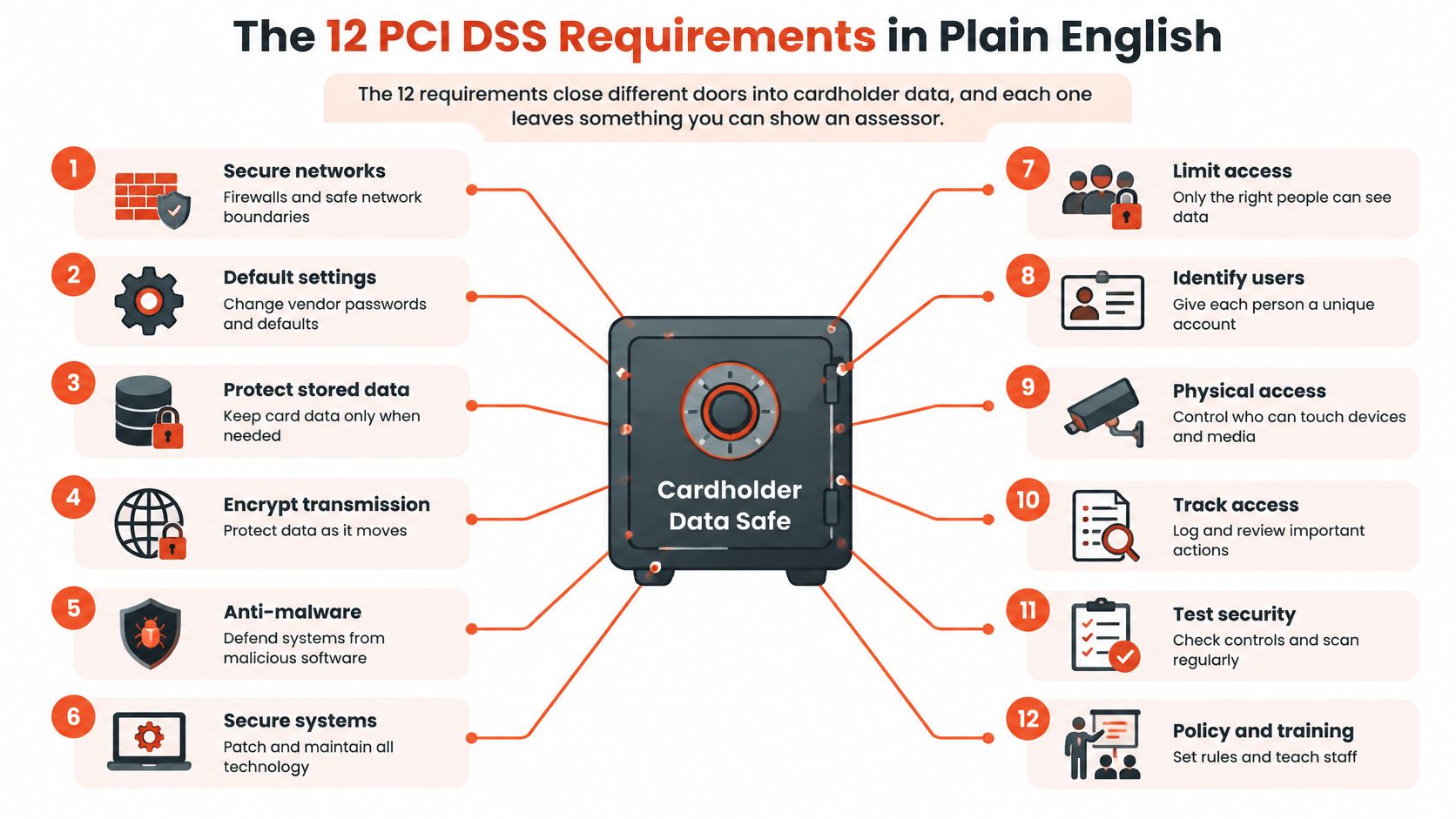
The 12 requirements close different doors into cardholder data, and each one leaves something an assessor can check. Think of them as locks on a cash safe. One strong lock doesn't help if another side is left open.
Here's how the requirements sit inside that safe.
Singapore's bank-level safeguards don't remove this merchant-side work. In its 19 February 2014 statement on payment card security, the Monetary Authority of Singapore pointed to EMV chip cards, dynamic one-time passwords, SMS or email alerts and secure card activation. It also warned that card transactions involve merchants and other non-bank parties, where data theft can occur. The risk at the counter sits with the shop.
PCI DSS control goals and what they mean in a shop
| Control goal | Requirements | What it means in a shop |
|---|---|---|
| Build and maintain a secure network and systems | 1-2 | Set firewall rules and change default passwords and settings on routers and terminals |
| Protect account data | 3-4 | Never store full card numbers; encrypt card data sent over open or public networks |
| Maintain a vulnerability management program | 5-6 | Run anti-malware and apply POS software and terminal patches on a set schedule |
| Implement strong access control measures | 7-9 | Give staff only the access they need, use unique logins and control physical access to terminals |
| Regularly monitor and test networks | 10-11 | Keep access logs and test for vulnerabilities and terminal tampering |
| Maintain an information security policy | 12 | Keep a written policy, train staff, maintain a vendor list and an incident response plan |
Requirement 2 shows up daily too. A router still using its factory password is a known door with a known key. Requirement 7 limits access to need-to-know, and requirement 10 keeps logs so actions can be traced.
Shops comparing PCI with broader governance options often start by choosing a security compliance framework that matches their size and data risk. Whichever framework sits above it, each PCI requirement still needs evidence, such as a signed access review or a dated tamper log. Action without a record is hard to prove.
Scope means every system that stores, processes or transmits card data, plus any system that could affect the security of those systems. The terminal is only one part. That's why two shops with identical terminals can face very different amounts of work.
Compare two shops. The first keeps card receipts with full numbers on a back-office PC. That PC, its backups and everyone who can log in now need controls. The second uses an encrypted terminal that sends card data directly to a validated processor. Its own systems never see the card number, so far fewer systems need testing and evidence.
Shrinking scope is usually cheaper than securing every system that accidentally touches card data.
Configuration matters here. Sambapay terminals can operate independently or alongside many existing POS setups, so a merchant can choose the arrangement that keeps card data out of its own systems. Shops comparing that choice can review the available POS hardware options in Singapore against their current counter setup. Sambapay submits merchant applications to Fiserv Merchant Solutions Pte Ltd, which acts as its acquirer and processor, so the processing path runs through that acquiring relationship.
Smaller scope doesn't mean no duties. The merchant still owns access governance, physical device protection, incident reporting and compliance records.
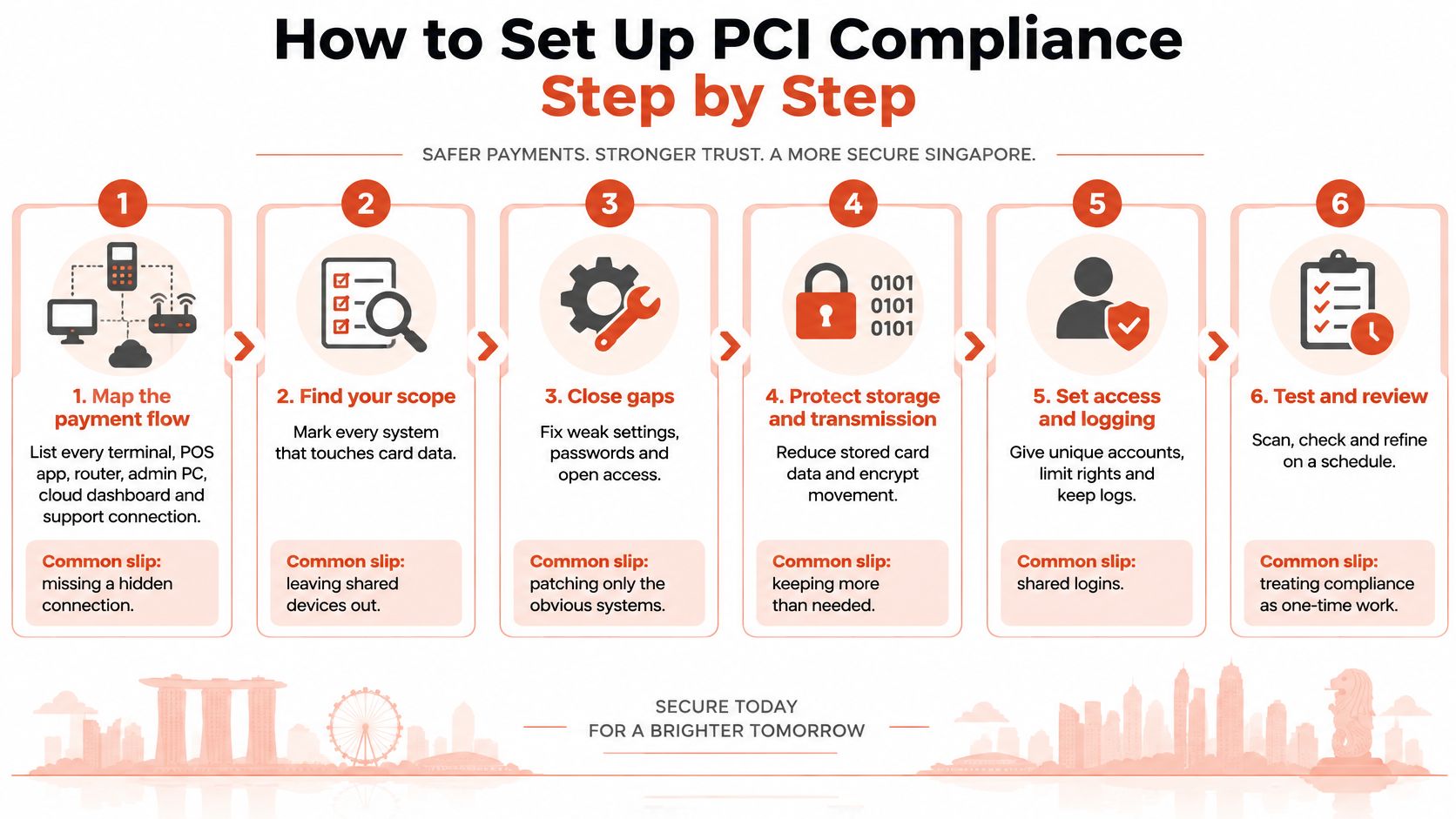
Draw the path from card tap to settlement on one page. List each system on it, including the router, and mark whether it ever sees card data. Any system marked yes stays in scope, and anything connected to it needs a second look.
PCI compliance works as a continuous control programme, not a one-off form. Guidance on PCI DSS compliance services from SGS covers protecting stored cardholder data, using strong cryptography over open or public networks, securing the network, named accounts with strong authentication, documented patching and logs that support investigation.
Here's a visual summary of the setup sequence before the detail.
Owners who want a checklist alongside these steps can cross-check against payment security guidance for small businesses and note which items their setup has already closed.
A finished setup looks simple from outside. One folder holds the flow map, the completed SAQ, the policy, training records and the patch log. When an assessor asks a question, the answer is already filed instead of rebuilt from memory.
A terminal set up correctly in January can be swapped, unpatched or left with a former employee's login by June. Compliance decays through ordinary staff changes and busy weeks. A fixed schedule catches that drift.
Recurring PCI compliance checks and evidence
| Frequency | Task | Evidence to keep |
|---|---|---|
| Every shift | Tamper check: loose casings, extra cables, unfamiliar stickers, serial number compared with the record | Initialled tamper log |
| Daily | Match settlement totals and refund counts against receipts | Signed daily report check |
| Monthly | Remove leavers and confirm who holds admin rights | Signed access review |
| Quarterly | Vulnerability scans, only where the SAQ or acquirer requires them | Scan report on file |
| Annually | Complete the SAQ, sign the attestation, refresh the policy and staff training | Signed SAQ, attestation and training records |
The every-shift tamper check takes under a minute. Staff look for a loose casing, an extra cable, an unfamiliar sticker or anything sitting over the card slot. Then they compare the serial number against the record and initial the log. A swapped device has little chance to sit unnoticed for long.
The daily check is about people, not hardware. Merchants can access clear reporting and transaction summaries to monitor card payment activity and daily totals. Match settlement totals and refund counts against receipts each day. A refund spike or a total that doesn't reconcile often flags staff fraud well before a customer complains.
Monthly, remove leavers' accounts the same week they leave, confirm who holds admin rights, and sign the review. Quarterly vulnerability scans apply only where the SAQ or acquirer requires them, so don't buy scanning out of habit without checking.
A dated sign-off beats a confident memory of having done the check.
The most common audit failure is missing evidence, not missing controls. Keep the records in one shared folder with a named owner, so the file survives staff turnover.
Many shop owners believe a provider's PCI status covers the shop. It doesn't. A provider's certification covers the provider's systems. The merchant still owns staff access, the premises, device handling and records, and responsibility splits along a boundary that needs to be written down.
That boundary matters because outsourced systems create dependency. An independent 2025 analysis of Singapore's 100 largest listed companies found that 100% had experienced a breach in their third-party ecosystem during the preceding year, and every company had a breached party in its fourth-party ecosystem. Those firms are far larger than a neighbourhood shop, but the lesson scales down. Outsourcing reduces technical burden and adds reliance on someone else's controls.
Use stated claims as starting points, then ask for proof. Sambapay encrypts personal data at rest and in transit and has appointed a Data Protection Officer, reachable at privacy@sambapay.com, so a merchant can ask for evidence of the encryption approach and keep the DPO contact on file for privacy questions. Shops reviewing merchant services in Singapore can run the same six checks against any provider on the shortlist.
Review the responsibility matrix at every renewal and whenever staff or vendors change. That review is how dependency risk gets managed instead of ignored.
These three cases are illustrative composites, not real businesses. Each follows the same pattern: the encryption held, and the process around it didn't.
Here's a visual summary of the three situations.

The café with one password. Four staff shared a single admin password on the tablet POS. Refunds crept up for months, and nobody spotted the pattern until the owner matched daily reports against receipts. The fix combines unique logins from the setup routine with the daily report check, so every refund carries a name.
The salon with the swapped terminal. During a busy Saturday, the card terminal was exchanged for a lookalike. No tamper log existed, so nobody could say when it happened or which transactions were affected. The every-shift tamper check and a serial number record would've caught the swap the same day.
This short video walks through how everyday counter habits expose payment data.
The clinic with the spreadsheet. Front desk staff kept patient card details in a spreadsheet for billing follow-up. The file was emailed around and lived in several inboxes for years, each copy a separate exposure. Deleting stored card data and setting a retention rule removes the problem at its source.
The wider threat isn't limited to databases either. The Singapore Police Force report on unauthorised card transactions recorded at least 656 cases between October and December 2024 in which phished card credentials were provisioned to mobile wallets, producing at least S$1.2 million in losses.
Most incidents begin with people and processes around the terminal rather than the encryption itself. Training staff to question suspicious calls, messages and refund requests protects all three cases at once.
Before the next acquirer review or renewal, close three items. Confirm which SAQ applies using the comparison table and the acquirer's written confirmation. Finish the one-page flow map. Book the first recurring check, even if it's only the every-shift tamper log.
Store the acquirer's confirmation in the evidence folder with the SAQ and attestation. If the setup changes later, that letter shows exactly what was agreed and when. It also makes the next annual review a refresh instead of a restart.
Next, ask Sambapay which SAQ fits its terminal setup, and request the attestation and responsibility matrix before signing anything. Ask for written confirmation of which parts of the payment flow it handles, so the shop's flow map matches the provider's documentation line by line. Any gap between the two documents is a control nobody owns.
Two practical details help at installation stage. Contactless transactions use the same security standards and encryption as traditional chip card payments, so tap payments don't need a separate security approach. Sambapay can schedule installation outside peak hours so card acceptance continues without interruption, which means the security setup doesn't have to cost a trading day.
The review is only as good as the evidence behind it.
Sambapay supplies in-store card acceptance for Singapore SMEs, with modern terminals and local support that help merchants keep card data out of their own systems and their PCI scope small. Merchants preparing for an acquirer review can discuss SAQ fit, attestations and responsibility boundaries before installation. Visit Sambapay to start that conversation.