
A Saturday queue in a neighbourhood boutique can expose everything that's wrong with an old till. One customer is ready to tap, another is searching for the right wallet app, and the cashier is still checking a separate spreadsheet for stock. In Singapore, that isn't just annoying, it's a sign that the counter is doing too many jobs badly.
For retail owners here, pos systems for retail stores are no longer just payment boxes. They decide how quickly queues move, which payment methods you can accept, how stock gets updated, and how much admin still waits after closing time. With Singapore's retail checkout already heavily card-led and cashless, the counter setup you choose shapes daily operations far more than most owners expect.
A modern counter has to do the work of three separate tools at once. It should take payment, record the sale, and leave the shop with a clean paper trail, without forcing staff to jump between systems. That's the practical difference between a basic terminal and a retail POS that can handle real shop-floor pressure.
At the till, the POS should accept card, contactless, and wallet payments, then issue a receipt by print or digital delivery. It should also keep a running tally of the day, assign each sale to the right staff member, and update inventory the moment an item leaves the shelf. Those functions matter because Singapore retail has already moved far beyond cash-only checkout, with digital payments adoption at 92.0% in 2025 and card payments still dominating POS value in 2024 at SGD 148.91 billion, according to PwC's Singapore payments publication and the BIS Singapore cashless data.
A useful way to think about it is simple. The hardware gets the item scanned and the payment approved, the software keeps the retail data tidy, and the payment layer moves money from customer to merchant. That's why a shop owner shouldn't buy “a terminal”, they should buy a checkout flow.
Practical rule: if the till cannot finish a tap, print or send the receipt, and update stock in one pass, it's not a retail POS yet.
For owners who want the shop floor and back office to stay aligned, a POS should also sit comfortably beside stock and order tools. A good starting point is to think about it as the cash register plus the omnichannel control center software that keeps sales channels from drifting apart.
Some Singapore retailers also prefer Android-based setups because they're easier to train staff on and simpler to keep compact. A practical overview of that approach is in this guide to Android POS systems, which suits owners who want a lighter counter footprint without losing core checkout functions.
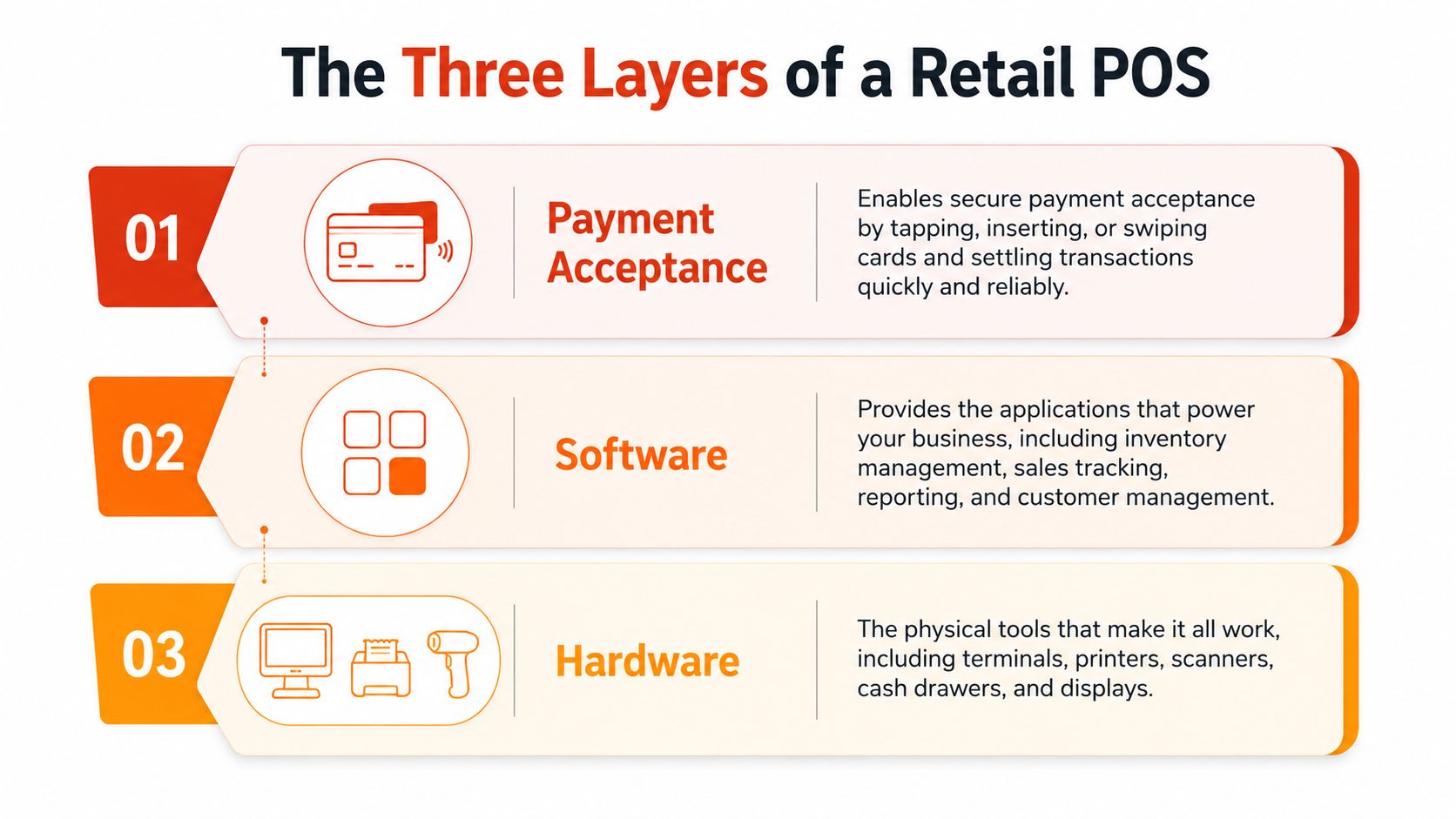
A lot of buying mistakes happen because people treat the POS as one object. It isn't one object, it's a stack. If one layer is weak, the whole checkout slows down even if the terminal looks modern on day one.
Hardware is the visible part, the terminal or tablet, barcode scanner, receipt printer, and cash drawer. In some Singapore stores, these pieces are folded into one Android device, which keeps the counter tidy and reduces cable clutter. That's useful for small boutiques, kiosks, and stores where staff need to move quickly without setting up a mini desktop at the till.
Software is the till app and dashboard. It holds the product list, pricing, discounts, sales history, user access, and often inventory counts. Cloud-hosted software is common because it lets an owner check store performance after hours without being physically at the shop, which matters when a retail team needs the same pricing and product view across the day.
Payment acceptance is the layer most guides gloss over. This is the acquiring bank or processor that connects the checkout to NETS, Visa, Mastercard, and local wallet rails, handles authorisation, and then settles funds later. For a shop owner, that means the payment brand on the front of the terminal is never the full story, because the real job is done by the processing path behind it.
Once the layers are split apart, it becomes easier to compare offers. A cheap terminal can still become expensive if the software subscription is heavy or the payment rate is unclear. A polished dashboard won't help if settlement is slow or support can't fix a payment hold during a Saturday rush.
The most useful buying habit is to price each layer separately before bundling them together. That makes it much easier to spot whether the vendor is selling a working checkout or just a box with a screen.
The physical counter decides whether the POS feels fast or clumsy. A good setup lets the cashier and customer reach the terminal easily, keeps cables out of the way, and leaves enough space for bags, product handoff, and receipt printing. The wrong layout creates small delays that add up every hour.
A fixed countertop terminal works well when the till position never changes and the cashier needs a stable, always-on setup. It suits shops that want one clear payment point and don't need to roam during peak hours. A portable device helps when queues build and staff need to move payment to the customer instead of sending the customer to the counter.
That trade-off matters in Singapore because a busy retail floor can change quickly across lunch, weekends, and sale periods. A portable unit can act as a queue-buster, but only if the connection is stable and the device is easy for staff to grab without delay. A fixed unit feels neater, but it can turn into a bottleneck if the store layout forces everyone into a single narrow lane.
Connectivity is usually more important than the brand printed on the casing. A wired setup is dependable, while a strong 4G connection gives a mobile terminal more freedom without locking the cashier to one spot. If the signal is weak or the device keeps dropping the session, staff end up apologising at the counter instead of serving customers.
Receipt flow also deserves attention. Some shops still need printed receipts, while others do fine with e-receipts sent after payment. In Singapore, many customers are already comfortable with wallet and PayNow-style interactions, so digital follow-up feels natural if the merchant doesn't need a paper trail for every sale.
Keep the counter design boring in the best way. If staff don't have to think about where to stand, where to plug in, or how to reach the terminal, checkout gets faster without anyone noticing the machinery behind it.
Plan the counter before the hardware arrives. Once the screen, scanner, and printer are on the bench, the layout gets harder to change without redoing cables and power points.
Retail owners often compare payment systems by headline rate and stop there. That's usually the wrong comparison, because the bill is spread across hardware, software, processing, and the messier items in between. The cheapest-looking offer can become the priciest one once monthly fees, settlement timing, and add-ons are counted.
The first layer is hardware, which includes the terminal, scanner, printer, and cash drawer. The second layer is software, which may be billed monthly for the till app, reporting, and inventory tools. The third layer is processing, where card or wallet transactions pass through an acquirer and the merchant pays a fee for acceptance.
That processing layer matters in Singapore because the checkout is high-frequency and card-led. MAS reported that in H2 2025, POS credit and charge card payments reached SGD 56.49 billion across 726 million transactions, while debit POS added SGD 28.40 billion across 960 million transactions. That means tiny pricing differences can add up quickly over time, especially for shops with steady daily turnover, according to the MAS retail payment statistics.
The hidden line items are the ones that catch owners out. Mobile terminals can bring SIM or data costs. Some setups involve compliance and chargeback administration. Settlement timing affects cash flow, which matters when stock needs to be reordered before revenue lands in the bank.
| Typical Monthly Cost Components for a Singapore Retail POS | One-Time (S$) | Monthly (S$) | Notes |
|---|---|---|---|
| Terminal or tablet | Varies by model | 0 if purchased outright, or rental if bundled | Fixed or mobile hardware depends on counter design |
| Receipt printer and scanner | Varies by model | 0 | Useful for faster checkout and cleaner item lookup |
| POS software subscription | 0 to vary by provider | Varies by plan | Covers till app, reporting, and admin access |
| Card processing fee | 0 | Varies by volume | Charged per transaction through the acquirer |
| Wallet and alternative tender support | 0 | Varies by provider | Depends on which rails are enabled |
| SIM or data line for mobile terminal | 0 | Varies by telco plan | Relevant for portable devices |
| Compliance and dispute handling | 0 | Varies by provider and case | Chargeback management should be clear in writing |
A proper comparison starts with total cost of ownership, not just the sticker price on the terminal. That means adding hardware, processing, and the operational cost of slower settlement into one view before signing anything.
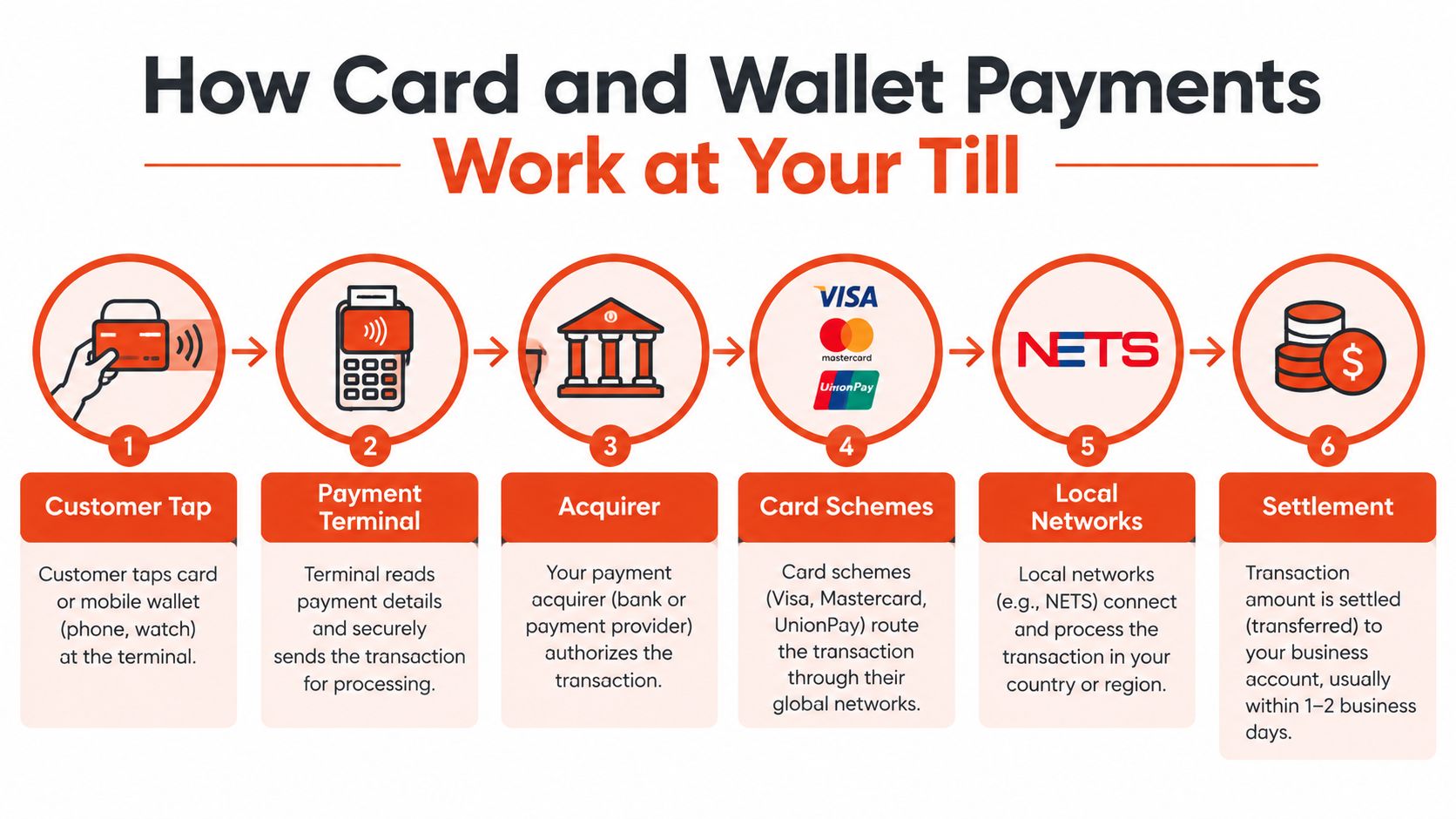
A tap at the counter looks instant, but the payment path behind it has several moving parts. The terminal reads the payment credential, the processor checks it, the scheme routes it, and the merchant eventually receives settlement. The cleaner that chain is, the fewer problems show up during reconciliation.
For a card payment, the customer taps, inserts, or swipes at the terminal. The payment then moves through the acquirer, the card scheme such as Visa, Mastercard, or UnionPay, and the merchant's settlement account. Local networks such as NETS sit in the same acceptance conversation for Singapore merchants, which is why retail owners need to know what their processor can route, not just what the terminal can display.
Wallets add another layer of routing, but the merchant experience should still feel simple. PayNow QR, GrabPay, Shopee Pay, Apple Pay, and Google Pay all matter because customers expect one counter to handle several tender types without slowing the queue. For merchants looking at wallet acceptance options, a practical example of card payment enablement is available in this credit card acceptance overview, which sits alongside wallet support rather than replacing it.
A useful merchant habit is to separate authorisation from settlement. Authorisation tells the cashier the payment was approved, while settlement is when the funds move to the merchant account later. Some acquirers in Singapore support settlement as early as T+1 under the right agreement, which helps with cash flow planning.
Take a straightforward S$48.50 sale paid by PayNow QR. The merchant should expect the system to record the transaction reference, the tender type, the amount, and the time stamp, then roll that into the daily close file. The reconciliation report is what helps the owner match what the cashier saw at the till with what lands in the bank later.
A good checkout doesn't just approve payments, it leaves a paper trail that the owner can match without guesswork.
Pre-auth, capture, and refund flows should also be clear before go-live. If the staff can't explain them, they'll struggle when a customer changes an item or asks for a reversal at the counter.
A POS starts paying for itself only when it stops acting like a standalone till. Once it talks to stock, bookkeeping, and online channels, the shop owner gets a working retail system instead of a pile of separate tools. That is where operational pain usually drops.
The first rule is SKU discipline. If a product is called one thing in the POS and something else in the accounting or marketplace dashboard, the sync becomes messy fast. Retailers that use a POS with inventory control can deduct stock automatically when an item is sold, then push the day's numbers into accounting software for cleaner reporting.
For Singapore SMEs, that often means linking the till to Xero or QuickBooks for bookkeeping and GST-oriented reporting, and to stock tools such as TradeGecko or Zoho Inventory for product counts. Marketplaces and online stores such as Shopify or Lazada Seller Centre can sit on top of that same product master if the mapping is clean.
Most integrations don't run like magic. A short sync delay is normal, and marketplace commission fees usually still need manual reconciliation because not every platform treats charges the same way. That's why a shop owner should treat the integration as a control layer, not as a promise that every number will always match automatically.
A useful reference point for owners who want accounting and CRM systems to sit together is this integration guide for QuickBooks and CRM. The principle is the same in retail, clean data flow matters more than extra dashboard features.
Practical wins do show up when the setup is done properly:
The cost of doing this badly is data silos. Once the POS, accounting tool, and online store each keep their own version of stock, the owner spends more time reconciling than selling.
A good provider is less about the longest feature list and more about whether the counter keeps working on a busy day. Retailers need transparent pricing, predictable settlement, and support that can solve a frozen terminal without making the owner chase three different people. Anything else is noise.
The first signal is effective MDR, not just a teaser rate buried in a brochure. The provider should spell out what the merchant pays across card acceptance, settlement, and any monthly software or rental charges. If the fee structure needs a spreadsheet and a decoder ring, the offer is probably not built for a busy SME.
The second signal is whether one team owns the payment and POS stack. When the acquiring side and software side are split across different vendors, the merchant can end up in the middle during a dispute or terminal fault. A single accountable point of contact usually makes migration, training, and downtime planning easier.
The third signal is local support that understands Singapore retail timing. A counter issue at lunch or on a weekend is not the same as a back-office software ticket on Tuesday afternoon. Settlement in SGD within one to two business days matters more than a glossy app marketplace because cashflow is what pays suppliers and restocks the shelf.
For owners comparing options, a practical shortlist should include a provider that can explain chargebacks in writing, a migration plan that includes staff training, and contract terms without unnecessary lock-in. One retail-oriented option in Singapore is Sambapay, which provides in-store POS terminals and payment acceptance for merchants that want a simpler counter setup with direct support.
If a vendor cannot explain fees clearly, pushes long binding periods, or treats cashback schemes as if they're essential to retail checkout, that's a warning sign. The counter should be the operational centre of the business, not an upsell channel.
A useful comparison point is a provider overview such as this Singapore POS system guide, especially when the shop owner wants to compare service terms rather than only hardware specs. For retailers, the right choice is the one that keeps checkout fast, settlement predictable, and support reachable when the line is growing.
If your retail shop is still juggling separate terminals, patchy settlement, and too many follow-up tasks after closing, Sambapay can help you simplify the counter with in-store payment acceptance and practical setup support. Visit Sambapay to compare a retail POS setup that fits Singapore stores and ask for a straightforward conversation about checkout, payments, and migration.