
A Tuesday lunch rush can expose a weak payment setup faster than any sales presentation. Two queues form at a Tiong Bahru café, one cashier handles orders, and a customer holds a contactless card against a terminal that takes too long to respond. The owner starts looking at new POS machines in Singapore, but the question isn't which device looks modern. It's whether the new arrangement will lower acceptance costs, release funds quickly, and give staff dependable help when service is busiest.
A POS machine Singapore buyer is choosing more than hardware. The decision affects card and wallet acceptance, settlement timing, reconciliation, replacement procedures, and the contract that may remain in place for years. Singapore's POS card market shows why reliability matters. MAS recorded 682 million POS card transactions in H1 2025, with transaction value reaching SGD 74.5 billion, compared with SGD 70.9 billion in H1 2024 (MAS retail payment statistics).
The owner who compares only the advertised rate can miss the cost of card mix, PayNow routing, rental charges, slow settlement, and weak support. The owner who compares only terminal brands can buy a machine that doesn't suit the counter, tables, mobile appointments, or stock workflow. The practical answer starts with the economics and operating pattern, not the logo on the device.
The café owner has two choices. One provider offers a low-looking card rate and a subsidised terminal. Another offers clearer pricing, faster settlement, and a portable unit that staff can carry to tables. The first quote appears cheaper until the owner asks what happens to PayNow transactions, premium cards, chargebacks, replacement hardware, and the contract after the introductory period.
That is the decision many Singapore SMEs get wrong. They treat a POS machine as a one-off hardware purchase when it is a payment operating arrangement. The terminal is the visible part. Behind it sit the acquiring relationship, payment rails, merchant account, settlement timetable, reporting, support process, and commercial terms.
Singapore's in-store environment leaves little room for narrow acceptance. Industry reporting citing GlobalData places Singapore's POS terminal penetration at 53,562 terminals per million people, while a payments study reported that 97% of retail POS transactions were cashless in 2022 (BIS retail payment statistics). The same verified market data indicates that cards accounted for 40% of POS spend in 2025, while digital wallets accounted for 36% (BIS retail payment statistics). A terminal that handles only one part of that mix creates avoidable checkout friction.
Practical rule: The cheapest terminal is not the cheapest acceptance setup. The effective cost depends on payment mix, settlement speed, fixed charges, and the support received when the device fails.
Before signing, the owner should record a normal Tuesday and a busy Saturday. Which payments do customers use? Does the queue move faster with a fixed counter terminal, a portable device, or phone-based acceptance? How much working capital is tied up while card batches wait for settlement? A retailer assessing customer acquisition or campaign performance may also find retail influencer ROI tools useful, but the payment setup still needs its own transaction-level review.
The right conversation is therefore less glamorous and more practical. It asks what the shop needs to accept, what each rail costs, when funds arrive, and who answers when the terminal freezes at the worst possible time.
A POS machine is the physical or mobile device that accepts an in-person payment and sends the transaction into the acquiring network. It reads a card, phone, or QR payment, requests authorisation, shows the result to the cashier, and helps route approved funds to the merchant's bank account.
The process is straightforward:
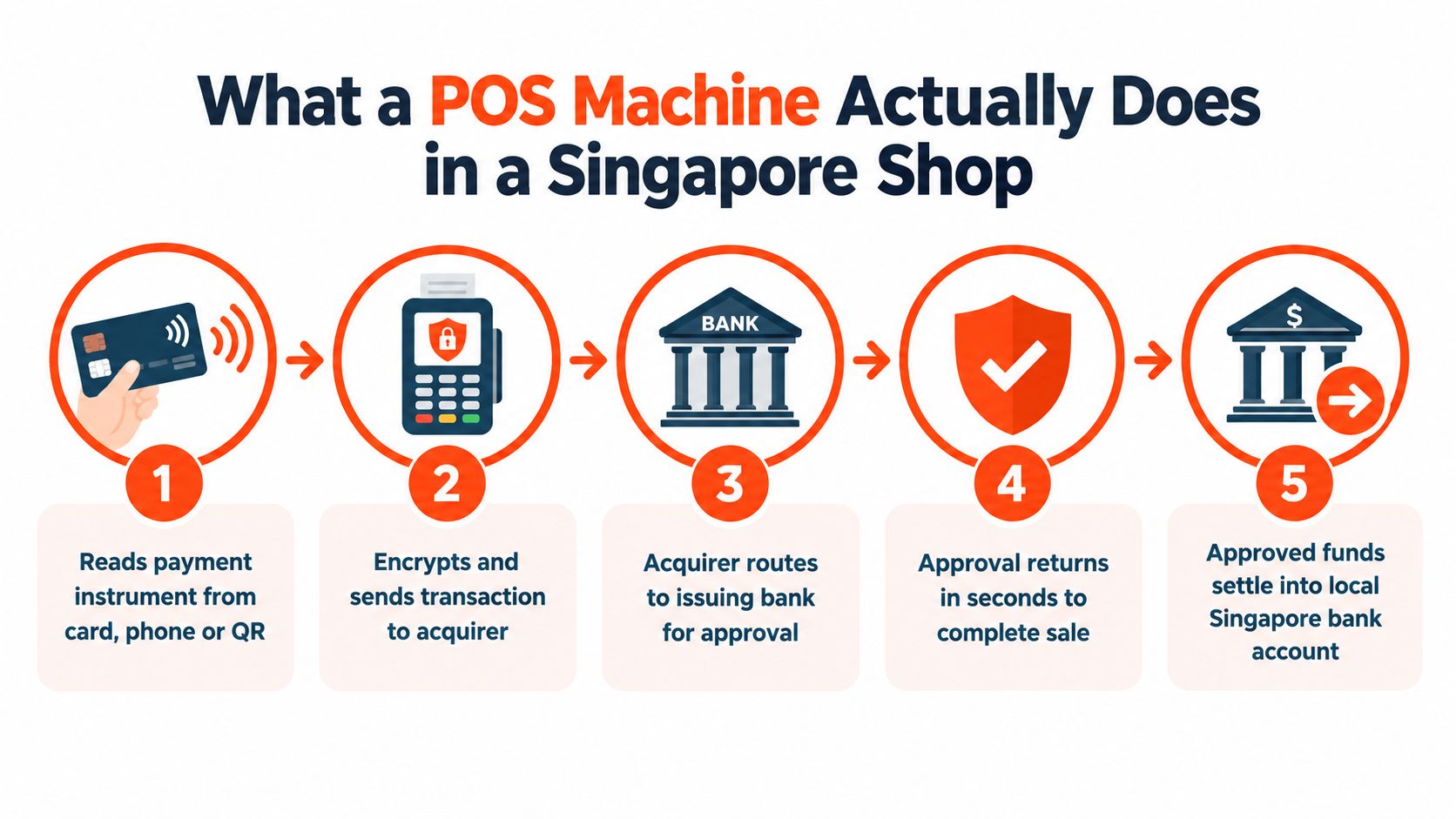
Singapore merchants need broad acceptance because customers don't follow one payment habit. MAS data shows 682 million POS card transactions in H1 2025, and the value of those transactions was SGD 74.5 billion (MAS retail payment statistics). The verified market data also reports 40% of POS spend from cards and 36% from digital wallets in 2025 (BIS retail payment statistics). That combination makes card-only or QR-only acceptance an operational compromise.
A terminal processes payment. A full POS system may also manage product catalogues, inventory, staff permissions, receipts, refunds, sales reports, and accounting exports. A café with table orders and kitchen communication needs more than a card reader. A small clinic that already uses separate appointment software may need only a reliable terminal and clean settlement reports.
The distinction matters because many vendors use “POS” to describe both products. A business should ask whether the quoted product includes payment hardware only, or whether it also replaces the operational software already used by staff. Buying unnecessary software creates subscription cost and training work. Buying only a terminal when inventory or appointment controls are essential creates manual processes that staff will eventually bypass.
Terminal selection should follow the physical workflow. A fixed checkout lane, a café table, a salon chair, and a pop-up stall don't need the same device.
A countertop Android terminal suits a pharmacy, boutique, or clinic with a defined payment point. It can remain connected to power, support a customer-facing display, and pair neatly with a receipt printer or barcode workflow. A portable PAX-style terminal works better for cafés, restaurants, salons, and gyms where staff need to bring payment to a table, treatment room, or membership desk. Tap to Phone can suit a new stall, event seller, or pop-up that wants to avoid dedicated hardware, provided the phone, acceptance features, connectivity, and operational controls meet the business's needs.
Connectivity deserves as much attention as the device. Wi-Fi-only hardware can be tidy in a stable shop, but it becomes vulnerable when the router fails or the broadband service drops. A 4G SIM gives the terminal an independent route, although signal quality can become the limiting factor in a basement salon or enclosed clinic. Hybrid connectivity, using Wi-Fi and cellular, generally gives an SME more resilience, but the provider should explain how failover works rather than merely listing “4G” on a specification sheet.
| Business type | Terminal shape | Connectivity | Payment methods needed |
|---|---|---|---|
| Boutique or pharmacy | Fixed countertop Android terminal | Wi-Fi or Ethernet, with cellular backup where available | Contactless cards, Visa, Mastercard, PayNow QR, mobile wallets |
| Café or restaurant | Portable terminal for table-side use | 4G and Wi-Fi | Contactless cards, Apple Pay, Google Pay, PayNow QR, selected wallets |
| Salon or spa | Portable PAX-style device | 4G preferred for room-to-room movement | Cards, mobile wallets, PayNow QR, receipts and refunds |
| Clinic | Fixed unit or portable terminal at treatment areas | Stable Wi-Fi with cellular fallback | Cards, PayNow QR, mobile wallets, clear reporting |
| Gym or pop-up seller | Hardware-light Tap to Phone or compact mobile reader | Reliable mobile data | Contactless cards, supported wallets, QR acceptance |
Payment coverage must be tested in a live demonstration. The device should support Visa and Mastercard, contactless phone wallets, PayNow through SGQR, and the local wallets relevant to the merchant. Singapore business guidance describes Visa, Mastercard, PayNow via SGQR, GrabPay, and other wallets as baseline expectations for modern merchant terminals (Singapore SME POS guidance).
A hairdresser near Nex needs portability more than a large display. A Bukit Batok pharmacy benefits from a stable counter unit that can connect sales to stock records. A dressmaker taking deposits at fittings may need a mobile arrangement, and resources covering billing options for dressmakers can help frame that conversation. The terminal should match where payment happens, not where the sales representative prefers to install it.
For merchants assessing contactless hardware and connectivity in more detail, the Singapore contactless payment terminal guide provides a useful reference point. The key question remains practical: can staff accept every common payment type quickly, even when the counter is crowded or the main connection fails?
A fee schedule is not a single rate. It is a stack of charges that may include merchant discount rate, scheme-specific pricing, terminal rental, software, statements, refunds, chargebacks, minimum commitments, and settlement options.
The headline comparison usually hides the most important variable, the merchant's payment mix. PayNow can be near-zero, while card acceptance commonly falls within 1.5% to 3.5%, depending on card type and business profile (PwC Singapore payments report). A merchant with mostly PayNow transactions can show a lower blended rate than a salon accepting more premium or corporate cards, even when both providers quote the same starting card price.
The correct calculation is:
Total acceptance cost = variable transaction charges + fixed fees + exception charges + cost of delayed settlement.
A small café with a low average ticket may process many transactions, making fixed fees and minimum charges important. A salon with a higher average ticket may focus more heavily on the percentage charged to card payments. The following table is a decision template, not a set of assumed market results. It shows which fields a provider must complete with the merchant's actual data.
| Merchant profile | Avg ticket (SGD) | Monthly volume | Card mix (PayNow / Debit / Credit / Amex) | Effective rate | Monthly MDR cost (SGD) | Fixed fees (SGD) | Total (SGD) |
|---|---|---|---|---|---|---|---|
| Café | 12 | Provider to confirm | Provider to confirm | Provider to calculate | Provider to calculate | Rental, software, and other fees | Provider to calculate |
| Salon | 85 | Provider to confirm | Provider to confirm | Provider to calculate | Provider to calculate | Rental, software, and other fees | Provider to calculate |
| Clinic | Provider to confirm | Provider to confirm | Provider to confirm | Provider to calculate | Provider to calculate | Rental, software, and other fees | Provider to calculate |
The table becomes useful when each provider applies the same transaction history. The merchant should request separate rates or rules for Visa, Mastercard, American Express, JCB, UnionPay, and wallet or QR transactions where applicable. A blended quote can be simple to reconcile, but it still needs a clear explanation of which rails are included.
A provider may also pass through scheme or interchange changes, add a post-billing adjustment, or apply a chargeback fee. Enterprise Singapore e-payment materials show that subsidised POS packages can bundle annual terminal fees with transaction fees, so subsidised hardware doesn't automatically mean lower total cost (Enterprise Singapore e-payment materials). The blended rate versus interchange-plus comparison helps merchants identify which pricing model gives clearer forecasting.
Ask for one number: the projected monthly total under the shop's actual PayNow, debit, credit, and premium-card mix. If the provider can't calculate it, the quote isn't ready for approval.
“Cheapest POS machine” is therefore the wrong search question. The better question is which acceptance arrangement produces a predictable total cost after payment mix, fixed charges, and settlement terms.
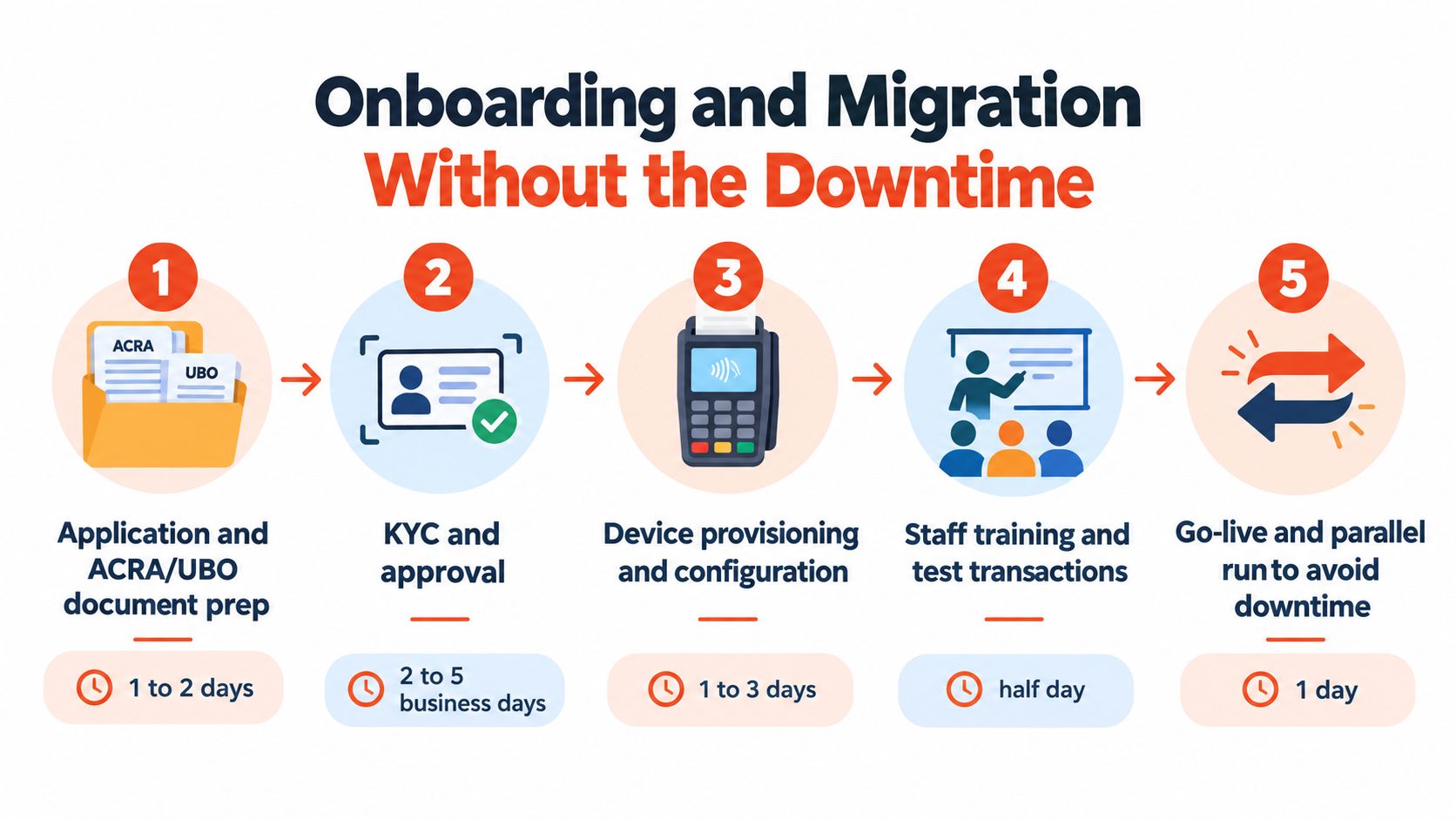
Switching providers becomes risky when the merchant treats it as a delivery job instead of a small project. A clean migration protects the old payment route until the new terminal has passed real transaction tests.
First, prepare the account file. The provider will typically need business registration information, authorised-person details, settlement account details, and beneficial-owner information. Missing UBO declarations or inconsistent company records can delay review.
Next, complete KYC and approval. The merchant should confirm which entity is being onboarded, which outlet is covered, and where funds will settle. If the business is GST-registered, the invoicing and receipt setup should match its tax-record requirements.
Then configure the hardware. The provider should load the merchant profile, payment applications, receipt settings, and connectivity credentials before the device reaches the shop. The plan should also identify who handles key injection and activation.
After that, test in parallel. Staff should run a small set of authorised, declined, refund, receipt, and settlement checks while the old terminal remains available. This is particularly important when an existing POS system, printer, accounting export, or QR workflow is involved.
Finally, cut over deliberately. The manager should choose a quiet operating window, brief every cashier, label the old equipment, and record the support contact. PayNow QR onboarding can often act as a bridge while full terminal activation is being completed, but the provider must confirm the settlement and reporting treatment.
Contract termination deserves attention before any new equipment is ordered. A merchant that cancels mid-billing cycle may face a final rental charge, equipment return requirement, or early termination fee. The POS switching guide for stores can help structure the changeover around documentation, testing, and operational continuity.
The provider should give the merchant a named escalation route, not only a generic inbox. A replacement device policy matters just as much as initial delivery because a terminal that fails during peak service can stop revenue immediately.
Settlement timing is working capital. A card payment authorised at the counter isn't the same as cash available in the merchant's bank account. Local SME guidance places typical card settlement in the T+1 to T+3 range, while Singapore-focused merchant products advertise next-business-day SGD payouts for domestic transactions (Sambapay settlement guidance).
The difference affects businesses that spend money every day. A restaurant may need to pay suppliers for the next service. A retailer may reorder once stock falls below its threshold. A clinic may replenish consumables before the next appointment block. If the card batch arrives later, the owner either holds more cash in reserve or delays another payment.
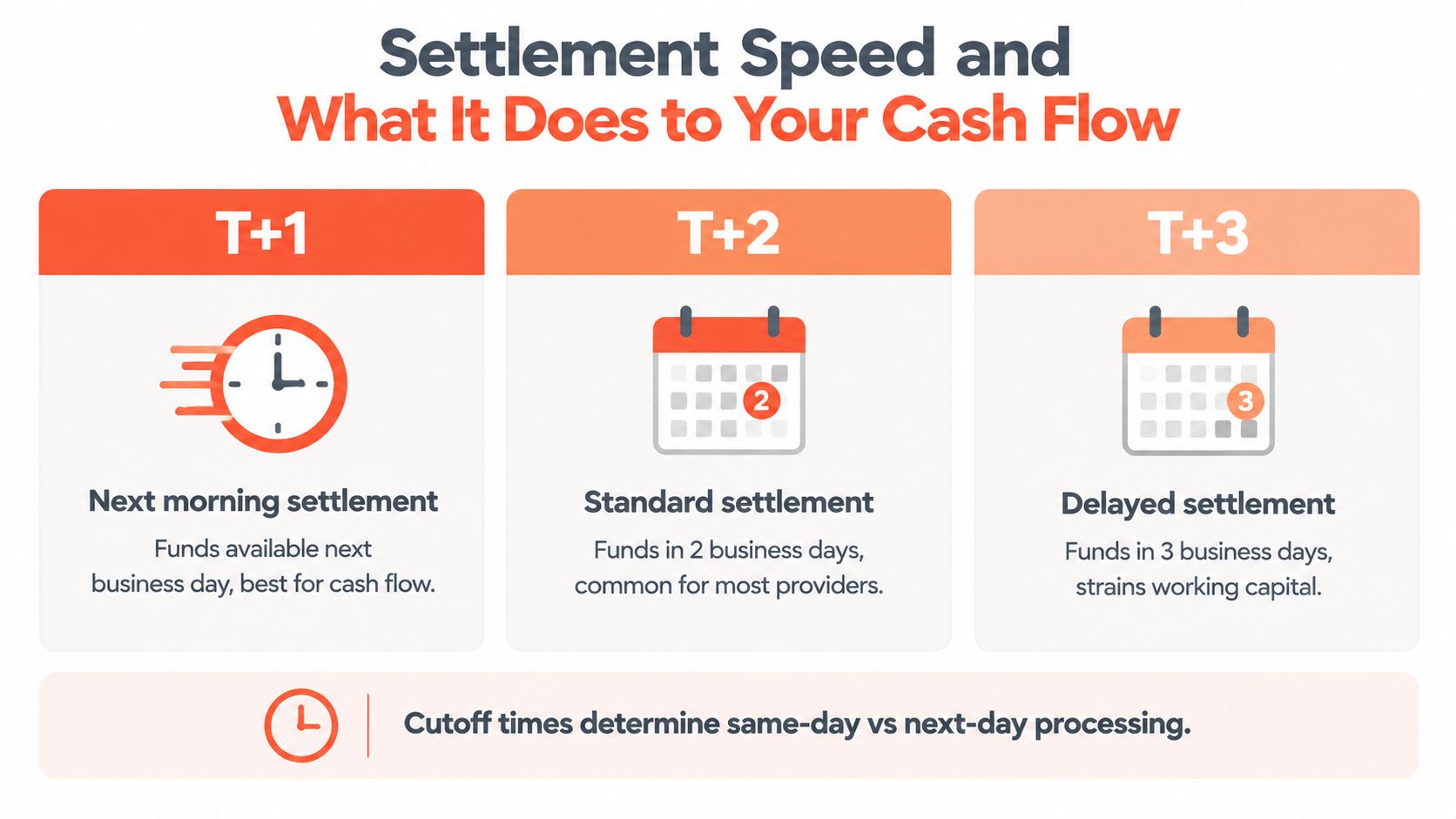
T+1 means funds generally arrive on the next business day after the relevant cutoff and processing conditions are met. T+2 leaves the merchant waiting another business day. T+3 creates a longer float and can become especially inconvenient around weekends or public holidays. The exact result depends on cutoffs, transaction type, risk review, bank processing, and the merchant agreement.
A sales representative should answer these questions in writing:
Faster settlement isn't automatically worth a higher fee. It is valuable when the business repeatedly needs liquidity for rent, payroll, supplier payments, or daily replenishment. A merchant with strong cash reserves may prioritise a lower acceptance rate. A restaurant with tight daily outgoings may rationally pay for a faster, more predictable schedule if the cash-flow benefit exceeds the incremental cost.
PayNow also needs separate confirmation. QR transactions can follow a different operational and reporting cadence from card batches, so the owner shouldn't assume that every payment rail reaches the bank account under one identical timetable.
A globally recognised processor may offer impressive scheme coverage, but brand recognition doesn't answer the question that matters at 8pm on a Saturday: who fixes the terminal when it stops accepting payments?
For most Singapore SMEs, major card and wallet access is increasingly standard. The differences appear in response times, replacement arrangements, onboarding quality, reporting clarity, and contract flexibility. A Tiong Bahru café and a Jurong retail shop may both accept Visa and Mastercard, but they can experience very different outcomes depending on whether a local support team answers quickly and understands the outlet's setup.
The contract needs careful reading before the merchant accepts any subsidy or discounted device. A low upfront price may reflect a rental commitment, minimum transaction requirement, or lock-in period. A provider may also reserve the right to change pricing after an introductory period or pass certain compliance costs back to the merchant.
| Contract clause | What it usually means | SME watch-out |
|---|---|---|
| Terminal rental | The device remains tied to a recurring charge | Compare rental over the full commitment, not only the starting offer |
| Minimum monthly commitment | The merchant pays or processes a minimum amount | Seasonal shops may pay for unused capacity |
| Introductory MDR | The initial rate may apply for a limited period | Request the post-introduction rate in writing |
| Scheme or interchange pass-through | Some underlying cost changes may reach the merchant | Ask how much notice is given and how the adjustment appears |
| PCI non-compliance charge | The merchant may pay if required controls are incomplete | Confirm responsibilities and remediation support |
| Early termination fee | Ending the agreement early may trigger a charge | Check whether hardware subsidies create repayment obligations |
| Auto-renewal | The contract may renew unless notice is given | Record the notice window and renewal length |
| Replacement hardware | Faulty equipment may be repaired or replaced under defined terms | Confirm shipping, onsite help, and temporary backup arrangements |
A provider should also explain data export. Sales history, refunds, settlement reports, and customer or inventory records shouldn't become inaccessible because the merchant changes terminals. Support hours matter too. A provider that only handles basic queries during office hours may not suit a business whose peak period begins after work.
The strongest partner is the one with clear terms and a usable escalation path, not necessarily the one with the largest logo.
SMEs should compare the agreement as a risk document. The payment rails get the attention, but the contract determines how much flexibility remains when sales patterns change, equipment fails, or a new outlet needs a different workflow.
A POS shortlist should contain two or three providers that have survived the same practical test. Each sales representative should receive the same transaction assumptions, outlet workflow, bank details, and support questions. That makes the comparison less vulnerable to polished demonstrations and selective pricing.
Does the hardware fit the payment point?
A fixed counter, roaming café service, salon chair, clinic room, and pop-up stall require different shapes. Ask staff to demonstrate a complete sale, refund, receipt, and QR payment using the proposed device.
Which payment methods are included?
Confirm Visa, Mastercard, contactless phone wallets, PayNow through SGQR, NETS where required, and relevant digital wallets. “Supported” should mean available in the quoted setup, not available only through a separate application or add-on.
What is the effective cost under actual card mix?
Give the provider a realistic split between PayNow, debit, credit, and premium cards. Request the monthly total including MDR, terminal charges, software, statements, refunds, chargebacks, and any minimum commitment.
When will funds reach the bank account?
Get the settlement timetable, cutoff time, bank-day treatment, and exceptions in writing. The merchant should compare T+1, T+2, and T+3 against supplier, payroll, rent, and replenishment cycles rather than choosing on speed alone.
Who answers during an outage?
Ask for support hours, escalation channels, response expectations, replacement procedures, and whether Singapore-based staff handle the account. A terminal is only useful if the business can recover quickly when it fails.
Can the merchant leave cleanly?
Review rental, lock-in, auto-renewal, early termination, data export, and price-change clauses. The contract should state what happens to the hardware, reports, and settlement account when the relationship ends.
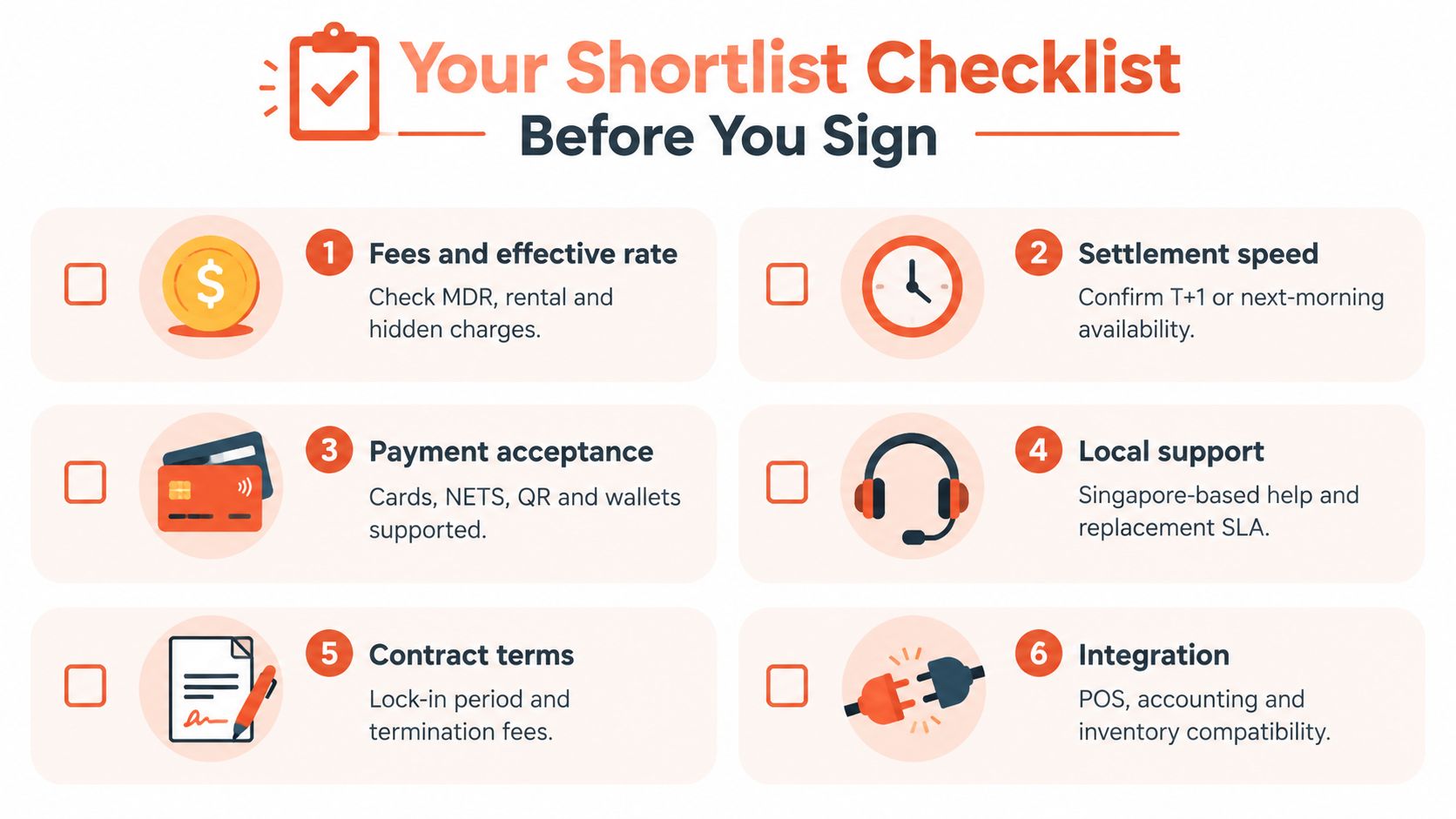
The final choice should reflect the merchant's actual counter pattern, not a generic feature list. A boutique with occasional traffic may value low fixed cost and mobile acceptance. A busy café may prioritise speed, resilient connectivity, and fast reconciliation. A clinic may care more about stable receipts, refunds, and settlement visibility. A gym may need recurring billing or a payment workflow that sits alongside membership software.
Sambapay provides Singapore SMEs with POS terminals for in-store card acceptance, selected digital wallets, local onboarding, migration support, and settlement options from as early as T+1 depending on the merchant agreement. Merchants comparing a POS machine Singapore setup can visit Sambapay to request a quote based on business type, ticket size, payment mix, and operating requirements.