
A Saturday brunch queue at a Tiong Bahru café rarely fails because customers don't know how to pay. It fails when the terminal takes too long to read a card, rejects a phone tap, or leaves a cashier waiting for an unclear response while the next customer holds up the line. One older card is declined twice, the cashier waves the next person forward, and the queue starts moving in fits rather than smoothly.
For Singapore merchants, a contactless payment terminal is no longer a marketing checkbox. It sits inside the service operation, affecting queue length, staff workload, reconciliation, and how quickly money reaches the business account. Singapore's adoption has matured considerably. Visa reported that more than nine in ten Visa transactions made by Singapore consumers were contactless in 2021, describing the country's penetration as among the highest globally. In 2023, Visa reported contactless card use among 82% of Singapore consumers, alongside mobile contactless payments at 52% and QR payments at 48%. (Visa Singapore)
The practical question has changed. Owners aren't deciding whether contactless exists. They're deciding which terminal format, acquiring route, scheme coverage, and settlement arrangement will keep trade moving when the counter is busy.
A customer tapping a phone or card expects the interaction to disappear. A card inserted into a chip reader usually requires more positioning, waiting, and sometimes PIN entry. A well-configured tap is faster because the customer presents the payment device to the terminal's near-field communication, or NFC, reader without inserting it into a slot.
That difference matters most during a concentrated service window. A café serving breakfast, a salon handling consecutive appointments, or a clinic processing co-payments can lose momentum when staff repeatedly ask customers to retry, insert, remove, or switch payment methods. The terminal might still complete every transaction eventually, but the queue absorbs the delay and staff spend time troubleshooting instead of serving.
Practical rule: A payment terminal should be judged by how little attention it demands during the busiest part of the day.
Singapore customers also arrive with mixed tender types. One person presents a Visa card, another uses a Mastercard in Apple Pay, another taps a watch, and someone else asks for a wallet or QR option. EMVCo defines EMV Contactless Chip as supporting in-store payments from contactless chip cards and NFC-enabled mobile devices without physical contact with the acceptance terminal. That shared acceptance layer is why a capable terminal can handle both plastic cards and compatible mobile wallets through one reader. (EMVCo's EMV Contactless Chip explanation)
A café owner should track more than whether a payment succeeds. Useful operating measures include failed-tap retries, time from order completion to approved receipt, queue complaints, and the number of transactions requiring staff intervention. A clinic should add refund handling and receipt retrieval. A boutique should examine whether customers abandon purchases when the terminal stalls at the final step.
Singapore's early infrastructure work helped create this expectation. IDA, now part of IMDA, issued a Contactless POS Terminals Call for Collaboration from April to June 2009, an early formal effort to catalyse nationwide tap-to-pay acceptance. By 2018, Visa found that 98% of Singaporeans were aware of contactless card payments, while 83% said they used them more frequently than two years earlier. (IMDA's archived Contactless POS Terminals document)
A contactless payment works like a brief, encrypted conversation between the customer's card or device and the terminal. The terminal creates a short-range radio field. The card, phone, or watch responds, the payment request travels through the acquiring bank and card network, and the issuer bank decides whether to approve it.
The consumer device provides the payment credential. It might be a contactless card, smartphone, or smartwatch. A mobile wallet generally uses a tokenised credential rather than exposing the underlying card number during the tap.
The terminal detects the NFC signal and runs the relevant EMV contactless kernel. The kernel is the terminal software that applies the scheme's rules, checks the payment application, and manages the contactless transaction flow.
The acquirer is the merchant's payment provider. It sends the authorisation request through the appropriate card scheme or payment route and returns the response to the terminal.
The issuer bank evaluates the account, risk signals, and transaction data. It sends an approval or decline, often quickly enough for the customer to collect the receipt without a long pause.
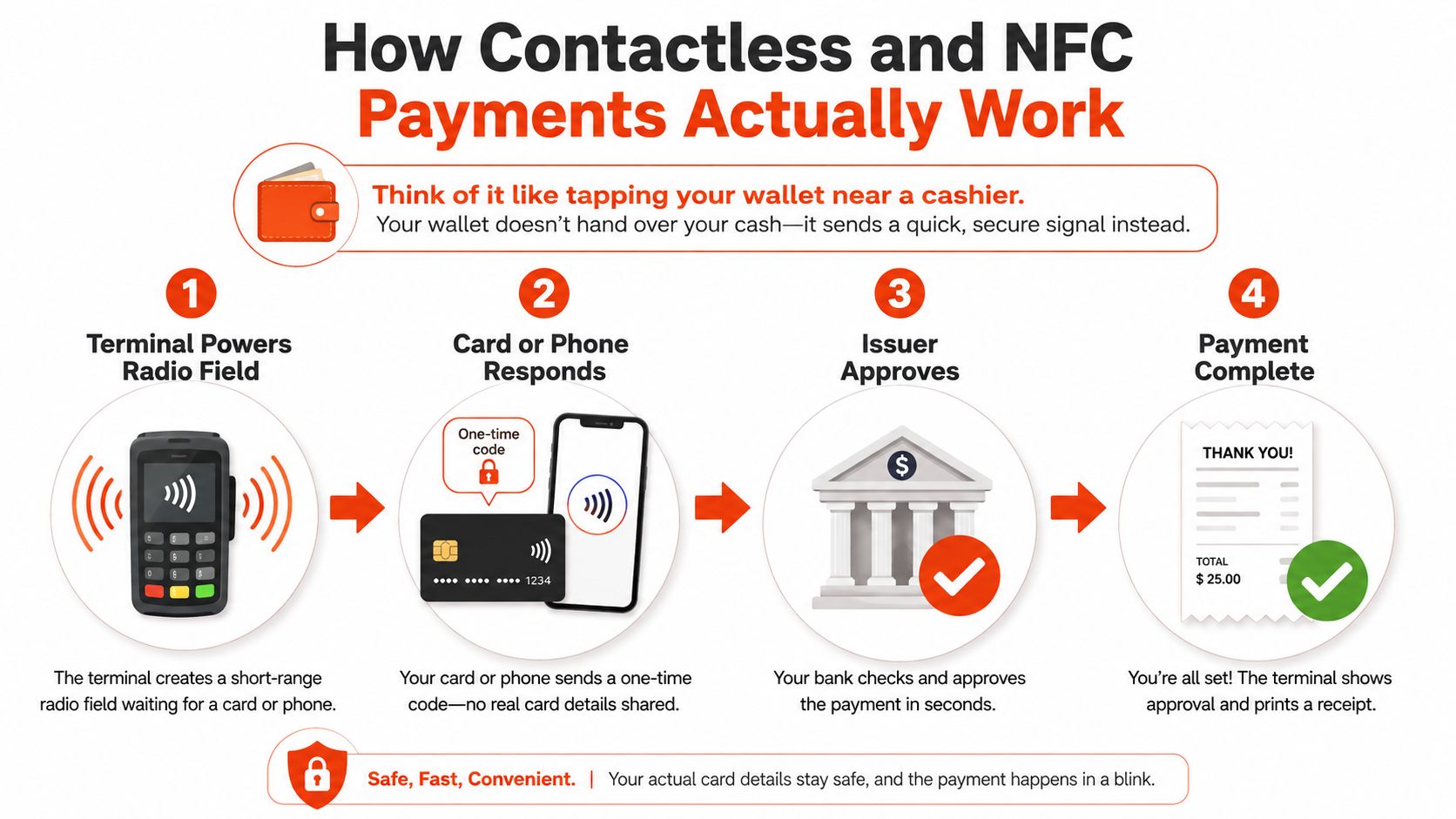
Contactless isn't magnetic-stripe payment. The terminal isn't copying a static track. A compliant EMV contactless transaction uses a dynamic cryptogram, a transaction-specific code generated to help demonstrate that the payment interaction is genuine and hasn't been replayed.
A tap doesn't guarantee that no verification will ever be requested. Depending on the transaction, card settings, issuer risk controls, or applicable contactless rules, the customer may be asked for a PIN or additional authentication on the phone. Staff should treat that prompt as a normal part of the acceptance flow, not an automatic terminal fault.
The terminal also has to manage risk if connectivity is briefly limited. Its configuration determines whether certain transactions can proceed offline and when an online authorisation is mandatory. That makes certification important. EMVCo describes the contactless architecture, while Singapore-market providers commonly refer to EMV and PCI compliance because the terminal must process contactless payments securely across the relevant schemes.
The strongest benefit is not that contactless looks modern. It is that the terminal removes small points of friction from a repeated task. A café cashier can keep attention on the next order instead of asking every customer to insert a card. A salon receptionist can take payment at the chair. A clinic can complete a co-payment while the patient is already collecting medication or paperwork.
The effect should be measured locally rather than promised as a universal percentage improvement. During the first month, owners can record:
A counter-service café benefits from throughput. The terminal should face the customer, wake quickly, and accept cards and wallets without staff rotating the device or searching for a cable. A salon gains more from mobility, because a stylist or receptionist can take payment where the service ends rather than sending the customer to a fixed counter.
A GP clinic values clarity and reliability. Reception staff may need to process different payment types, issue a receipt, and handle a refund without creating a second reconciliation trail. A boutique may care more about mixed scheme acceptance, particularly when local shoppers, tourists, and mobile-wallet users present different credentials.
| Store type | Typical transaction time saved per sale | Main operational benefit | Watch-out |
|---|---|---|---|
| Café | Qualitative, the biggest gain appears during concentrated rushes | Faster counter flow and fewer customer retries | A weak reader position can still create failed taps |
| Salon | Qualitative, especially when payment happens at the service chair | Mobile checkout and fewer unfinished payments | Battery and connectivity need daily checks |
| Clinic | Qualitative, where co-payments and receipts must be completed clearly | Less reception congestion and cleaner payment handling | Refund and receipt workflows must match clinic records |
| Boutique | Qualitative, when customers use varied cards and wallets | Broader acceptance with less checkout hesitation | Acquirer routing and scheme support need verification |
Contactless can also reduce physical wear on the card slot because customers don't need to insert a card for every eligible transaction. Customers handle their own cards and devices, which can make the payment interaction feel cleaner, although staff still need a sensible cleaning routine for the terminal surface.
The owner shouldn't accept a provider's speed claim without testing the actual counter setup. A terminal that performs well at an empty desk may behave differently beside a router, under crowded Wi-Fi conditions, or when several staff members share one device.
A tap transaction passes through several security controls before approval. Merchants don't need to operate each control manually, but they do need to understand what the terminal is doing so that a security prompt or decline doesn't trigger the wrong workaround.
The EMV kernel validates the payment application and applies the card scheme's contactless rules. It helps the terminal distinguish a supported payment instrument from an unusable or malformed one. That matters when a customer holds a card at the wrong angle, presents an unsupported credential, or tries to use a damaged card.
Tokenisation protects mobile-wallet payments by substituting a token for the underlying card number. The phone or watch can therefore present a wallet credential without sending the primary account number, or PAN, through the ordinary tap interaction. If a customer loses a phone, the wallet provider and issuer can manage that token separately from the physical card account.
The dynamic cryptogram adds a transaction-specific value. A copied transaction cannot be replayed as though it were a fresh tap, because the payment data changes with the interaction. This is one reason contactless EMV is materially different from relying on a static magnetic-stripe credential.
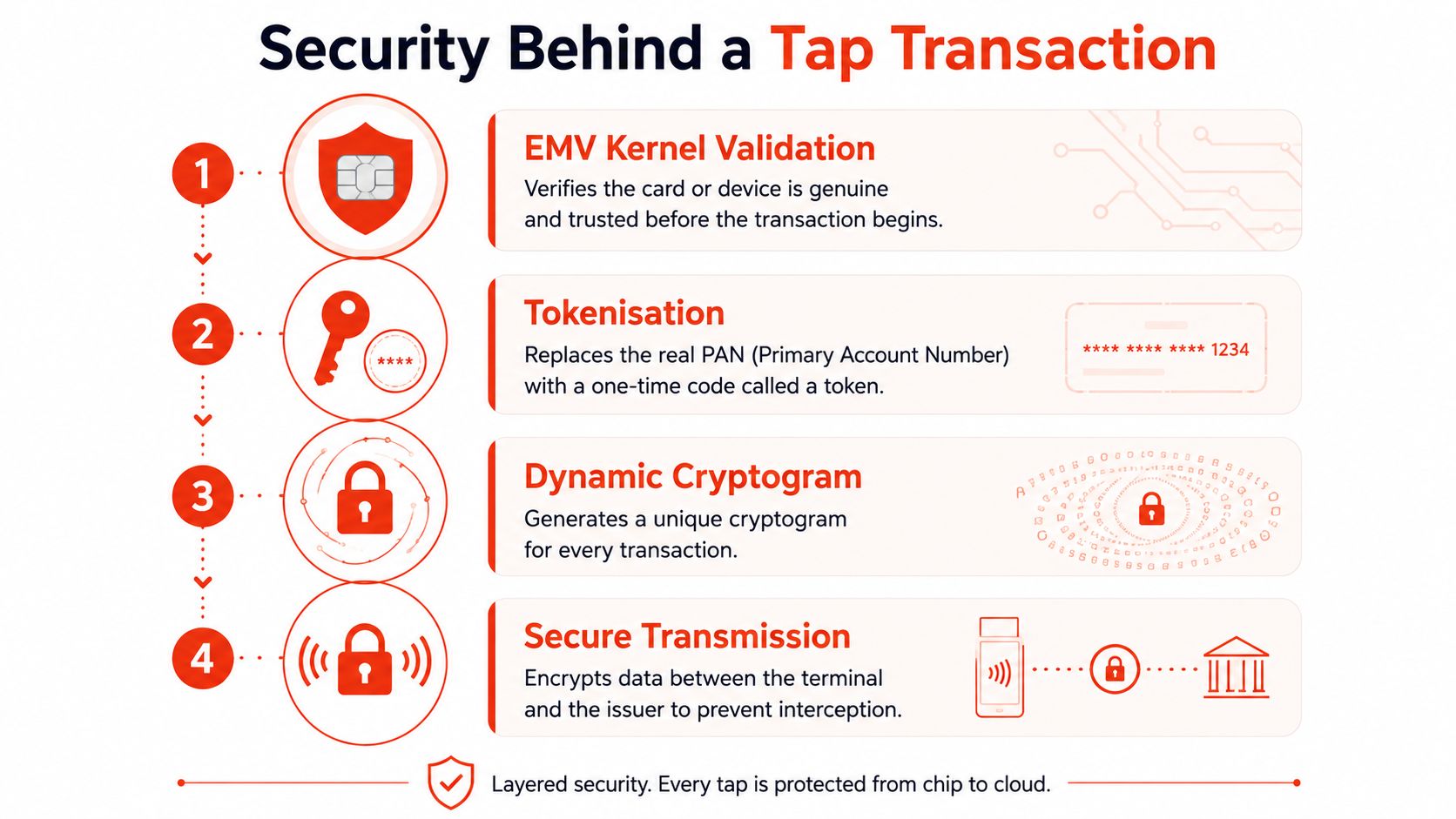
The terminal sends the authorisation through the merchant's acquirer and the applicable scheme rails. The transmission must be protected, and the acquirer, issuer, and scheme apply their own risk controls. Contactless doesn't bypass the normal payment ecosystem. It changes how the credential is presented at the counter.
A customer may still be asked for a PIN, device biometric, or other verification. The trigger can depend on the card, issuer, transaction conditions, and applicable limits. Staff should never ask a customer to disclose a PIN or write down card details. The correct response is to let the terminal display its prompt and allow the customer to complete authentication privately.
Online fallbacks create a different risk profile. If a merchant sends a customer to an online payment page for a remote or card-not-present transaction, 3D Secure can add an issuer authentication step. It doesn't replace terminal security, because it applies to a different payment environment.
Merchants considering card acceptance can also review how a provider explains its safeguards in practical terms. Sambapay's card payment acceptance information is one example of the type of provider material that should be checked alongside scheme coverage, support arrangements, and settlement terms.
A secure terminal is not useful if staff bypass its prompts, record card details manually, or keep retrying an unclear decline without checking the receipt.
Terminal format should follow the movement of staff and customers. A fixed counter device suits a Tiong Bahru café where customers order and pay at one lane. It is less suitable for a salon where payment happens beside the styling chair or a clinic where reception staff move between desks.
A countertop Android POS unit offers a larger interface and a stable home at the till. It can suit cafés, boutiques, and minimarts that prioritise a clear counter workflow. It needs dependable power and a sensible connectivity arrangement, and its fixed position can become awkward when staff must carry it across the shop.
A portable handheld terminal supports payment at the table, chair, treatment room, or consultation area. That mobility can reduce customer movement and make the device useful in a Tanjong Pagar salon. The trade-off is operational discipline. Staff need to charge it, protect it from drops, and understand what happens if Wi-Fi weakens away from the access point.
An integrated checkout system connects the payment device with a broader point-of-sale setup. It can reduce duplicate entry and improve the relationship between the sale, receipt, inventory, and payment record. It can also create counter clutter, integration dependencies, and a more complicated failure path when the POS application or payment connection stops responding.
| Format | Best for | Mobility | Connectivity | Watch out for |
|---|---|---|---|---|
| Countertop Android POS | Counter-service F&B, boutiques, minimarts | Low | Fixed power with Wi-Fi or wired options, depending on setup | Counter placement and single-lane dependency |
| Portable handheld | Salons, table service, clinics, mobile checkout | High | Wi-Fi and, where supported, cellular fallback | Battery management and dropped connectivity |
| Integrated checkout | Retail operations needing POS and payment alignment | Medium, usually within the checkout area | Tied to POS and acquirer integration | More dependencies and possible counter clutter |
A Bukit Merah clinic may need one device that can move between reception and consultation areas, while a heartland minimart usually benefits from a simple, visible terminal that gets customers through one queue quickly. Businesses assessing a broader POS workstation can review the HP A46f8pp i3 8GB 256GB as a reference point for the type of hardware environment that may sit around a payment terminal, rather than assuming the payment device must perform every POS function alone.
The deciding test is a live workflow. Staff should process a normal sale, a wallet tap, a decline, a refund, and a connectivity interruption. If the format looks efficient only when one person stands still at an empty counter, it isn't the right format for the store.
More guidance on matching hardware to acceptance needs is available in Sambapay's terminal options.
The cheapest advertised rate rarely tells a merchant what the terminal will cost operationally. A proper comparison starts with acceptance coverage, then moves through settlement, support, integration, and the contract's exit conditions.
First, confirm the exact schemes and wallets the provider can process for the merchant's business. The conversation should cover Visa payWave, Mastercard Contactless, UnionPay QuickPass, and any relevant American Express or JCB acceptance. It should also clarify Apple Pay, Google Pay, Samsung Pay, PayNow, GrabPay, Alipay, and QR requirements where those methods matter to customers.
Don't accept the phrase “wallet support” without a test. A terminal may read a card in a phone wallet while the acquirer route, merchant profile, or refund process fails for another wallet. Singapore's payment environment includes tokenised cards, PayNow and FAST transfers, and SGQR acceptance, so the merchant needs a reconciliation view that explains what happened to each tender type. (PwC Singapore's payments analysis)
Next, request the full pricing schedule. It should show the per-transaction rate, any monthly minimum, statement or gateway fees, hardware charges, refund costs, chargeback handling, and the treatment of international cards. A merchant comparing providers can also use this practical resource on how to cut card transfer costs to frame questions about payment routing and fee layers.
Settlement timing affects working capital. A hawker stall replenishing ingredients and a boutique managing supplier payments may value predictable access to funds differently, even when both accept similar cards. The provider should state the settlement schedule in writing, including weekends, public holidays, refunds, reversals, and the time at which a batch is considered closed.
Support quality is equally important. The contract should identify response channels, escalation contacts, replacement arrangements, software update practices, and whether a failed terminal can be swapped without restarting onboarding. A terminal that accepts the card but loses its acquirer route still creates a queue, so the provider must explain its monitoring and fallback process.
Contract check: Read the clauses covering settlement holds, termination, equipment return, replacement hardware, chargebacks, refunds, and changes to fees twice.
Integration deserves a separate test. The payment record should match the POS sale, GST treatment, refund status, and bank settlement without forcing staff to maintain a second spreadsheet. Merchants exploring a small-business setup can compare their requirements with Sambapay's POS machine for small business, then ask every provider to demonstrate the same sale-to-settlement journey.
Finally, demand a short pilot or live demonstration at the actual outlet. A provider that cannot show a card tap, wallet tap, decline, refund, batch close, and settlement report has not yet proved that its terminal will work in the merchant's daily operation.
A terminal change should be treated like an operational rollout, not a box delivery. The safest approach is to complete merchant onboarding, outlet configuration, and payment testing before the old device is removed from service.
Complete acquirer onboarding and the relevant CCD or PayNow merchant linkage two weeks before the planned launch, as a practical scheduling target rather than a guaranteed industry requirement. The merchant should confirm the outlet ID, GST rate, receipt details, refund permissions, staff access, and settlement account before the terminal reaches the counter.
The terminal then needs testing in the place where customers will use it. Check the shop's Wi-Fi at the counter, test any available 4G failover, and repeat the tests during a busy period when nearby devices and customer traffic place more demand on the network. A device that works in a quiet back office hasn't passed the test.
The test script should include the payment types customers present:
Staff training should be brief and physical. Show the correct tap position, explain what a successful approval looks like, and demonstrate where decline codes appear on the receipt. Staff should know when to ask for chip insertion, when to ask the customer to authenticate on a phone, and when to stop retrying and call support.
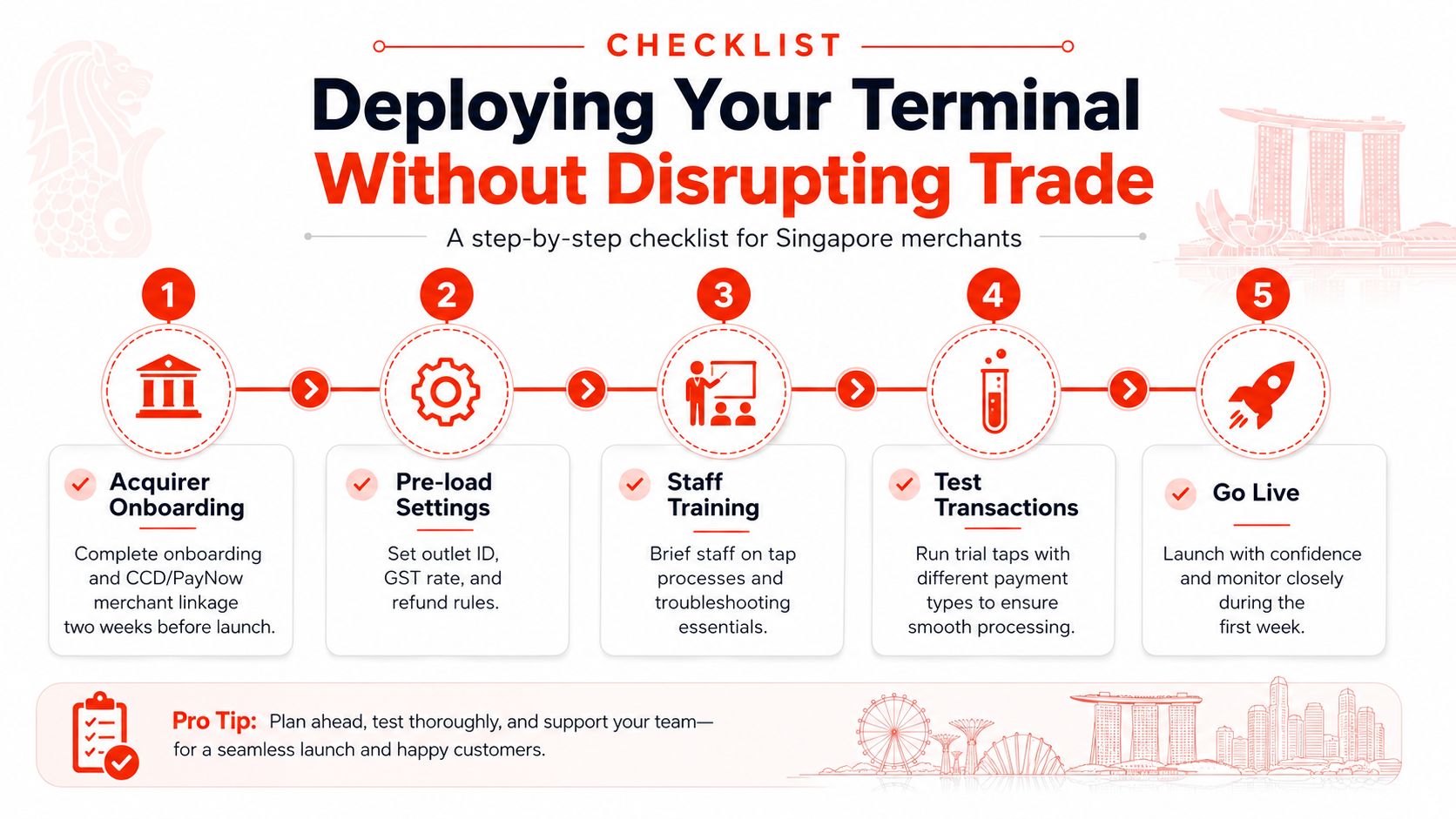
For the first week, the owner or manager should log transaction count, decline reasons, failed taps, refund activity, and settlement timing each day. The old terminal should remain available as a backup until batch reports reconcile cleanly across two consecutive trading days.
Don't judge the new device only by customer comments. Compare the terminal's actual reports with the till and bank records. If a payment succeeds on the device but fails to appear in the settlement report, the problem is not a slow tap. It is an integration or acquiring issue that needs escalation.
Sambapay provides Singapore SMEs with contactless-capable POS terminals, card and selected wallet acceptance, onboarding, installation, migration support, local assistance, and settlement options from as early as T+1 depending on the merchant agreement. Merchants evaluating a switch can visit Sambapay to discuss terminal configuration, scheme coverage, settlement timing, and a migration plan that keeps the existing setup available until reconciliation is proven.