
A café owner in Tanjong Pagar can finish a lunch rush with orders from the counter, QR menus, delivery platforms and table staff all landing in different places. Customers tap cards, scan PayNow, use wallets or ask to split a bill, while the team still needs to send accurate tickets to the kitchen and close the day with figures that match the bank settlement.
That pressure explains why choosing an F&B POS Singapore solution requires more than buying a faster cash register. The right system must connect order entry, payment acceptance, kitchen workflows, accounting and settlement data without creating another layer of manual work. It must also make commercial sense for the outlet's ticket sizes, payment mix and operating model.
The immediate problem usually appears at the busiest moment. A cashier enters a dine-in order while a delivery ticket prints, a server requests a split bill and a customer asks whether PayNow is available. If the terminal, ordering system and accounting records don't share the same transaction information, staff end up checking multiple screens and correcting discrepancies after closing.
An F&B POS should therefore be assessed as an operating system for the outlet, not just a payment device. It needs to capture the original order, route the correct items to preparation, record the tender type and produce a settlement trail that a manager can understand. The fewer times staff re-enter the same information, the fewer opportunities exist for an incorrect price, duplicate order or unmatched payout.
A practical shortlist can begin with Singapore POS system options for small businesses, but the final decision should follow the outlet's workflow rather than a generic feature ranking. A quick-service café, a full-service restaurant and a mobile stall face different constraints, even when they serve the same city.
This guide focuses on the issues that are easiest to overlook: hybrid order flows, multi-rail acceptance, reconciliation effort, settlement timing and transparent pricing. The useful question isn't which POS has the longest feature list. It's whether the chosen setup removes enough friction from a specific outlet to justify its cost and implementation effort.
Singapore F&B operators sell through a combination of physical counters, digital platforms and delivery channels. The Singapore Department of Statistics reported S$1.5 billion in F&B services sales in April 2026, with 19.9% coming from online sales, according to Singapore F&B sales and POS trend coverage. The same coverage recorded year-on-year growth of 0.4% in April, after 2.3% growth in March. Restaurants grew 1.2%, while cafés grew 2.4% year-on-year.
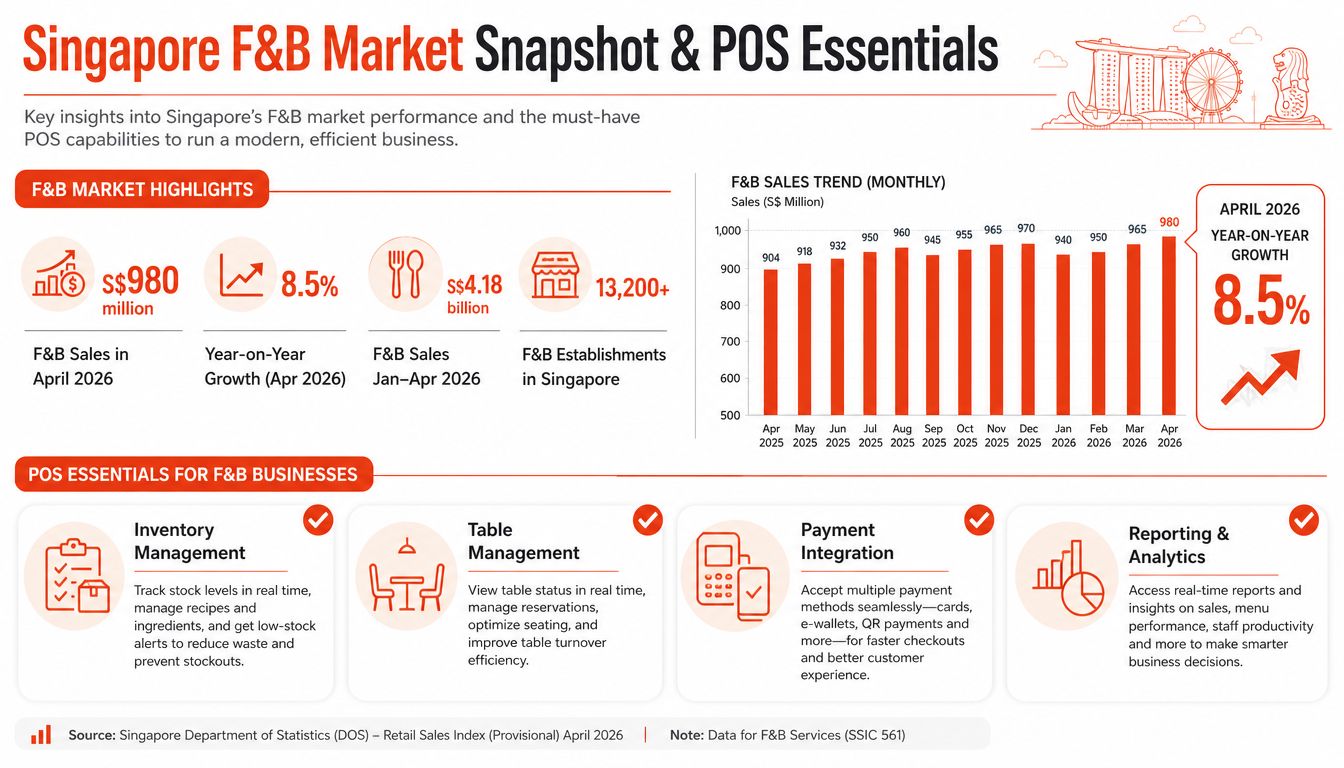
Restaurants and cafés also recorded month-on-month declines of 0.5% and 0.9% respectively. For SMEs, that makes transaction accuracy and reconciliation operating concerns, not secondary software features. Digital orders must retain order identifiers, modifiers, refunds, platform charges and settlement records as they move between channels.
PayNow support belongs in the core requirements for a Singapore outlet. It affects checkout design, staff procedures and the evidence available for end-of-day matching. Cards remain central as well. PwC's Singapore payments figures show 2024 POS transaction value divided between credit cards at SGD 54.54 billion, or 38.76%, debit cards at SGD 28.52 billion, or 20.27%, and e-money at SGD 2.52 billion, or 1.79%, as reported in Singapore SME payment coverage.
A terminal should therefore accept contactless credit and debit cards, tokenised wallets and QR payments within a controlled checkout process. The cost test is equally practical: managers should be able to compare tender totals, processor payouts and platform deductions by outlet type, rather than treating every channel as one blended revenue line.
A suitable POS should provide:
The break-even question is whether these controls reduce enough correction time, payout investigation and stock variance to justify subscription, transaction and implementation costs. A small café may value fast reconciliation over a large feature set, while a multi-outlet operator may prioritise shared menus and outlet-level settlement reporting. Businesses assessing automating retail supply chains should apply the same standard to POS selection: automation pays when sales, stock, fulfilment and finance records remain consistent.
Order flow determines what the POS must do under pressure. A counter-service café, a kiosk-led outlet and a table-service restaurant may all accept the same payments, but each requires a different sequence of actions and controls.
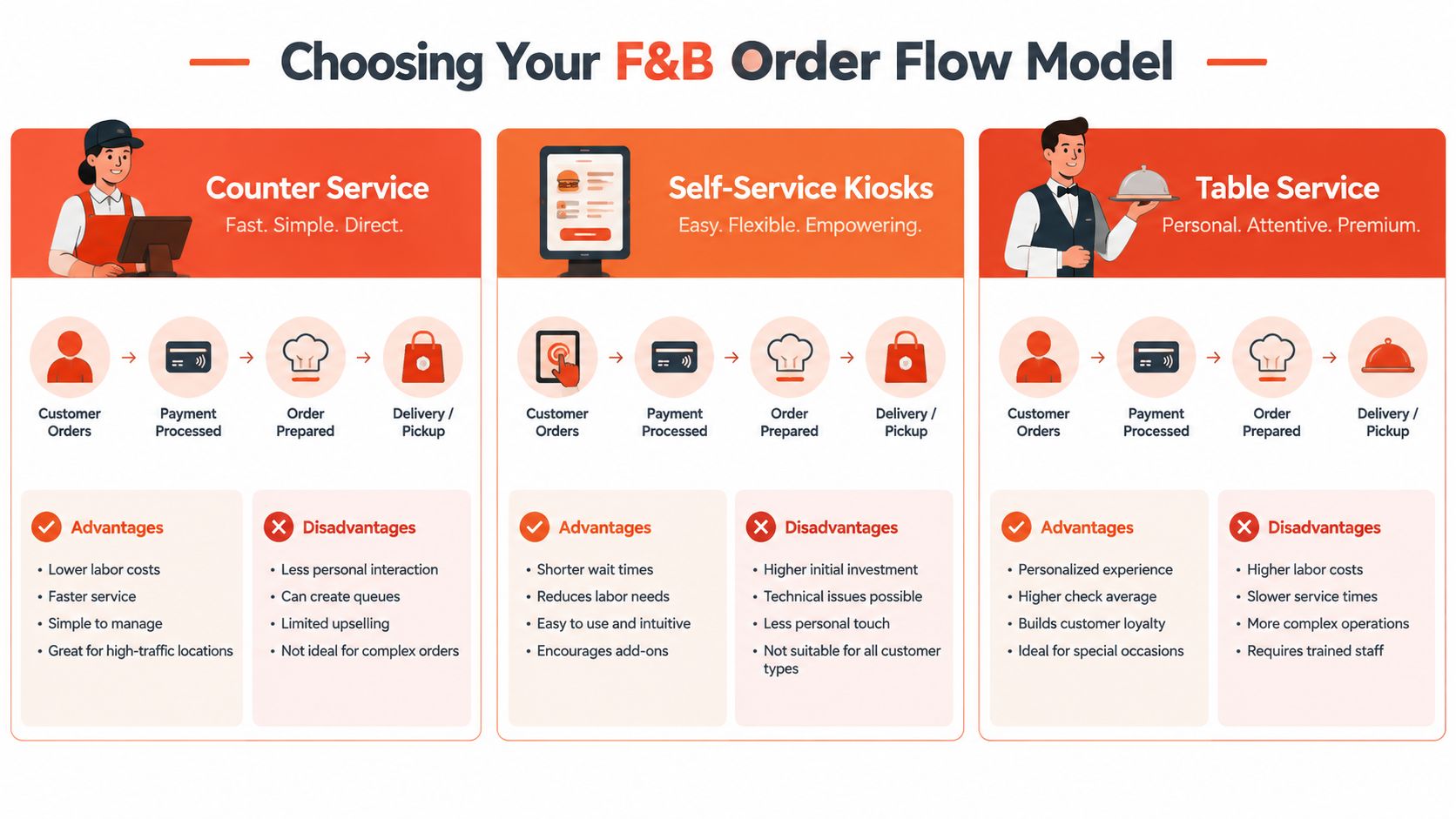
| Model | Typical flow | Operational advantage | Main POS risk |
|---|---|---|---|
| Counter service | Order, pay, prepare, collect | Simple hand-off and quick payment | Queue pressure and order-entry errors |
| Self-service kiosk | Browse, customise, pay, collect | Moves order entry away from the cashier | Menu, device and exception-management complexity |
| Table service | Seat, order, send to kitchen, pay at table or counter | Supports coursing, amendments and split bills | More staff interactions and greater order-state complexity |
The cashier controls the transaction from start to finish. The POS needs fast product search, modifier prompts, clear payment selection and a reliable kitchen print or display route. For a café, the strongest configuration usually prioritises speed and accuracy over elaborate table maps.
The key test is not merely how quickly a staff member can tap through a standard order. The system should also handle an unavailable item, a customer amendment, a void and a refund without forcing the cashier to leave the transaction screen.
A kiosk changes the labour allocation. Customers enter their own orders, while staff manage preparation, collection and exceptions. This can suit a menu with repeatable choices and visible modifiers, but poor menu architecture transfers confusion from the cashier to the customer.
A kiosk-capable POS should keep menu data synchronised with the main terminal. Price changes, sold-out items, dietary information and promotion rules shouldn't require separate manual edits on every device. Payment confirmation must also reach the kitchen workflow clearly, especially where customers collect orders from a shared counter.
Table service requires the POS to preserve an open order while the guest adds items, changes seats or requests separate payments. Split bills, transfers, discounts and course timing become core controls rather than occasional features.
Practical rule: The best order flow is the one that minimises re-entry. Every manual hand-off between ordering, preparation and payment should have a clear operational reason.
A platform that supports only a fast counter sale may still be suitable for a café, but it becomes restrictive when a restaurant needs table assignments, handheld ordering or bill-level adjustments. The model should be selected before hardware is specified, because a single countertop terminal and a network of handheld devices solve different problems.
A POS can process every payment correctly and still leave the finance team with a difficult close. The problem appears when delivery orders, in-store sales, wallet transactions, refunds and bank settlements sit in separate systems with different identifiers.
An independent report found that SMBs spend about six hours weekly reconciling payments, while 75% identify reconciliation as a key pain point and 49% rely on multiple SaaS tools, according to Singapore SME POS integration reporting. Those figures make integration a measurable operating concern, not an abstract technical preference.
A vendor demonstration should test the complete transaction path:
An integration that runs only through a periodic spreadsheet export may be technically available but operationally weak. The merchant should ask whether data synchronises automatically, how often it does so, who owns errors and whether staff can correct a mismatch without deleting the original audit trail.
The POS report should distinguish gross sales, refunds, discounts, payment fees and actual settlement amounts. This distinction matters because a delivery platform or payment provider may settle a different amount from the customer's original receipt.
For practical guidance on matching card batches, refunds and bank entries, operators can review these credit card reconciliation tips from Jumpstart Partners. The same discipline should apply to QR and wallet payments, even when those transactions feel simpler at the front counter.
A connected POS doesn't eliminate reconciliation. It makes the remaining exceptions visible, classified and easier to resolve.
Payment pricing should be modelled against the outlet's actual transaction mix. A low-looking headline rate can become expensive once card types, wallet rails, minimums, terminal charges, settlement conditions and GST treatment are included.
Enterprise Singapore materials show subsidised QR payment pricing as low as 0.5% for registered merchants in the public programme, while Singapore card payments reached S$119.6 billion in 2025, according to Singapore card payment and SME fee coverage. The contrast is commercially important. A merchant may accept low-cost QR transactions while paying materially different charges on card-present sales, so the blended outcome depends on the mix rather than one advertised rail.
A legacy structure may separate fees by card scheme, card type or transaction category. That can be appropriate for a business with granular payment reporting, but it can also make monthly costs difficult to forecast. A transparent blended model trades some granularity for a simpler relationship between processed volume and expected fees.
The relevant comparison is:
All-in payment cost = transaction charges + fixed terminal or platform costs + gateway or settlement charges + applicable tax effects.
The merchant should request the calculation in Singapore dollars, using the outlet's own monthly volume, average ticket, card share, QR share, wallet share, refunds and settlement requirements. Without that model, a fee comparison is mostly marketing language.
The table below is a template for merchant-side modelling, not a claim about market-average volumes or provider rates. The entries should be populated from the outlet's statements and written quotations.
| Outlet Type | Average Monthly Volume | Legacy Fees (SGD) | Blended Fees (SGD) |
|---|---|---|---|
| Café | Enter actual volume | Calculate from current statement | Calculate from blended quote |
| Casual dining | Enter actual volume | Calculate from current statement | Calculate from blended quote |
| Salon | Enter actual volume | Calculate from current statement | Calculate from blended quote |
| Clinic | Enter actual volume | Calculate from current statement | Calculate from blended quote |
The break-even point is the volume at which the blended model's total cost equals the legacy model's total cost. If the blended plan has fewer fixed charges, it may suit an outlet with variable monthly volume. If its percentage rate is higher, the merchant should calculate whether the simpler structure still reduces total cost after the mix of cards and QR payments is included.
For a detailed comparison of the mechanics, operators can consult blended rates versus interchange-plus pricing in Singapore. The output should be a written monthly estimate, plus clear answers on payout timing, refund treatment, chargebacks, minimum commitments and cancellation terms.
A POS migration affects more than the technical cutover. Menus, staff permissions, payment credentials, kitchen routing, reports and service habits all change. For an F&B SME, the migration plan should therefore test both service continuity and post-settlement reconciliation.
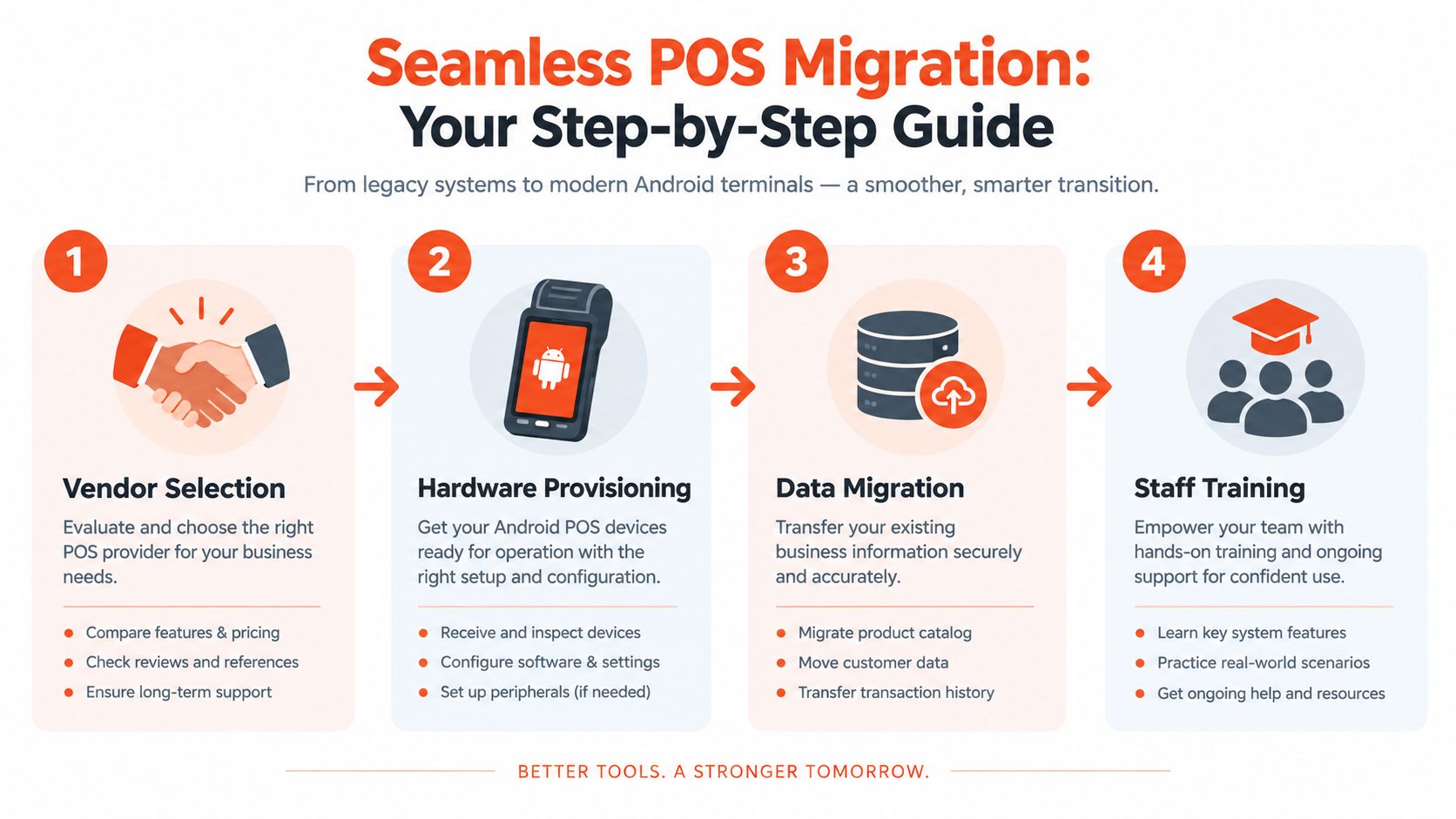
Start with a live demonstration using the outlet's actual menu. Staff should test modifiers, sold-out items, discounts, split payments, refunds and kitchen routing. Generic demonstrations often hide the steps that delay service.
The vendor should document hardware replacement, connectivity fallback, support ownership, payment settlement, data export and integration responsibilities. PayNow readiness also matters because it is widely used locally. Government reporting recorded 2.8 million individual registrations and 115,000 corporate registrations, with adoption exceeding 65% among adults aged 20 to 75, as stated in the PayNow parliamentary record. The terminal should process that rail within the same transaction view, rather than requiring staff to maintain a separate log.
Ask for settlement files that distinguish card, PayNow and other tenders. That detail supports outlet-level comparisons between blended fees and legacy charges, especially when payment mix differs by café, restaurant or mobile stall.
Use a controlled sequence:
Run a parallel validation period by comparing new reports with the legacy system, without requiring staff to operate both systems during peak service. Stage menu imports, and have a manager approve high-volume products before cutover.
A practical guide to switching POS solutions for a store can structure vendor, hardware and staff coordination. Set named escalation contacts, spare devices or printed fallback procedures, then complete a reconciliation check after the first settlement. The migration is ready only when sales, tenders, refunds and payouts agree across both systems.
Different outlets need different POS architectures. The configuration should follow the point where work accumulates, whether that's order entry, table coordination, payment acceptance or end-of-day finance.
A café with a compact menu and concentrated peak periods benefits from a fast counter terminal, customer-facing payment device and clear kitchen routing. A QR menu or kiosk can move routine ordering away from the cashier, but only if the same catalogue controls prices, modifiers and sold-out items.
The commercial test is whether the setup reduces steps during the rush without creating a second menu-management task. Payment acceptance should cover contactless cards and local instant-payment flows in one operational view.
A casual dining venue needs open checks, table assignments, item amendments and split-bill handling. Handheld ordering can reduce the distance between the guest and the kitchen, but the system should preserve the order history when a table changes its request.
The important report is not just total sales. Managers should be able to inspect discounts, voids, refunds, tender types and settlement differences by service period. That makes training and close-out more precise.
A stall needs portability, fast onboarding and reliable connectivity. A smart Android terminal with integrated card acceptance and PayNow QR can keep the setup compact, while a simple catalogue prevents staff from navigating unnecessary screens.
The owner should confirm how the system handles weak connectivity, receipts, refunds and settlement across event days. A portable configuration also makes pricing transparency more important, because fixed hardware or rental charges can weigh heavily when trading volume changes.
The shared lesson is that “full-featured” isn't always the same as suitable. A restaurant may value table controls more than a kiosk, while a stall may gain more from mobility and rapid settlement than from advanced inventory functionality.
The strongest F&B POS Singapore profile is a multi-rail, integration-ready system with transparent commercial terms. It should accept the payment methods customers already use, connect order and settlement data, support the outlet's service model and provide local assistance when a device or integration fails.
A vendor shortlist should be tested against five questions:
The recommendation should change by outlet type. A quick-service café should prioritise fast order entry and kitchen routing. A casual restaurant should demand table management and split-bill controls. A mobile seller should prioritise portable hardware, payment breadth and settlement visibility.
Sambapay is one option for Singapore SMEs that need modern Android POS terminals, card acceptance across major schemes and selected wallets, transparent blended pricing, settlement options from as early as T+1 depending on the merchant agreement, and local onboarding and migration support. The provider's fit should still be tested against the outlet's payment mix, integrations and written cost model rather than assumed from a product description.
Decision standard: A POS earns its place when it lowers checkout friction and makes the money trail easier to verify.
The next step is a live, outlet-specific demonstration. The merchant should bring current statements, menu data, settlement reports and examples of difficult transactions, then ask each vendor to reproduce them. A written comparison of total cost, workflow steps, integration ownership and support commitments will produce a more reliable decision than a feature checklist.
Sambapay helps Singapore F&B businesses assess modern POS terminals, multi-rail in-store acceptance, settlement options and transparent blended pricing around their actual operating needs. Visit Sambapay to discuss a practical setup for a café, restaurant or other SME outlet and request an evaluation based on its transaction mix and workflow.