
An electronic point of sale system links a payment terminal, sales-recording software and the bank network. Each layer handles a different part of a sale: the terminal captures the payment, the software records it, and the bank processes settlement.
For a first-time Singapore business owner, the tap is only the start. After the beep, compare the terminal's transaction total with the sales report, then check that the bank deposit reflects the settlement. Fees, timing or a failed connection can leave those records out of step. Treating the terminal, software and bank settlement as separate layers makes it easier to find where a mismatch or fallback risk begins.
At a busy café, a customer taps a phone at the counter. The terminal responds, the receipt prints, and the sale appears in the café's records. If the order includes an item tracked in stock, the software can update its count too. The cup of coffee and the record of its sale move through connected parts of one system.
An old cash register mainly records a total. An electronic point of sale system combines a till with software that records orders and helps staff manage sales. Its card terminal handles the payment request, while its software keeps the order and sales record. Those jobs connect, but they are not the same.
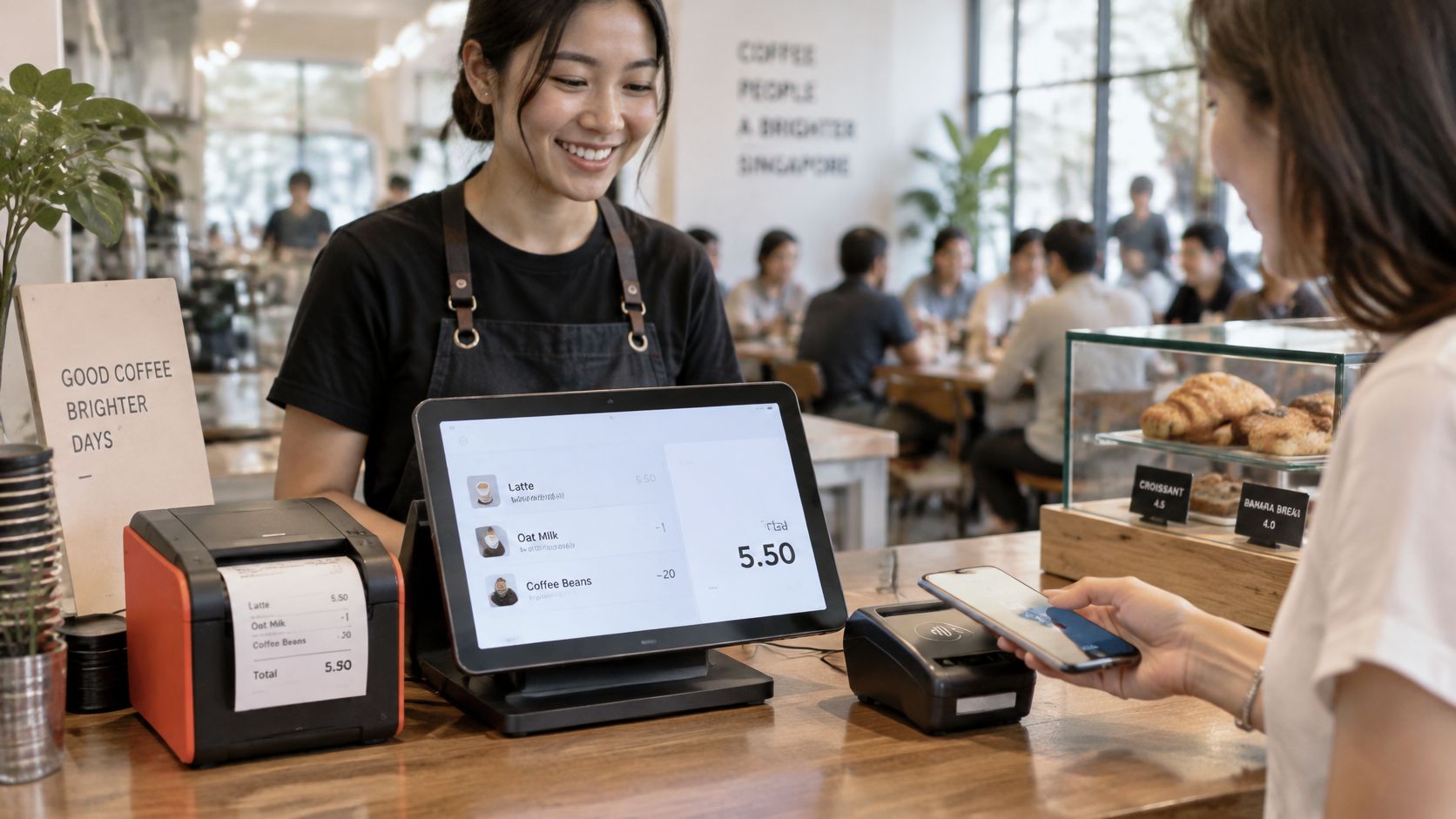
The terminal submits a card payment for authorisation, and the bank network processes that request. The POS software records the order and can mark it paid using the transaction details. For a split bill, several card payments may connect to one order. The system therefore involves more than one money-related step, even though the order record itself does not move funds. If records and deposits differ, owners need to compare the sales entry, payment transactions and bank settlement rather than assuming they are one total.
Card acceptance matters because customers may want to pay by card or phone, and a POS setup needs a way to handle those transactions alongside its sales records. Xero and Lonergan Research found 76% of Singapore consumers surveyed used credit or debit cards in 2024. To assess what the business needs, map a typical sale from order entry through payment and recording, then note which functions staff use each day.
At a café counter, the terminal can approve a card while the POS app records the order and the bank settles the funds later. These are separate layers, like a cashier's card reader, an order pad and the account where takings arrive. Each has its own job, so mismatches often appear when information passes between them.
| Component | What it does | Example at a café |
|---|---|---|
| Terminal hardware | Reads chip, contactless and wallet payments, then sends the card request | Countertop Android unit tapped by a customer's phone |
| POS software app | Builds the order, applies tax and prepares receipt data | Menu screen with item modifiers and table numbers |
| Back-office dashboard | Shows sales reports, stock levels and staff activity | Daily sales summary by outlet and staff member |
| Payment acquirer | Routes authorisation requests to card schemes and issuing banks | Sends a Visa or Mastercard purchase for approval |
| Bank settlement account | Receives net card sales on the agreed payout cycle | Funds credited after sales according to the provider's schedule |
| Receipt printer or customer display (optional) | Gives the customer proof of payment and the total | Printed slip or screen showing the amount before tap |
A receipt printer or customer display is useful, but it is not needed for every setup. The other components cover distinct tasks: the terminal accepts payment, the POS app records the sale, and the acquirer and bank handle routing and settlement.
Singapore's payment setup also shows why these layers should not be confused. MAS describes Unified Point of Sale terminals as one interface accepting major debit and credit-card brands, including contactless cards and cards embedded in smartphones. That describes what a terminal can accept. It does not mean the terminal itself settles the funds into the business's bank account.
For reconciliation, each approved payment, wallet tap, QR payment or refund should connect to one common order record with a transaction identifier. The order record is the shared label: staff can use it to match what the POS recorded with what the terminal processed and what the bank later credited. Without that link, switching between Visa, Mastercard, mobile wallets and PayNow can split sales across reports.
Check on a live demo: Run one test sale and confirm the terminal, app and reports show the same order ID.
A bundled provider may reduce the number of handoffs, while separate vendors can still work. The trade-off is practical: with separate systems, staff may need to match reports by hand, and a payment can appear approved in one layer before settlement shows in another. Before signing, ask whether the terminal, POS app and settlement reports share the same order ID, and what staff should check when their totals do not match.
One example makes the flow easier to follow. A customer pays S$12.50 for a flat white by card, and the money travels through six steps before the café can treat the sale as finished.
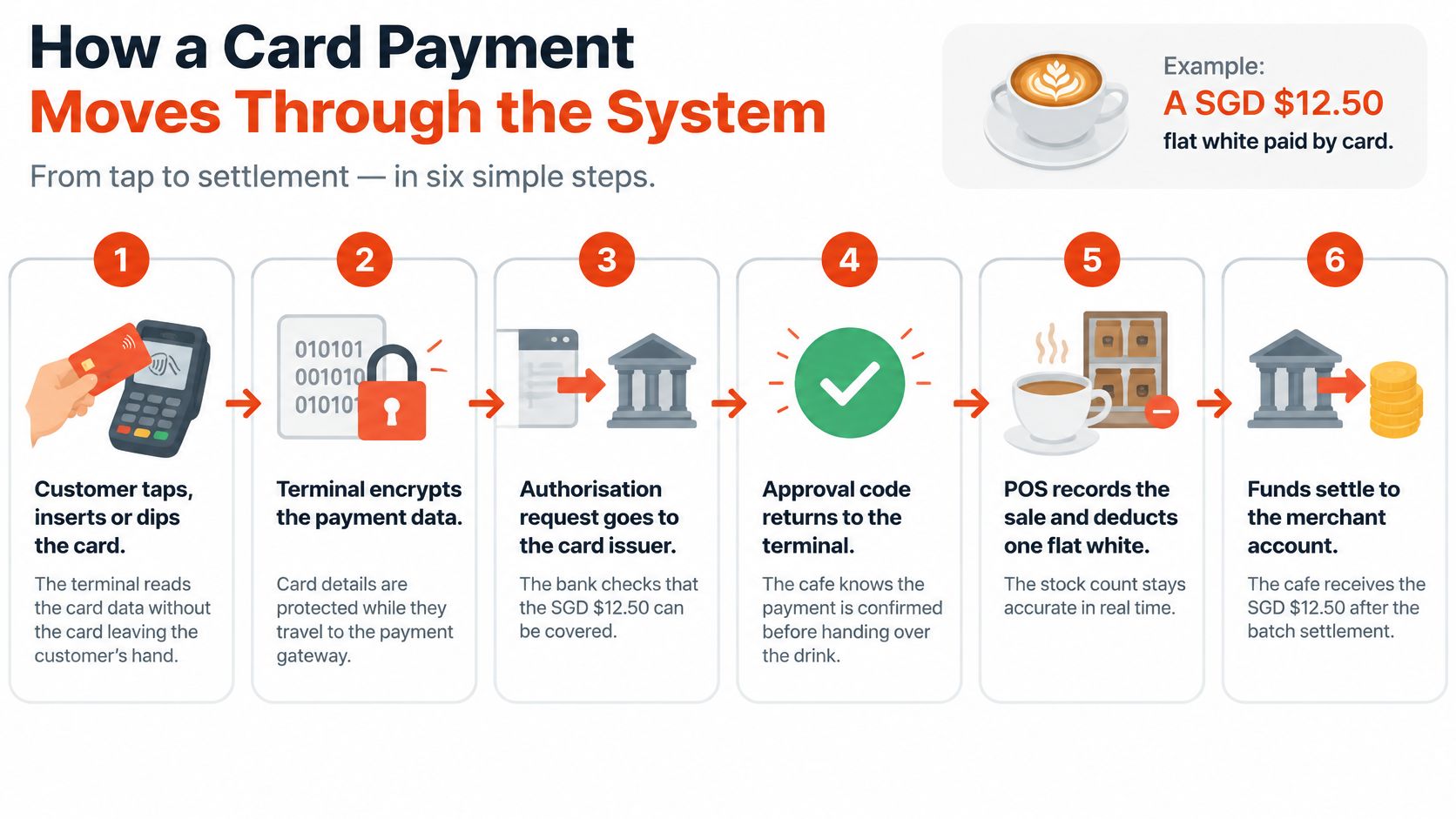
Owners comparing providers often focus on step two and ignore step six. A closer look at how credit card payments move from terminal to settlement helps show why the approval code, not the receipt alone, is the anchor for matching reports.
The most common break point is a sale approved on the terminal but never recorded in the POS app. It doesn't show up as an error during service. It surfaces later as a gap at reconciliation, when the bank credit is higher than the sales report.
Match the three totals every day, not monthly. A one-day gap takes minutes to trace. A month of gaps takes an afternoon.
A customer at a café counter may tap a phone, insert a card, scan a QR code, or hand over cash. The right setup depends on how people pay at each point of sale, and on whether staff can match each payment to the sale and its later settlement. Singapore Business Review reported that digital wallets led 39% of e-commerce transactions in 2024. That figure concerns online transactions, not in-person terminal payments.
| Payment method | How the customer pays | What the merchant must check |
|---|---|---|
| Credit and charge cards | Chip, tap or swipe | Scheme coverage, such as Visa, Mastercard, American Express, JCB and UnionPay |
| Debit cards | Chip or tap, often with PIN | PIN support and debit scheme acceptance on the terminal |
| Mobile wallets (Apple Pay, Google Pay) | Tap the phone on the terminal | Contactless enabled and tested with the provider |
| QR wallets (SGQR, GrabPay, Alipay) | Scan a displayed code or the terminal's QR | Label integrity, merchant identity display and refund route |
| PayNow | Scan a QR and pay from a banking app | Payment reference matched to the order number |
| Cash | Hand over notes or coins | Not processed by the terminal; count and reconcile separately |
Each payment method creates its own refund route, settlement timing and reconciliation line. A card terminal, POS software and bank settlement are separate layers, like a till, a sales ledger and the money arriving in the account. Owners should check that each accepted method appears in the sales record and can be matched to its settlement. For help comparing cashless options, see this guidance on cashless payment choices in Singapore.
A café might accept cards and mobile wallets at the counter, PayNow through a table-order QR, and cash at a weekend market stall. That arrangement fits different queues and customer habits. Staff need to know which methods work at each location, and how each payment shows up in the sales records.
SGQR needs particular care because one label can represent multiple schemes. Protect label integrity by using tamper-resistant placement and checking that the displayed merchant identity is correct. A replaced sticker could send a customer's payment elsewhere. Refunds can also take different routes: a QR or PayNow refund may not follow the same process as a card refund.
Before adding a method, have staff explain how to refund it and when its proceeds should settle. If they need a spreadsheet to find those answers, clarify the process before relying on that payment option.
Responsibility splits in two. The terminal and provider protect card data in transit through chip encryption, contactless tokenisation and 3D Secure on online-linked transactions. The merchant controls who touches the device, what software runs on it and what records staff keep. Most small-business failures happen on the merchant side of that line.
| Control | Risk it reduces | Merchant action |
|---|---|---|
| Chip and contactless encryption | Card details intercepted during the tap | Confirm the terminal encrypts at read; do not key card numbers manually |
| PCI DSS compliance | Card data exposed at the provider or terminal | Ask for current compliance evidence before signing |
| 3D Secure | Online card fraud without cardholder verification | Enable it on any online-linked card transaction |
| Tokenisation | Stored card numbers reused or leaked | Never keep full card numbers in notes, sheets or messages |
| Staff logins and roles | Unauthorised refunds or voids | Give each staff member a login and limit refund rights |
| Refund approval threshold | Cash taken through fake refunds | Require manager approval above a set amount, for example S$100 |
| Software and network control | Unapproved apps or hijacked Wi-Fi | Allow only provider-approved apps; separate terminal and guest networks |
Owners who want a structured way to work through provider evidence can use a payment security compliance checklist as a starting framework, then test each item against their own setup. The key checks are current PCI DSS evidence, a terminal locked to approved apps, and a terminal network kept separate from guest Wi-Fi.
Staff controls deserve equal weight. Individual logins, manager approval for larger refunds and a monthly review of void logs catch patterns that encryption can't. These settings form part of the wider package described under merchant services for Singapore businesses, so they should be confirmed before installation day.
Practical rule: If a control can't be shown on a live demo or in writing from the provider, treat it as missing.
One common mistake undoes several controls at once. Storing card numbers or full receipt details in a spreadsheet or chat thread puts protected data in an unprotected place, outside tokenisation entirely.
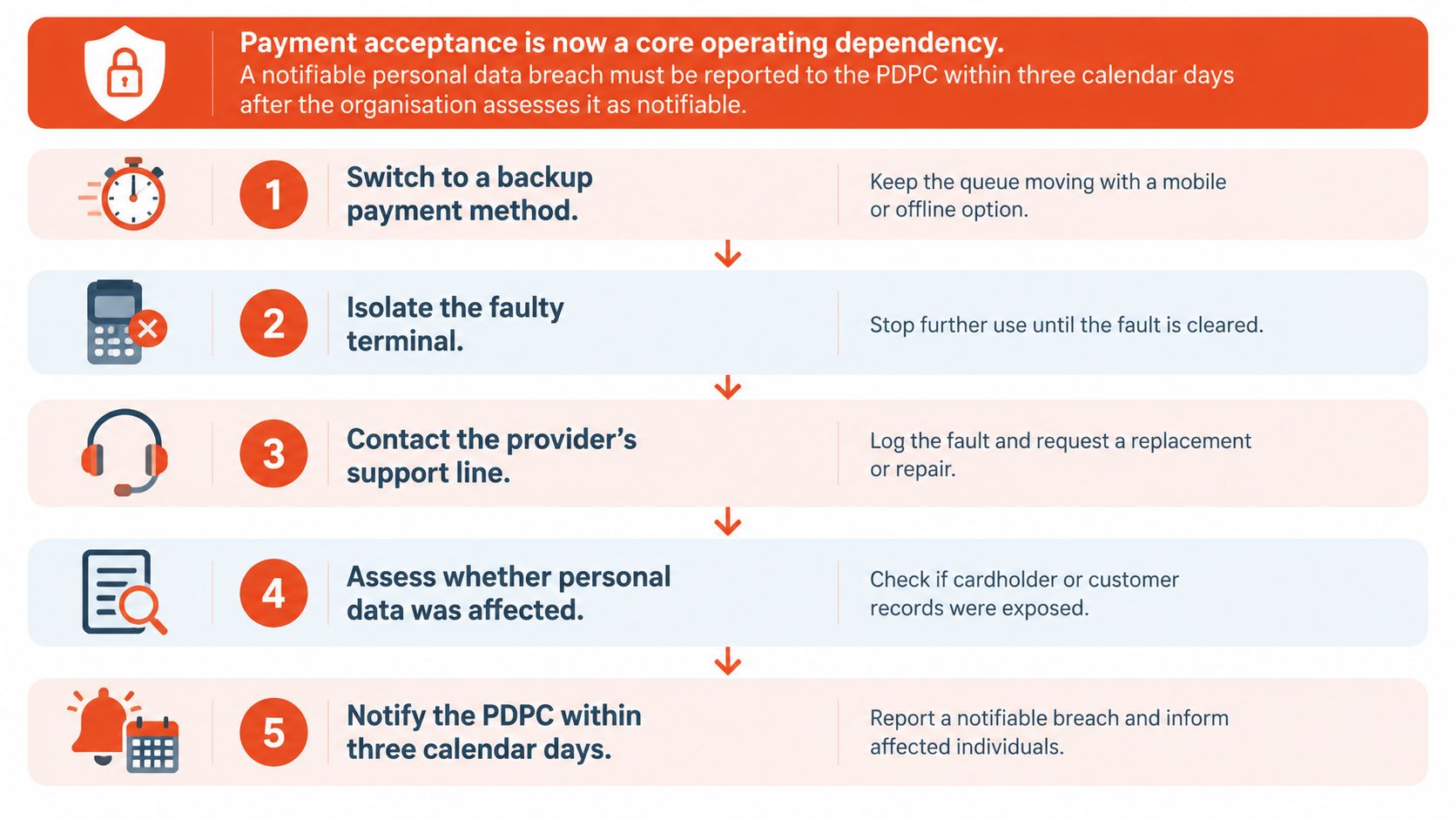
A terminal can fail while the till software still records the sale, or the bank can delay settlement after a payment appears approved. Treat these as separate layers: the device handles the transaction, the POS software records it, and the bank settles the funds. During an outage, check each layer so a fallback payment is not mistaken for a completed card transaction.
Prepare the fallback before a fault occurs. Keep a one-page incident sheet at the counter with the support number, approved payment alternatives and instructions for matching terminal, POS and bank records. That gives staff a clear sequence to follow, from the first error message through settlement checks.
Where the sale happens shapes the right device. Retail Asia reported 21% of Singapore retailers surveyed used mobile point-of-sale solutions in 2024, which shows fixed counters are no longer the only pattern. A fixed countertop unit suits one checkout point, a tablet-based setup suits a menu or catalogue screen, and a mobile unit follows staff to the table, treatment room or shop floor.
| Business type | Main priority | Feature to prioritise | Watch-out |
|---|---|---|---|
| Retail shop or boutique | Mixed ticket sizes and returns | Stock tracking and refund logs | Returns rules that differ from card refunds |
| Restaurant or café | Speed at peak hours | Split bills, modifiers and kitchen printing | Slow tap speed on weak Wi-Fi |
| Beauty salon or spa | Appointments and prepayments | Deposits, packages and staff commissions | Prepaid packages recorded as revenue too early |
| Medical or dental clinic | Higher-value, itemised payments | Itemised receipts and reporting | Patient data kept on shared devices |
| Gym or fitness studio | Recurring memberships | Recurring billing and card-on-file consent | Failed renewals without a follow-up process |
The table hides useful differences. A busy café lives or dies on fast taps and split bills during a short peak, so connectivity at the counter matters more than deep reporting. A salon runs on appointment-linked deposits and package prepayments, where the risk is recording prepaid packages as revenue before the service is delivered.
Clinics handle higher-value payments and need itemised receipts patients can use for claims, plus discipline about what's stored on shared devices. Gyms depend on recurring membership billing, so clear card-on-file consent and a follow-up process for failed renewals matter more than checkout speed.
There's an exception worth naming. A market stall or event seller may gain more from a mobile terminal carried to each customer than from a fixed unit waiting at a counter that doesn't exist.
Count daily card sales and average ticket size for one normal week before shortlisting. Those two numbers size the terminal, the connectivity and the pricing conversation.
Once the parts, payments and security controls are understood, the choice narrows to cost, commitment and support. Features alone don't decide it, because two systems with identical feature lists can differ sharply on what happens when something breaks on a Saturday.
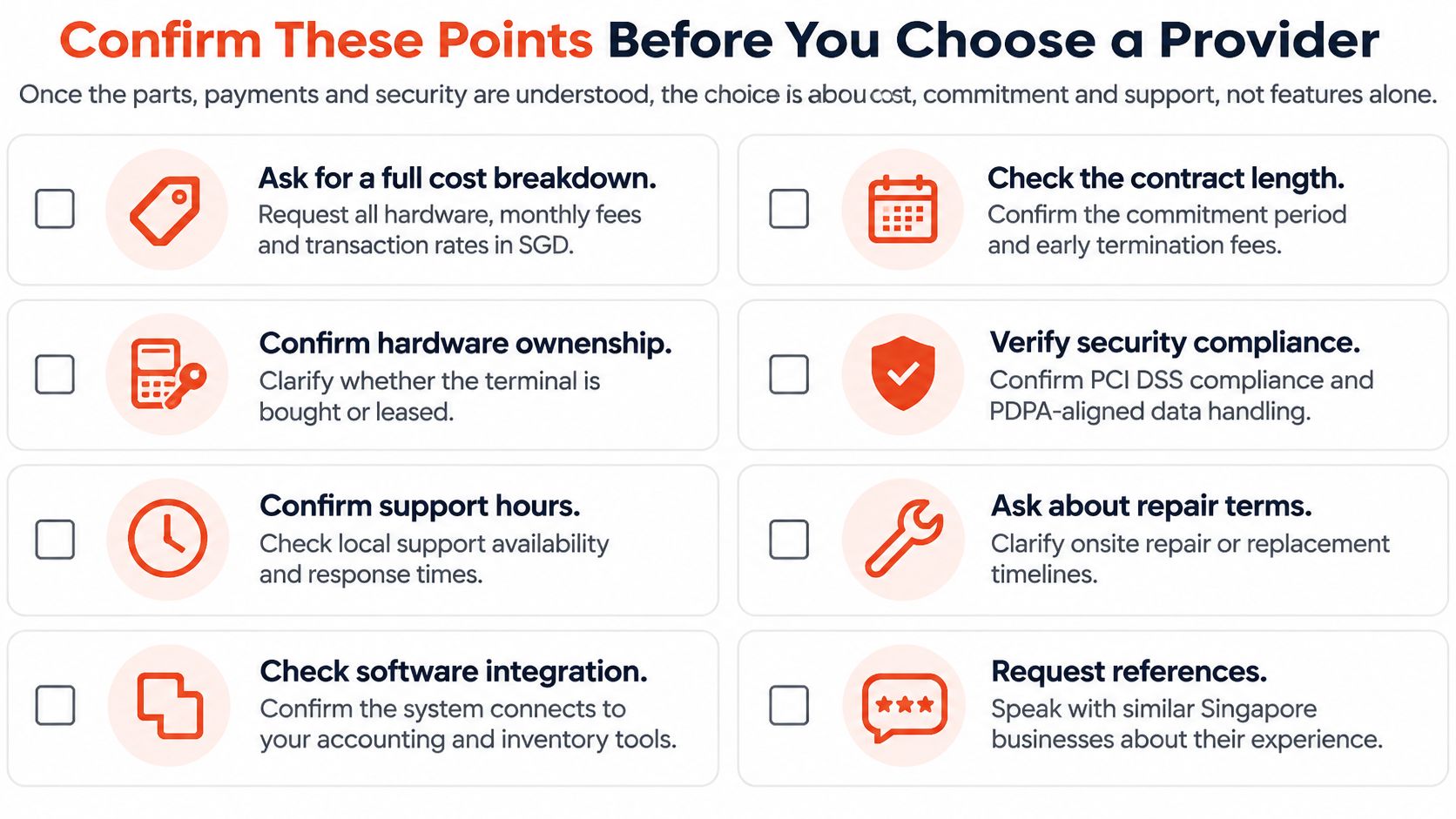
Sambapay is one option to test against this list. It states no monthly terminal rental for standard setups, no binding period and no cancellation fee, and those stated terms should be confirmed in writing alongside its blended-rate quote, exactly like any other provider's claims.
The decision rule is plain. Pick the provider that answers all eight points in writing, not the one with the longest feature list.
Ready to put the checklist to work? Sambapay supplies smart Android POS terminals for Singapore SMEs with card and selected wallet acceptance, transparent blended pricing and local support for installation and switching. Request a written quote, run it against the eight points above, and test the terminal with real sales before committing.