
A busy counter in Singapore makes the choice obvious fast. A customer taps a card, another wants PayNow, a tourist is holding a UnionPay card, and the queue starts to thicken the moment a terminal hesitates. At that point, credit card terminal Singapore is no longer a hardware phrase, it is a daily operating decision about speed, acceptance breadth, fees, and when cash lands in the bank.
The market already treats card acceptance as core infrastructure. MAS reported that total card payments reached SGD 148.91 billion in 2024, with point-of-sale card payments contributing SGD 54.54 billion for credit and charge cards and SGD 28.52 billion for debit cards, alongside 2.286 billion total card-payment transactions in the same year MAS retail payment statistics. That scale changes the buying decision. SME owners are not choosing a box to sit on the counter, they are choosing how every sale clears, how many customers can pay without friction, and how quickly the day's takings become usable cash.
The counter problem is rarely theoretical. A cafe owner does not care about terminal architecture while the lunch queue is forming, they care that the payment goes through on the first try, that the right card is accepted, and that the next customer does not give up and walk out. That is why terminal selection in Singapore has become an operational lever, not a procurement chore.
Singapore's card environment is already dense and mature. A widely cited GlobalData assessment placed Singapore at 53,562 POS terminals per million people, and MAS said unified point-of-sale terminals that accept major debit and credit card brands have been widely deployed since 2017 GlobalData assessment cited in market coverage. In practice, that means the competition is no longer between card acceptance and cash, but between terminals that keep the queue moving and those that create tiny but costly delays.
The owner feels three things at once, queue speed, payment breadth, and settlement timing. A terminal that only handles basic cards can still slow the counter if it does not support the customer's preferred scheme, wallet, or local rail. That matters in mixed neighbourhoods, mall locations, and tourist-heavy areas where customers arrive with different payment habits.
Practical rule: the best terminal is the one that reduces decisions at the counter, not the one with the longest feature list on paper.
The entry of tap-to-phone has made the decision even more commercial. DBS launched tap-to-phone in Singapore in June 2026, letting merchants accept contactless cards on Android smartphones without a separate payment terminal DBS tap-to-phone announcement. That does not replace every terminal, but it does change the threshold for micro-merchants who want to lower hardware burden and still accept cards cleanly.
For SMEs, the question is simple. Does the setup help revenue flow through the till smoothly, or does it introduce friction in acceptance, pricing, or cash flow? The right answer usually protects both customer experience and daily working capital.
A Singapore merchant usually ends up choosing between three practical formats. The right pick depends less on branding and more on where the device sits, who uses it, and how messy the checkout flow gets during a peak period.
A countertop terminal suits a fixed checkout point. It stays plugged in, lives near the till, and works well where staff want a stable device with predictable handling. A portable terminal is better when payment happens at the table, in a salon chair, or anywhere the customer does not stand still long enough for a single fixed counter.
A mobile GPRS-over-4G unit fits sellers who move around more often, including pop-ups, food trucks, or delivery-linked retail. It relies on connectivity rather than a wired counter setup, so the merchant gains flexibility but also depends more on signal quality and battery discipline. Those trade-offs matter more than the brochure language.
An Android POS terminal goes further. It combines payment acceptance with workflow functions such as receipts, table handling, and sometimes basic inventory or staff operations. That makes sense for a retailer or cafe that wants one screen to do more than just take payment.
The simpler route can still work. But once a second outlet opens, or once staff start splitting bills, reprinting receipts, and handling refunds in a rush, the device's operating model matters more than its shape. Sambapay offers smart Android POS terminals for brick-and-mortar SMEs, alongside other in-store acceptance options, which fits merchants that want the payment device to do more than swipe and approve.
| Terminal type | Best fit | Connectivity | Payment scope |
|---|---|---|---|
| Countertop terminal | Fixed retail, clinics, cafes | Ethernet or Wi-Fi | Cards, contactless, and selected wallets depending on provider |
| Portable terminal | Table service, salons, restaurants | Wi-Fi or 4G | Cards and contactless, with receipt handling often on-device |
| Mobile GPRS-over-4G unit | Pop-ups, delivery-linked sales, mobile merchants | Cellular data | Card acceptance on the move |
| Android POS terminal | Multi-task counters, multi-operator environments | Wi-Fi, 4G, or wired setup depending on model | Payments plus front-of-house workflows |
The practical rule is not complicated. If the device only needs to accept one payment at one counter, keep it simple. If staff need to move, split bills, or manage more than payment, the terminal should behave more like a workstation than a reader.
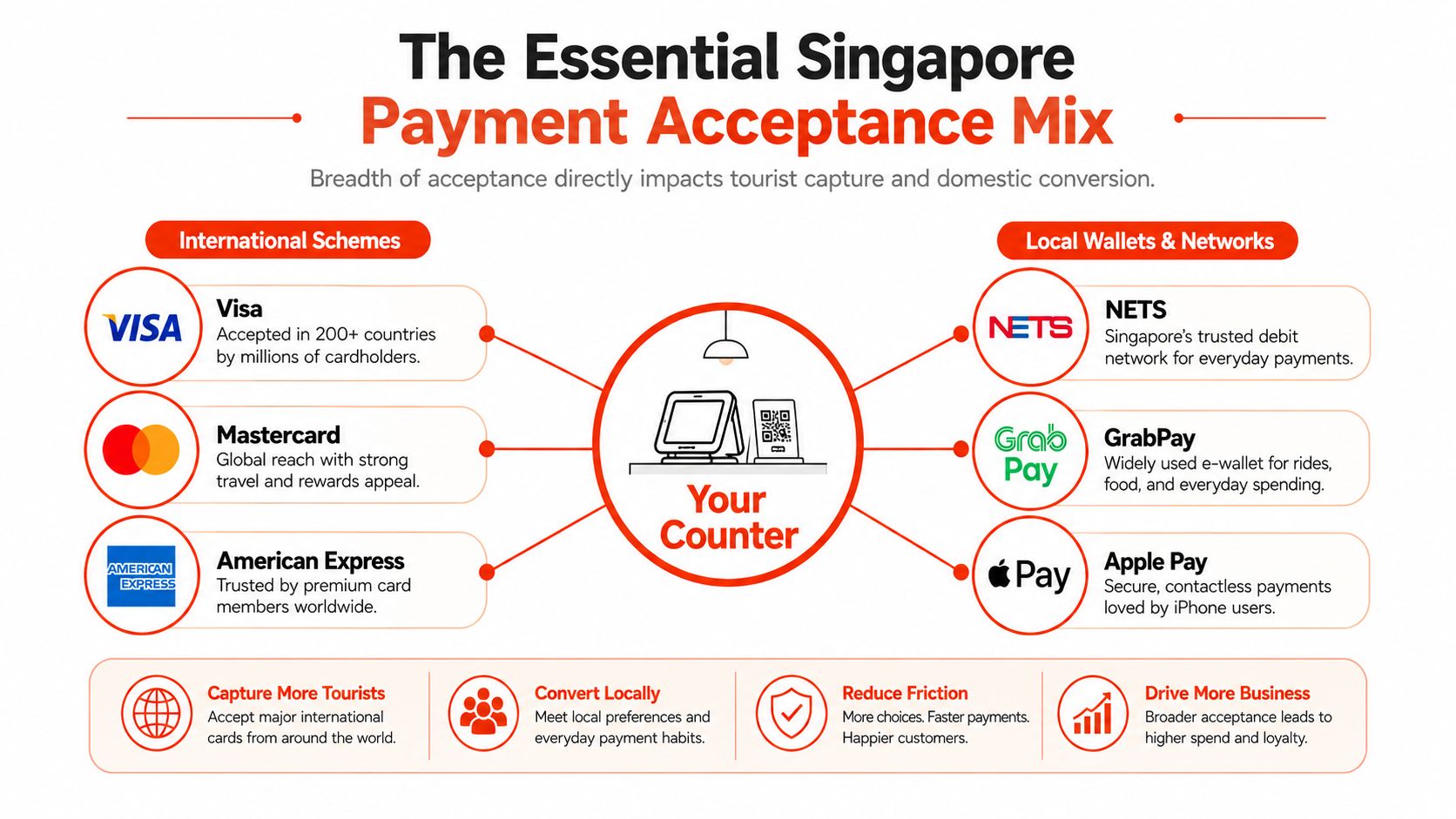
A terminal that only handles Visa and Mastercard can still leave money on the table in Singapore. Scheme breadth matters because the customer mix at the counter is rarely uniform. Domestic regulars, tourists, expatriates, and business travellers often arrive with different cards and wallet habits.
NETS, PayNow, Apple Pay, Google Pay, GrabPay, and Alipay all play different roles in a merchant's daily conversion pattern. International cards matter more in tourist-heavy areas, while domestic wallet usage matters at neighbourhood counters where speed and convenience decide whether a customer completes the sale. For a merchant in Orchard, Amex, JCB, and UnionPay can matter more than they do in a local heartland salon. For a hawker stall or clinic, local debit and QR acceptance may matter more than broad international breadth.
A practical internal reference on wallet behaviour is available in SambaPay's e-wallet guide, especially for merchants comparing where wallet acceptance fits in a local checkout mix.
Practical rule: if more than five percent of visibly present customers are using a card or wallet you do not accept, that gap deserves attention.
Coverage gaps are usually invisible on a spec sheet. A terminal can say it accepts cards, yet still skip Amex or JCB, which can matter in a clinic, boutique, or hotel-adjacent retail setting. That is not a technical quirk, it is lost conversion at the till.
NETS' merchant terminal offering also shows why a single device choice can be broader than it first looks. Its multi-payment terminal option adds major card schemes such as Visa, Mastercard, American Express, JCB, Diners Club, Discover, and UnionPay, while also supporting foreign cards and overseas wallets Fiserv merchant terminal offering. That breadth matters because merchants do not want to add separate devices every time they expand acceptance.
The decision should start with the customer mix, not the device brochure. A tourist-facing merchant needs scheme breadth. A local convenience-led merchant needs smooth domestic rails. The right terminal supports both without forcing a queue slowdown.
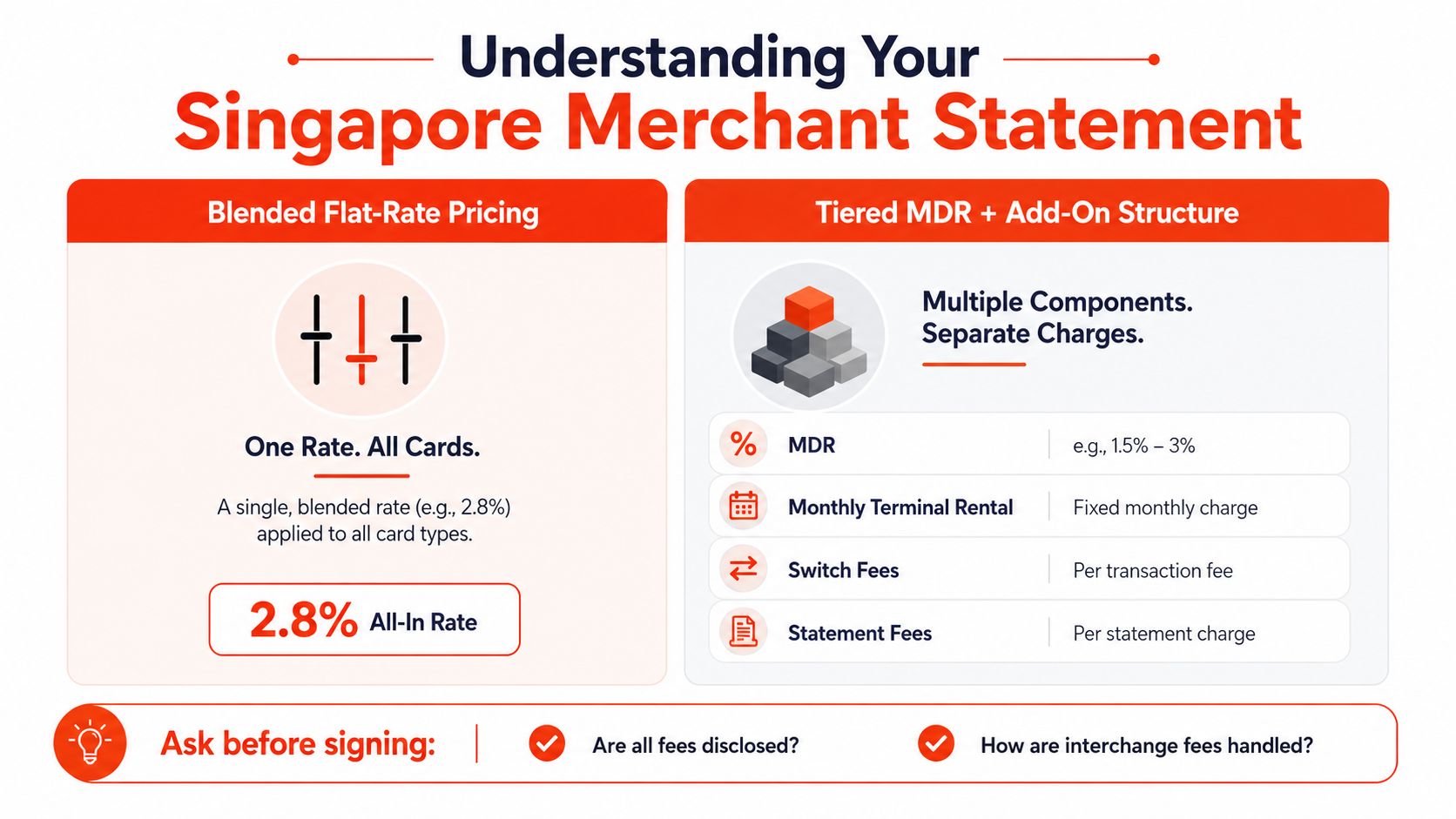
Merchant pricing looks simple until the first statement arrives. The number on the quote is rarely the full story, because the statement can combine processing fee, card scheme fee, interchange fee, acquiring fee, rental, support, and sometimes extra line items that only show up after signing Adyen credit card processing overview.
Blended pricing rolls the moving parts into one predictable merchant rate. That makes budgeting easier for an SME that wants to know what the card channel costs month after month. Tiered MDR plus add-ons can appear cheaper at the headline level, but it often becomes harder to compare because separate fees are applied across different parts of the transaction stack.
The danger is not that tiered pricing is always bad. The danger is that merchants compare a teaser rate to a blended rate without converting both into the same effective cost. A quote that looks light on paper can become expensive once terminal rental, statement fees, scheme charges, and support are added.
A provider should be able to answer these clearly:
That list is not paperwork for paperwork's sake. It tells the merchant whether the quote is stable or just cosmetically cheap. If a provider cannot produce the last three months of effective rates for a similar-volume merchant profile, the quote is probably too vague to trust.
The practical buying test is simple. Ask for the statement format, then ask what happens in a slow month, a refund-heavy month, and a month with more tourist cards than usual. The right pricing model stays understandable when the business does not behave perfectly.
A terminal can approve a payment in seconds and still leave the merchant waiting for the money. That gap matters because stock, wages, and supplier invoices do not wait for back-office settlement to catch up.
MAS describes EFTPOS-style card payment flows as authorising the merchant at the point of sale and then settling net positions through the settlement bank for participating institutions, while Singapore market references describe merchant card acquiring settlement as commonly T+1 EPOS payment terminal overview. For an SME, that timing is not just operational detail, it is working capital.
A boutique clearing SGD 40,000 a month feels the difference between next-day and slower settlement in how soon replenishment can happen. A cafe clearing SGD 65,000 a month can have a large amount of sales value sitting in transit for one more day if the cycle slips. A clinic billing SGD 25,000 in card-paid packages may not notice the difference at the till, but it will notice it when supplier or payroll timing gets tighter.
A faster payout matters most when the merchant buys inventory often, pays staff weekly, or carries high daily expenses.
Settlement cadence is shaped by cut-off times, weekend queueing, public holidays, and whether the provider supports daily batching cleanly. Merchants should also ask whether faster settlement carries a premium or a volume condition, because next-day cash is useful only when the cost does not erase the benefit.
The operational question is direct. Does the business need cash released as soon as possible, or can it tolerate an extra day in exchange for a lower fee? For boutiques, cafes, clinics, and salons, the best fit is usually the one that matches outgoing payment rhythm to incoming card funds.
| Merchant Profile | Monthly Card Volume (SGD) | T+1 Cash in Transit | T+2 Cash in Transit | T+3 Cash in Transit |
|---|---|---|---|---|
| Boutique | 40,000 | 40,000 | 40,000 | 40,000 |
| Cafe | 65,000 | 65,000 | 65,000 | 65,000 |
| Clinic | 25,000 | 25,000 | 25,000 | 25,000 |
The table shows the money tied up in the cycle, not a precise fee outcome. The actual impact comes from how long the merchant must wait before those sales become usable cash.
The hardware choice has changed. Dedicated Android POS units still do the heavy lifting for many merchants, but software-based acceptance is now a real option for the right setup. In Singapore, that means merchants are comparing how the counter works, not whether cards can be accepted at all.
A dedicated terminal such as a PAX A920, Verifone T650p, or Ingenico Move/5000 class device stays on the counter and is built for repeated use. It suits queues, split bills, refunds, and more than one cashier. For hardware-side context on contactless acceptance, see SambaPay's guide to contactless payment terminals.
DBS's tap-to-phone option, launched in June 2026, lets merchants accept contactless cards on Android smartphones without separate terminal hardware.
Tap-to-phone lowers hardware burden, but it also depends on a charged staff phone and a workflow disciplined enough to avoid confusion at peak time. A device on the counter is one thing. A phone in a busy shift handoff is another.
The trade-off is easier to judge in a side-by-side view.
| Dimension | Dedicated Android POS Terminal | DBS Tap-to-Phone (Jun 2026) |
|---|---|---|
| Merchant fit | Multi-counter retail, F&B, salons, clinics | Single-counter micro-merchants, mobile staff, low hardware setups |
| Setup cost | Hardware and possible rental or purchase | No separate terminal hardware |
| Supported use | Full checkout workflows, depending on setup | Contactless card acceptance on Android smartphones |
| Connectivity | Wi-Fi, 4G, or wired depending on model | Phone connectivity and battery dependent |
| Receipt handling | Usually on-device print, email, or SMS | Usually digital-first, depending on the app flow |
| Counter placement | Fixed point on the till or service desk | Staff-held phone or small stand setup |
| Refund flow | More structured on a merchant device | Depends on app permissions and device process |
| Queue speed | Better for steady high-volume counters | Best for lighter, less complex flow |
| PIN handling | Depends on device and scheme setup | Not the main strength of softPOS models |
| Lifecycle | Rental, warranty, replacement planning | No terminal replacement cycle, but phone management matters |
A dedicated terminal fits when the counter is busy, shared, or operationally messy. Tap-to-phone fits when the merchant wants to start small, keep hardware low, and accept cards without adding another device to maintain. The practical question is not which option sounds newer. It is which one keeps the till moving, supports the card mix you see, and stays reliable when the queue builds.
A terminal rollout goes well when the merchant treats it like a workflow change, not a box swap. Most problems on launch day come from simple issues, weak connectivity, bad placement, missing paper, or staff who were not shown the refund flow before the first sale.
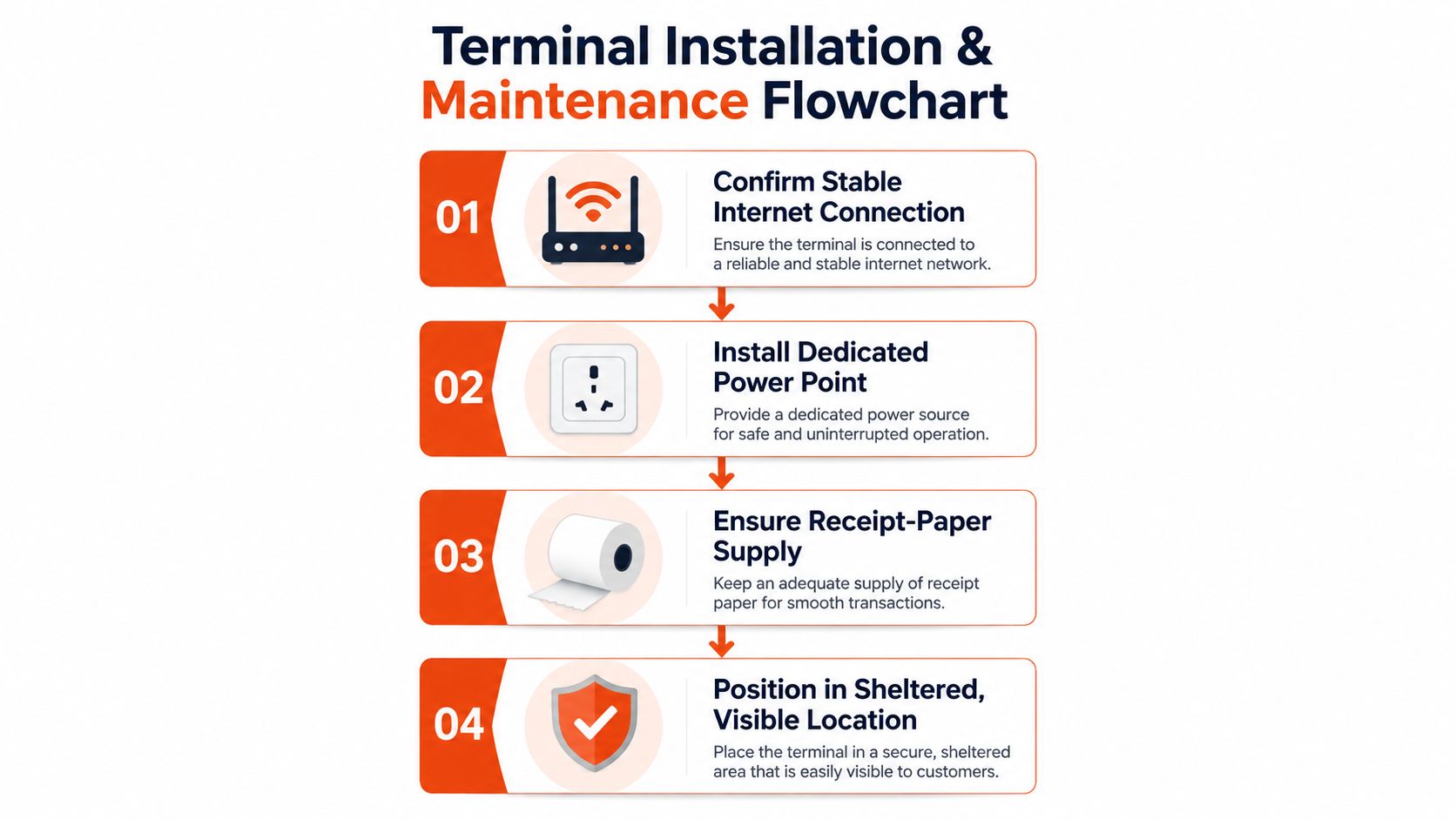
The counter should be ready before the provider arrives. That means stable internet, a dedicated power point, a visible and sheltered position, and enough receipt paper to avoid a first-day scramble. Staff should know where the device sits, how it is charged, and who handles a declined payment or duplicate-charge complaint.
The provider should also test the actual payment mix the business intends to accept. That includes cards, contactless taps, refunds, tax receipt settings, and any multi-operator or table-service flow used by clinics, salons, or restaurants.
The following visual captures the basic setup discipline that prevents avoidable downtime.
Keep the old terminal alive until the new one has settled batches, refunds, and any pre-authorisations cleanly. For portable and Android units, test Wi-Fi failover, charging routines, and cellular backup before peak trading starts. Reconcile the terminal totals against settlement reports daily, because a mismatch often shows up first as a workflow issue rather than a device fault.
Operational habit: recurring declines usually point to weak connectivity, unsupported card types, or staff handling, not just terminal hardware.
Day to day maintenance stays basic. Clean card slots and charging contacts, inspect cables and stands, update software only under agreed support terms, and log outages with timestamps. Clinics, restaurants, and salons should also test multi-operator use, because the problem often appears when a second staff member tries to use the device in the rush.
A strong setup is boring in the best way. The terminal should disappear into the workflow and only become visible when it saves a sale, not when it creates a queue.
The lowest quote is often the most expensive way to buy a terminal. The better test is whether the provider can show the counter flow, the price stack, and the payout timing before the contract is signed.
Before signing, a merchant should ask:
The provider should demonstrate the workflow under realistic pressure. That means a tourist card, a domestic debit card, a refund, and a connection loss during the same test window. The merchant should also confirm ownership or rental terms, warranty response time, replacement procedure, and any integration fee.
The quote pack should answer a few extra points without prompting:
Sambapay sits in this market as a Singapore-based in-store payments provider offering POS terminals, blended pricing, and settlement from as early as T+1, which makes it one of the practical options merchants may compare when they want a local setup with direct support. That kind of offer matters most when the business values straightforward fees and a local deployment path rather than a long procurement cycle.
The final test is still the same one at the counter. If the provider can't explain the payment mix, the fee stack, and the cash timeline in plain English, the setup will probably be painful later. For merchants ready to review their options, Sambapay is worth checking for in-store terminal, pricing, and settlement details that can be compared against the actual way the shop, cafe, clinic, or salon takes payments today.