
A café owner in Tanjong Pagar watches the lunch queue stop moving. The terminal is powered on, but it can't reach the router. Staff restart the device, customers wait, and the owner starts wondering whether the “cheap” card reader was really cheap after all.
That problem rarely comes from the plastic casing or the size of the screen. It comes from a mismatch between the card reader for small business and the way the business takes payment. Connectivity, software, fees, refunds, dispute handling, and settlement timing all affect the counter. A terminal that accepts cards but delays payouts or fails during a rush can create more operational pain than it solves.
Singapore's in-store card channel is already mature. The Monetary Authority of Singapore's H1 2025 retail payment statistics show total card payments of S$148.909 billion in 2024 and S$153.164 billion in H1 2025 annualised comparison data. POS credit and charge card payments rose from S$54.540 billion to S$56.490 billion, while debit card payments rose from S$43.309 billion to S$46.676 billion in the same comparison. These figures are reported in Singapore card payment coverage based on MAS statistics.
The decision, then, isn't which reader to buy. It's which payment workflow can keep the queue moving and the cash account predictable.
At a busy lunch counter, the reader is the final step in the sale and the owner's link between revenue and working capital. A device can accept tap and chip payments yet still create problems if it loses connectivity, records transactions poorly, or pays out later than expected.
Choose the payment workflow first. Can the setup switch connections when the shop network becomes unstable? Does it keep checkout moving while several customers wait? Will each payment appear correctly in the reconciliation report? When will the funds reach the business bank account? Those answers matter more than a larger screen or a newer-looking casing.
Singapore's payment infrastructure makes the choice harder to ignore. POS terminals numbered about 254,469 in 2021 and were projected to reach 316,695 by 2024. The country had 44 POS terminals per 1,000 people in 2021, among the highest densities in Asia-Pacific, according to Singapore SME payment infrastructure analysis. A reader is part of the standard payment setup for physical retailers, F&B operators, clinics, salons, and other SMEs.
The advertised transaction rate is only one cost layer. Software, statements, a SIM, support, hardware replacement, and early-cancellation fees can change the monthly bill. A lower headline rate also loses value when the business pays for unused features or waits several business days for settlement.
Settlement timing belongs in the buying decision. Faster access to funds can help an SME cover payroll, rent, and supplier invoices, while delayed payouts place more pressure on working capital. Ask the provider for the settlement schedule, cutoff times, refund process, and treatment of weekends and public holidays before signing.
Disputes add another workload. A chargeback may arrive after the sale and require receipts, transaction records, and staff explanations. A reader that links payments cleanly to orders and customer records can reduce administration, even when its device price is not the lowest available.
Practical rule: Judge a reader by its full acceptance cost, settlement timing, and daily workflow, not by the hardware price on the box.
Tap-to-phone changes the decision further. DBS launched a Singapore feature in June 2026 that turns an Android smartphone into a payment terminal, with funds settled the next working day, as described in DBS's tap-to-phone announcement. For a mobile operator or small counter, a phone-based setup can remove hardware ownership from the calculation. Check the phone's compatibility, battery needs, staff process, and receipt options before choosing it over a standalone terminal.
Choose a reader by how payment moves through the business, not by the device on the counter. A fixed till, roaming staff member, and multi-counter operation create different demands, even when they accept the same cards.
A neighbourhood provision shop with one checkout point usually benefits from a countertop terminal. The device stays plugged in, connects through Wi-Fi or Ethernet, and gives staff a consistent place to accept a tap, chip, or PIN entry. A tethered PIN pad also keeps the customer interaction clear, without making the cashier pass a phone across the counter.
This format prioritises speed, stability, and visibility. It uses counter space and fits poorly when staff take payment at tables, delivery locations, or event booths. It also leaves the shop exposed to one failed device or connection unless the operator has a backup plan.
A mobile reader suits a caterer collecting a deposit at a client's kitchen, a beauty professional visiting customers, or a hawker stall extending into off-site events. Some devices carry their own 4G connection. Others pair with a smartphone or tablet over Bluetooth, then rely on the phone's app and data connection.
Mobility reduces setup work, but shifts responsibility to the battery, phone, and payment app. During a busy service period, pairing a small reader with a phone can feel slower than using a dedicated terminal. Check who will carry the equipment, how it will be charged, and what happens if the phone is unavailable.
A multi-counter café needs more than an approval message. Its reader may need to communicate with the EPOS, update stock, record the correct table, and send each transaction into reporting. An integrated POS reader connects payment with those operating systems, so staff do not re-enter the same sale in separate places.
That setup adds configuration and support requirements, but it can reduce manual reconciliation. Clinics and salons can use the same approach to connect payment with appointments or service records. A standalone terminal remains easier to deploy, though the team may need to match payments to sales manually.
| Reader type | Best environment | Typical price range (SGD) | Key trade-off |
|---|---|---|---|
| Countertop terminal | Fixed retail counter or boutique | Provider-dependent | Stable at one till, limited mobility |
| Mobile reader | Pop-ups, catering, field services | Provider-dependent | Portable, but depends on battery or phone connectivity |
| Integrated POS reader | Multi-counter retail, F&B, clinics, salons | Provider-dependent | Links payment to operations, requires more setup |
Contactless and QR acceptance have broadened the payment choices available to Singapore businesses. That does not make the newest device the right one for every shop. Match the reader to the checkout pattern, staff movement, and records the business must maintain.
The practical test is simple: select the format that removes the most work from the sale. A fixed counter needs dependable access. A roaming seller needs portability. A growing operation needs payment data to reach the systems that run the business.
Connectivity determines whether a terminal is a reliable checkout tool or a powered-up ornament during an outage. The best option depends on where payment happens, how many transactions arrive together, and whether another network can take over.
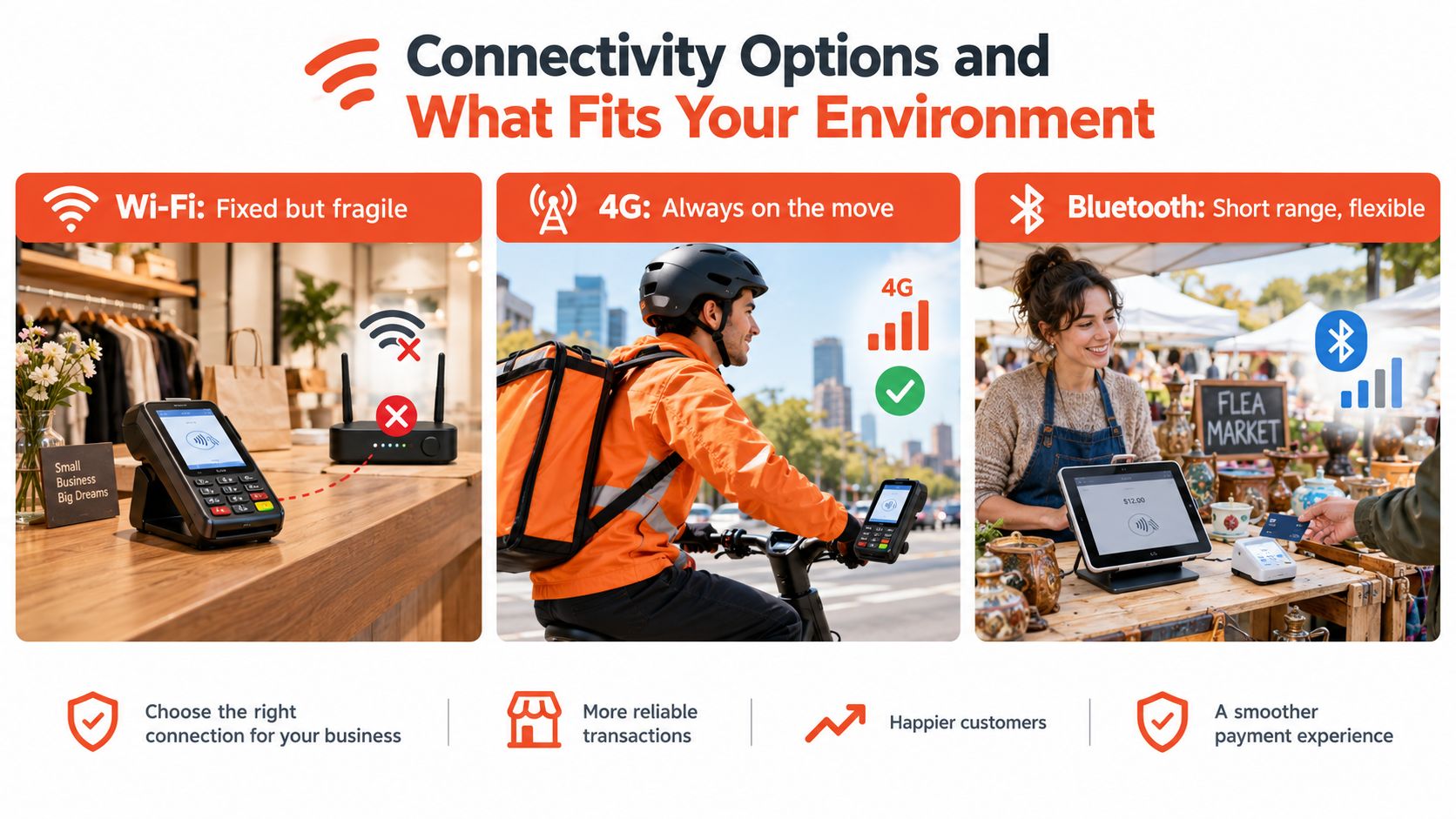
A fixed boutique with dependable fibre can use a Wi-Fi terminal without unnecessary complexity. The reader stays within range of the access point and avoids the cost or management of a mobile connection.
The weakness is obvious during router resets, access-point failures, or building-level service disruptions. Staff may still have working tablets and phones, but the terminal can't authorise the sale. Businesses assessing connectivity can also consult broader guidance on reliable internet for UK offices because the same principles apply, network resilience, coverage, and planned fallback.
A 4G terminal carries its own connection, making it suitable for pop-ups, event stalls, delivery teams, and businesses that take payment away from a fixed counter. It removes the need to pair the reader with a staff member's personal phone.
The trade-off is the SIM or data arrangement, plus dependence on mobile coverage and battery management. The device should be tested at the actual locations where customers pay, not merely switched on in the office.
Bluetooth readers suit low-volume sellers who already carry a charged smartphone or tablet. A flea-market stall, home-based service provider, or occasional market vendor may value the small footprint.
A busy café needs to be more cautious. Pairing, app availability, phone battery, and short-range communication all add failure points. An integrated Android POS setup, such as the workflows described through Android POS systems for business, can be more suitable where staff need payment and sales controls on one device.
Decision rule: Fixed counter with dependable fibre means Wi-Fi or Ethernet. Field-heavy or pop-up trading means 4G. A hybrid business should prioritise clean failover rather than a single connection type.
Payment security sounds technical because several safeguards operate at different points in the transaction. A merchant doesn't need to memorise the standards, but staff should understand what each layer protects.
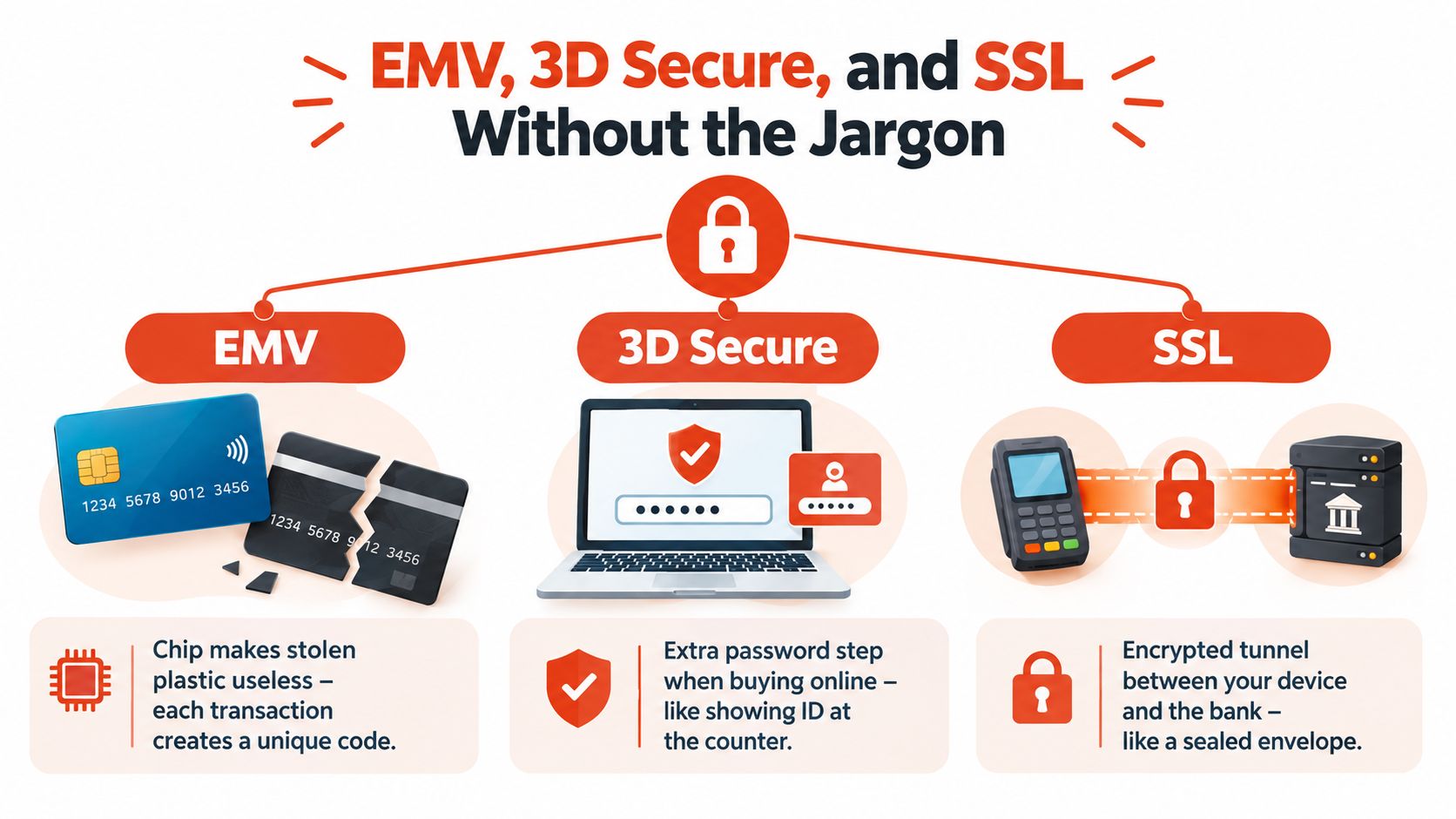
An EMV chip creates a transaction-specific code that the issuing bank can verify. If someone copies the visible details from a physical card, those details alone shouldn't recreate the chip's changing authentication at another terminal.
That makes chip insertion and contactless acceptance preferable to relying on older magnetic-stripe flows. A modern contactless reader can accept taps from cards, phones, and watches through EMV contactless and NFC. Mobile wallets such as Apple Pay and Google Pay tokenise the payment at the point of sale, so the underlying card number isn't exposed to the terminal in the same way.
3D Secure mainly applies when the customer isn't physically presenting a card at the counter. It acts like an additional identity check, such as a bank prompt or authentication step when an online payment looks unusual.
That distinction matters for a salon taking an in-person payment and a clinic sending a remote payment request. The card reader handles the face-to-face flow, while 3D Secure supports card-not-present transactions. Merchants evaluating remote collection can review how credit card payment acceptance works alongside their in-store setup.
SSL is the encrypted tunnel between the device and the payment processor. It prevents someone on an unsafe network from overhearing the information travelling between the terminal and the processing environment.
The reader still needs the correct contactless kernel, connectivity, and routing through the acquirer, card network, and issuer. A fast tap depends on that full chain, not only on the terminal's processor. Providers should also confirm that the hardware meets relevant payment security requirements, including PCI PTS certification for devices handling real card transactions.
A reader can look affordable at the counter and still cost more each month than expected. Compare the full payment workflow, including software, connectivity, hardware obligations, and the time between a customer's payment and the funds reaching your account.
Singapore pricing varies by payment method and product. UOB lists examples ranging from 0.8% MDR for NETS or SGQR card-linked acceptance to 3.5% for eNETS, with subscription structures and settlement options from T+1 to T+3, depending on the product and sector, as shown in UOB's merchant payment pricing information. Treat these as examples, not a universal rate card.
Ask the provider for an itemised quote before signing. Check these charges:
The right commercial structure depends on payment volume and how predictable that volume is. Pay-as-you-go keeps costs easy to follow and suits a small or seasonal seller. A blended rate offers one simpler headline charge, while interchange-plus pricing shows the underlying components more clearly but can be harder to forecast. Review this blended versus interchange-plus pricing guide for Singapore before accepting a quote. A subscription bundle can suit a high-volume retailer that needs software and operational controls.
| Cost component | What it covers | Typical range (SGD) |
|---|---|---|
| MDR or transaction fee | Processing each card or wallet payment | Provider and payment-method dependent |
| Subscription or licence | POS software, reporting, inventory, and staff features | Provider-dependent |
| SIM or data | Mobile connectivity for 4G terminals | Provider-dependent |
| Statement or administration fee | Account reporting and servicing | Provider-dependent |
| Chargeback handling | Dispute administration and evidence workflow | Contract-dependent |
| Hardware | Purchase, rental, replacement, or accessories | Provider-dependent |
Compare providers using your payment mix, average ticket, monthly volume, and settlement schedule. A slightly higher fee with T+1 settlement may support replenishment and supplier payments better than a lower-priced option that pays later. Singapore-focused payment guidance describes T+1 as the common next-business-day model, and cards represented 72% of Singapore e-commerce gross transaction value in 2024, with the share projected to rise further, according to SambaPay's settlement guidance.
For a wider technology comparison, review the guide to the best POS systems and separate payment hardware from the software layer. Then ask what the provider charges, when funds arrive, and what happens if you leave.
Cost test: Request a written monthly example based on your actual transaction pattern. If the provider cannot show every charge clearly, reject the quote until it can.
A retail shop and a mobile caterer may both need contactless acceptance, but their best reader formats are different. The decision should begin with staff movement, payment points, and the systems that must stay synchronised.
| SME type | Best reader format | Key reason |
|---|---|---|
| Retail shop or boutique | Countertop or integrated POS | Fast fixed checkout with product and stock control |
| Café or food court stall | Mobile or hybrid POS | Lets staff collect payment away from one fixed point |
| Clinic or dental practice | Integrated POS | Connects payment with appointment and patient workflows |
| Salon or spa | Integrated or mobile POS | Supports service records, tips, and flexible payment locations |
| Gym or fitness studio | Integrated POS | Links recurring services, memberships, and front-desk payment |
| Pop-up or event stall | 4G mobile reader or tap-to-phone | Portable setup that doesn't rely on a permanent counter |
A boutique with one till should prioritise contactless reliability, a readable customer display, and barcode or inventory integration. A countertop device usually wins because staff don't need to carry the terminal around the shop.
The calculation changes when the shop has several payment points or expects staff to serve customers across the floor. An integrated setup prevents separate entries for the sale, stock movement, and payment record.
A café queue may start at the counter and finish at a table. A mobile or hybrid reader lets staff close orders where service occurs, but the connection to the EPOS must remain accurate. Otherwise, the business trades a shorter queue for reconciliation problems later.
F&B operators should test tipping, refunds, split payments, receipt delivery, and offline behaviour before committing. A device that handles a quiet morning can still frustrate staff during a crowded dinner service.
A clinic or salon doesn't only record a dollar value. Staff may need to associate the payment with an appointment, service, package, or customer record. Integrated POS software is usually more valuable than a basic reader in these environments because it reduces duplicate entry.
Pop-ups have the opposite priority. The reader should start quickly, remain portable, work through 4G or a phone, and operate from a practical power arrangement. A compact setup can be more useful than a full POS system while the operator tests a new location.
A prepaid service model may also need a separate way to track usage and entitlements. Businesses considering that workflow can review a prepaid pack usage system before choosing hardware that only records one-off sales.
A boxed terminal on the counter is not the automatic answer for every small business. Tap-to-phone, also called SoftPOS, lets an eligible NFC-enabled smartphone or tablet accept contactless payments through a payment application.
That model suits a market stallholder, home-based service provider, micro-retailer, or pop-up seller that wants to test demand without adding another device. It also gives a roaming operator a payment method that travels with the phone already used for bookings, messaging, and invoices.
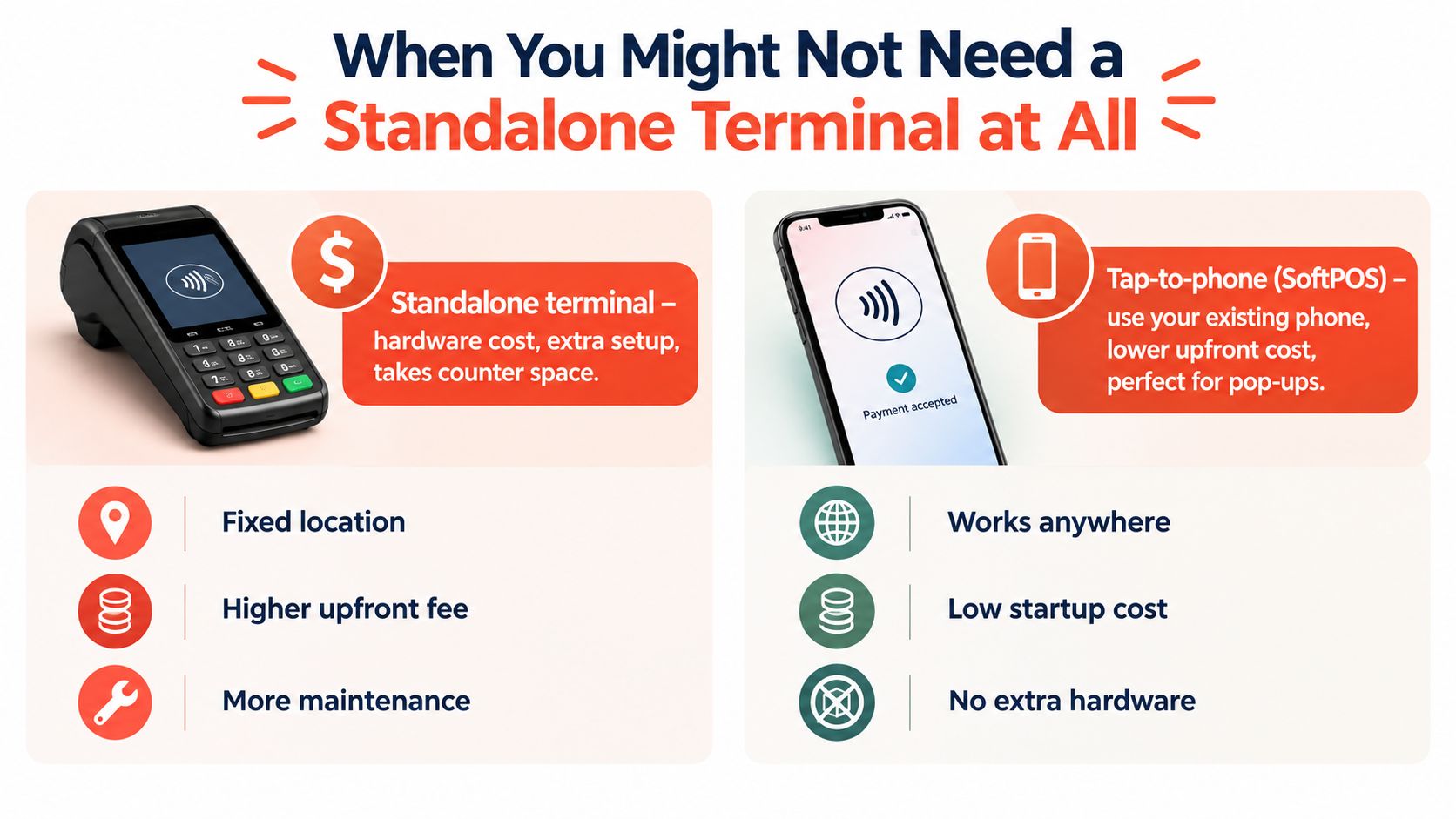
The phone still needs battery, a supported operating system, NFC capability, a reliable data connection, and an approved merchant profile. A single operator can manage that flow easily, but a busy counter may need several staff members accepting payments at once.
A phone-based setup can also be less suitable where customers expect a dedicated PIN pad, printed receipts, or a fully integrated inventory process. Some acquirers may apply merchant-category restrictions, so eligibility must be confirmed before the business changes its checkout process.
A Bluetooth reader paired with a tablet-based POS app can provide product, inventory, and reporting features without the footprint of a full countertop system. This option works for a small café, travelling service team, or retailer that needs a physical reader but values mobility.
Standalone terminals remain the stronger choice for fixed, high-throughput counters. Tap-to-phone is the practical starting point for portable, low-complexity acceptance. The sensible choice sits on a spectrum, not in a binary decision between a large terminal and no card acceptance.
A payment provider should pass a workflow test, a commercial test, and a support test before the business signs.
The strongest safeguard is a 30-day pilot or trial, whenever available. Providers that disclose the total cost of acceptance and settlement timing in writing deserve priority over providers that lead with a teaser rate and explain the rest later.
Sambapay provides modern POS terminals for Singapore SMEs, with card and selected digital-wallet acceptance, settlement options from as early as T+1 depending on the merchant agreement, and transparent blended pricing. Businesses comparing a card reader for small business can visit Sambapay to discuss a setup matched to their counter, connectivity, and cash-flow requirements.