
A POS is the merchant-side system that captures a payment at checkout, sends it through acquiring infrastructure for authorisation, and connects the transaction to settlement into the merchant's bank account. It records the sale as well as accepting the payment, so the checkout beep is only part of its job.
At a Singapore café, a customer taps a phone, the cashier sees an approval, and the next order begins. Later, the owner still needs to know whether that payment reached the bank, which charges were deducted, and how a refund would appear in the records. That's where understanding the whole POS process becomes useful.
A customer orders coffee and taps a card against the terminal. The cashier checks the screen before handing over the drink. Behind that ordinary exchange, the merchant's payment system has captured payment credentials, requested authorisation and received a transaction result.
The point-of-sale system, usually shortened to POS, is the technology used to complete and record an in-person purchase. Singapore's payment infrastructure grew from electronic funds transfer at point of sale, and modern unified terminals provide an interface for major card brands, including contactless cards and cards embedded in smartphones, as described in Singapore's e-payment guideposts.
The handheld device is the part customers notice. The owner also needs a usable transaction record, a receipt or digital confirmation, and information that can be checked against the eventual payout.
A payment terminal shouldn't automatically be mistaken for an inventory, accounting or restaurant-ordering system. Those functions may connect to payment acceptance, but a merchant needs to verify the connection rather than assume that everything comes with the device.
For broader reading about point-of-sale terminology, Hinawi ERP POS insights from Explorer Computer LLC, Hinawi Software ERP, provides a useful companion resource when comparing payment acceptance with wider business-software requirements.
Practical distinction: Accepting a payment and managing the business are related jobs, but they aren't necessarily handled by the same software.
At the café, staff might enter an order in one application and take payment through another. An integrated arrangement should be evaluated by whether the amount passes correctly between them and whether staff can match the payment to the order afterwards.
The simplest answer to what is a POS is therefore a payment-acceptance and transaction-recording system. Its usefulness depends on what happens before and after the customer taps, not just whether the terminal makes a reassuring sound.
A card payment resembles a delivery route. The terminal is the collection point, the acquiring infrastructure routes the request, and settlement is the financial delivery to the merchant's account. A successful collection doesn't mean the delivery has already arrived.
The payment journey can be pictured as follows.
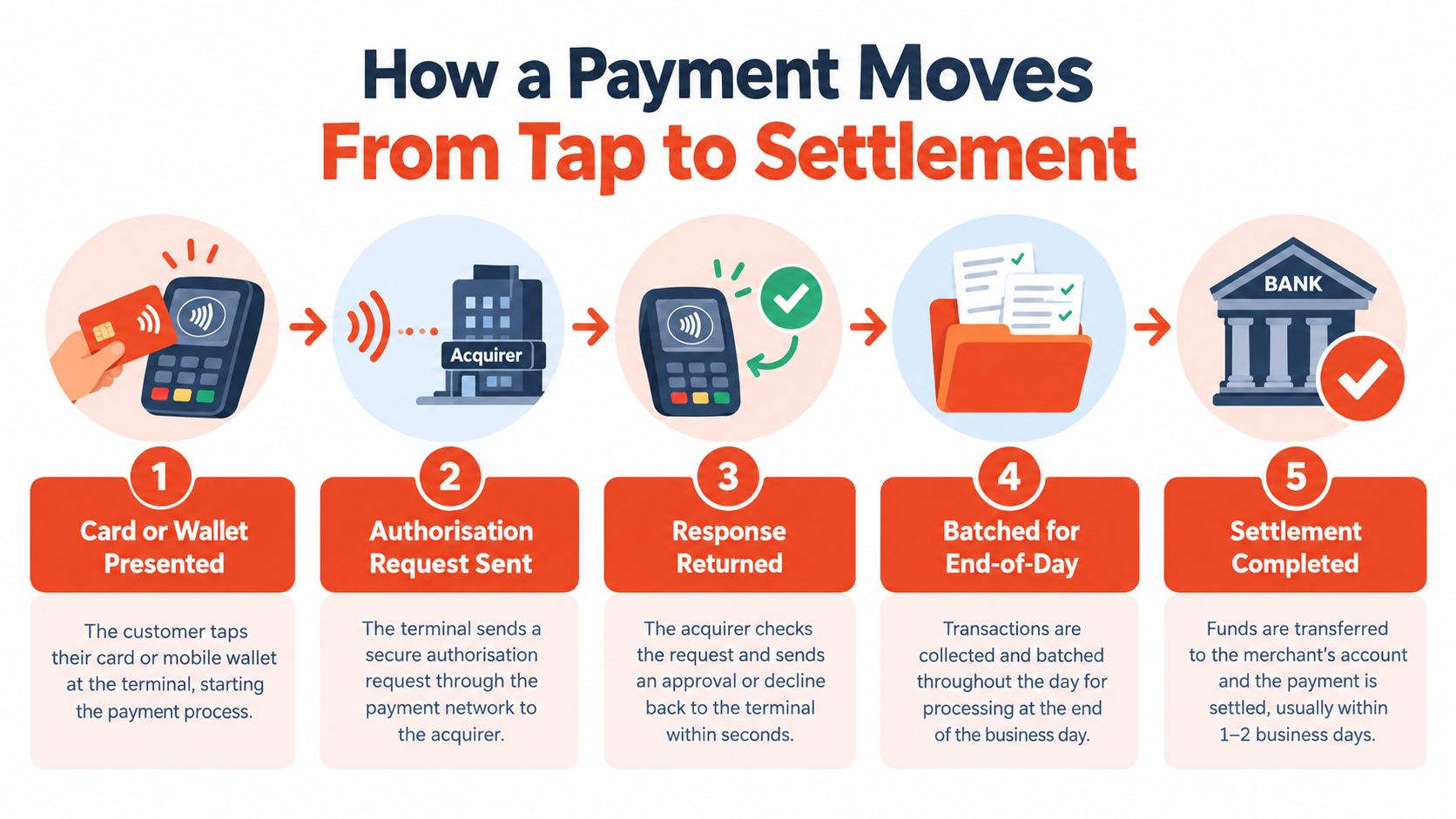
Authorisation isn't settlement. Authorisation answers whether the payment can proceed; settlement concerns the movement of funds into the merchant's account.
A timeout deserves particular care because the terminal may not have received a conclusive response. Staff shouldn't blindly submit the payment again, since an unresolved original attempt can create duplicate-charge problems.
The following video provides another way to visualise the payment-processing journey.
A café can finish serving customers before the related card proceeds become available for supplier payments. Owners therefore need the provider's settlement schedule, batch cut-off rules and treatment of refunds, rather than assuming that the sales total equals money immediately available.
Settlement options can be as early as T+1, depending on the merchant agreement and operational requirements, as outlined in the publisher's credit-card payment service information. Merchants should ask how the provider defines that timeline and handles non-processing days.
A clear payout schedule makes purchasing decisions easier to organise. It also gives the bookkeeper a sensible starting point when matching transactions to bank deposits.
A modern Android POS terminal is like a counter assistant's tool belt. Different parts handle interaction, payment capture, communication and confirmation. A tidy exterior doesn't reveal whether those parts suit a busy shop.
The component view below helps separate the device's visible features from its underlying hardware.
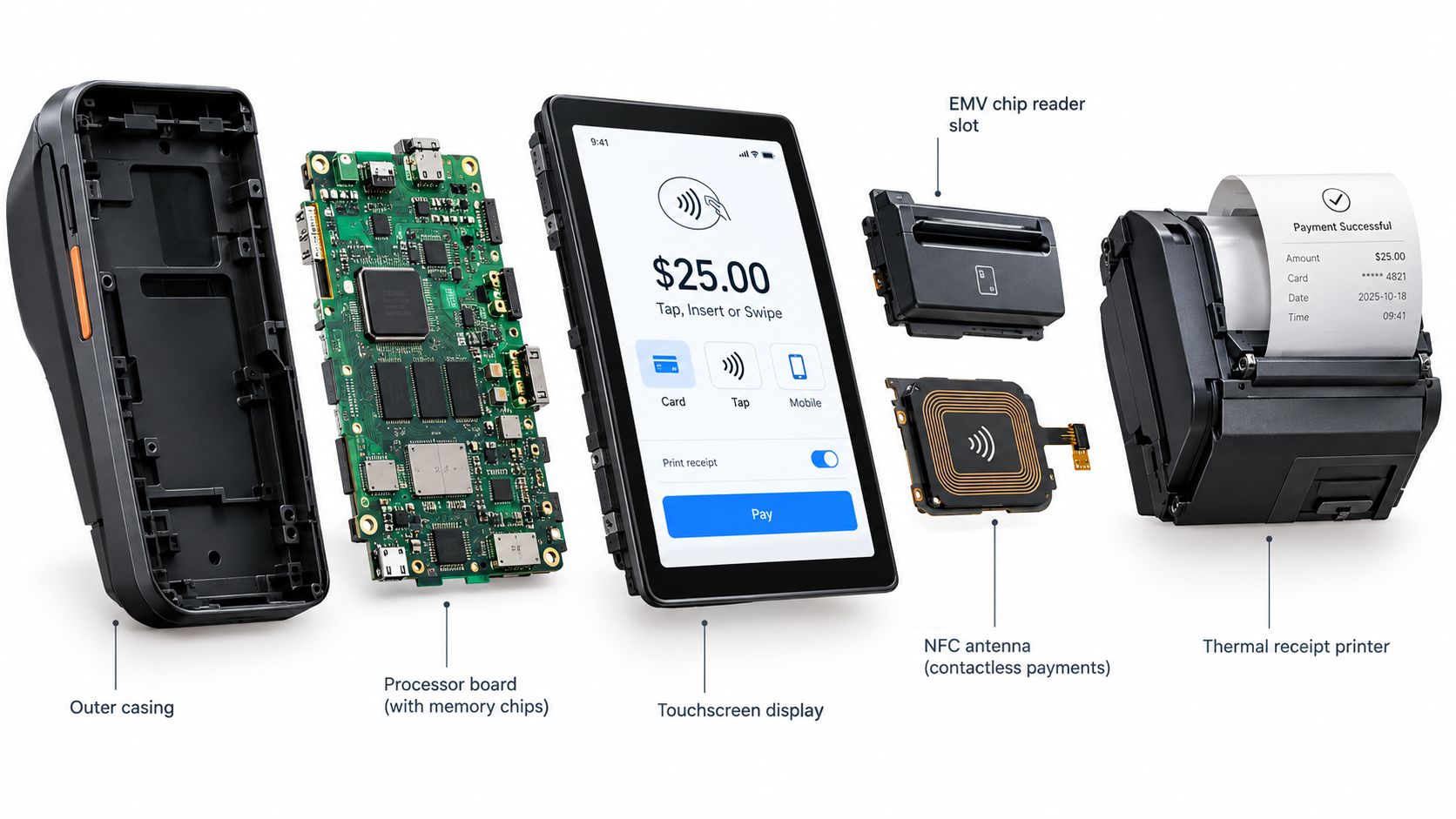
These are evaluation questions, not a specification that every terminal automatically meets. A countertop arrangement and a handheld device may suit very different service routines.
The operating system supports the device, while the payment application controls the transaction workflow. Merchants should ask who maintains each layer, how updates are installed, and whether staff can accidentally leave the approved payment environment.
PAX Android terminals are one hardware option available through the publisher's offering. Rather than relying on a product photo, an owner should request a demonstration using the proposed application, connection and receipt configuration.
For a separate perspective on terminal selection, Vendmoore Enterprises payment solutions offers a companion resource for the buying discussion. Provider claims should still be checked against the specific equipment and agreement being offered.
A useful test is straightforward: can a new cashier take a payment, identify its result and retrieve its record without guessing? That matters more than a long feature list.
A customer's phone doesn't identify the payment rail on its own. A phone tap using a card-backed wallet and a payment made by scanning a QR code can look equally convenient while following different acceptance arrangements.
Singapore's payment mix makes that distinction important. PwC Singapore reported that 97% of retail POS transactions were cashless in 2022 in its payments state-of-play report, making payment coverage a practical consideration for physical businesses.
| Rail | Type | Typical Use | Average Ticket (S$) |
|---|---|---|---|
| Credit and charge cards | Card payment | Customers paying with a supported credit or charge card | Credit/charge: 80.16; debit: 34.89, calculated from MAS H1 2025 POS value and volume |
| Debit cards | Card payment | Customers paying with a supported debit card | Debit benchmark included above |
| Apple Pay and Google Pay | Card-backed mobile-wallet acceptance | Customers tapping a phone with supported card credentials | No separate benchmark provided |
| Alipay and GrabPay | Selected wallet acceptance | Customers using an enabled wallet payment method | No benchmark provided |
| PayNow | Account-to-account payment, commonly presented through QR | Customers scanning merchant payment details | No benchmark provided |
The card averages are market benchmarks, not predicted basket sizes for an individual shop. A boutique's customer mix may differ substantially from a café's.
A provider's card list might include Visa, Mastercard, American Express, JCB and UnionPay. The merchant should verify each required scheme, along with selected wallets, rather than treating “accepts cards” as a complete answer.
For QR acceptance, the practical questions include how the customer initiates payment, how staff confirm receipt and where that transaction appears in reports. The publisher's PayNow QR payment information is a starting point for that discussion.
QR and wallet methods can be additional acceptance options within a POS arrangement; they don't automatically require separate machines. Equally, their availability shouldn't be assumed from the terminal's appearance.
Owners should bring their actual payment mix to pricing discussions. They should also ask whether reports distinguish the rails clearly enough to explain charges, refunds and payouts without manual guesswork.
At a café during lunch, the cashier needs an obvious amount, an accessible tap position and a result that's easy to interpret. The owner should test the proposed setup with realistic order handling, rather than watching a demonstration of an isolated payment.
A queue-friendly workflow leaves little room for unnecessary screen changes. If staff must switch between ordering software and the terminal, the demonstration should include that hand-off and show how the payment is matched back to the order.
Reception work raises different questions. A merchant evaluating itemised receipts, partial payments or refunds needs to establish which functions belong to the payment terminal and which require the clinic or booking software.
The receptionist should be able to locate the original transaction before starting a permitted refund. The owner should also check whether the resulting records give the bookkeeper enough context without exposing information to staff who don't need access.
The right workflow is the one staff can follow during an ordinary working day, not just during a provider's demonstration.
A retail shop faces another test at closing time. Staff need to match completed sales, refunds and reversals to payment records, while the owner needs to distinguish money processed from money available in the bank.
Connectivity is part of these workflows, not merely an installation detail. Merchants reviewing their premises can use the Purple Access network platform from Purple Access as a companion resource for retail-network planning, then confirm the payment provider's own connection requirements.
These café, reception and closing-time scenarios are practical tests, not claims of guaranteed performance. A suitable POS arrangement should demonstrate how it supports the merchant's day before the owner commits.
A tap payment can feel effortless without making the merchant's responsibilities disappear. Security includes the way payment credentials are handled, but also who can issue refunds, view reports or change device settings.
The Association of Banks in Singapore states that Singapore-issued cards use EMV chips, whose cryptographic protection makes chip contents harder to copy than magnetic-stripe data, and that magnetic-stripe transactions at Singapore POS terminals have been rejected since 1 July 2012, in its payment-card security guidance.
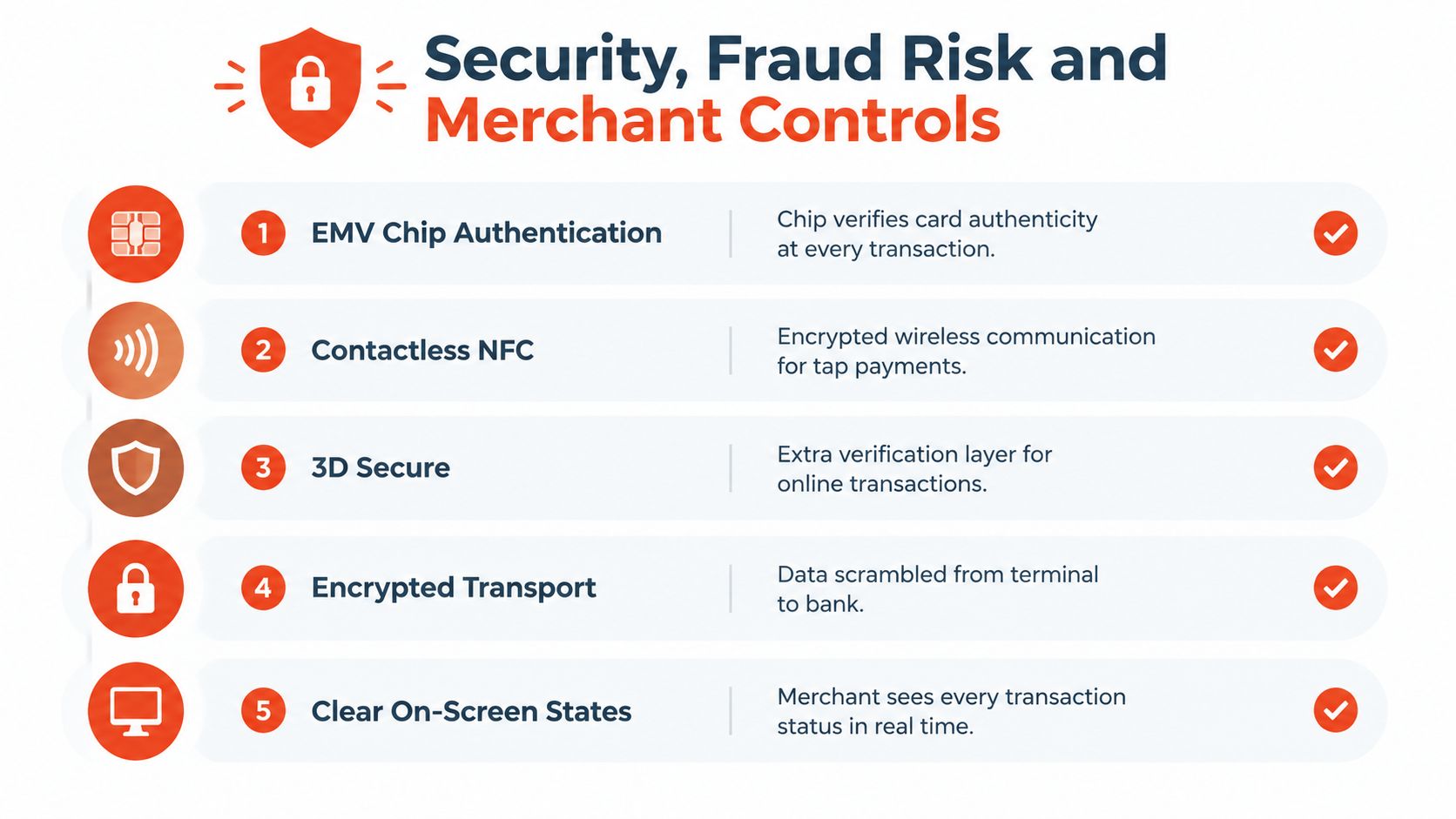
EMV supports chip-based card authentication. NFC enables contactless communication, while encrypted transport protects payment information as it moves through the processing connection. Merchants should ask providers to explain the protections in the actual deployment rather than relying on broad security labels.
3D Secure belongs to the online-payment discussion, not an ordinary chip insertion or contactless tap at the counter. A business accepting both in-person and remote payments should ask about the controls for each channel separately.
The checklist below groups the security layers that merchants may encounter across their payment arrangements.
A Singapore retail survey reported that 33% of businesses experienced cyberattacks or data breaches in the previous 12 months, while 44% said mobile-enabled payment and service tools improved checkout speed and customer satisfaction, as reported in Singapore Business Review's payment-market coverage. These findings support a balanced approach: checkout convenience and operational controls deserve attention together.
Owner's checkpoint: A provider should explain what staff must do when something goes wrong, not only how payments work when everything goes smoothly.
A discussion about merchant services in Singapore should therefore include support responsibilities and escalation procedures. A terminal can reduce particular payment risks, but it doesn't eliminate social engineering, misuse of staff access or operational mistakes.
A POS proposal should be judged through acceptance, payout arrangements, workflow fit and merchant controls. Hardware matters, but the owner also needs to understand the commercial agreement and the support process surrounding it.
A compact device may suit table-side service but be awkward beside a fixed retail till. A broad acceptance list may be useful, yet incomplete reporting can leave the bookkeeper with extra work. The strongest fit is the arrangement whose parts work together for the actual business.
The owner should request written answers and a demonstration of the proposed setup. A useful demonstration includes a normal sale, retrieval of its record and the permitted exception workflows, not just a customer tapping successfully.
Before comparing quotes, a merchant can prepare a short description of peak trading periods, current payment methods, receipt needs and existing software. Recent transaction information can also help providers quote against the business's actual activity rather than an assumed customer profile.
The question isn't whether a device can take payment. It's whether the complete arrangement gives staff a dependable checkout process and gives the owner records, available funds and support that are straightforward to manage.
Sambapay offers Singapore SMEs modern Android POS terminals, in-store card processing and selected digital-wallet acceptance, supported by a local team. Owners can visit Sambapay to discuss their checkout workflow, payment mix and settlement requirements, and request a proposal that explains the equipment, pricing and support arrangements.