
Singapore has become a market where pay with contactless is no longer a premium checkout feature. Visa reported that 82% of Singapore consumers used contactless cards, 97% used card payments overall, and more than 95% of Visa transactions were contactless by 2023. The same study found that contactless cards were preferred in convenience stores, retail shopping, supermarkets, public transport, and taxis or ride-hailing, confirming that tapping has become routine across both retail and mobility Visa Singapore Consumer Payment Attitudes study.
The most common merchant mistake is surprisingly basic: contactless is disabled on a terminal that supports it, or the tap prompt is hidden behind an unnecessary chip-and-PIN selection. A customer can have a ready card or mobile wallet and still face friction because the counter setup hasn't been configured around the behaviour customers already expect.
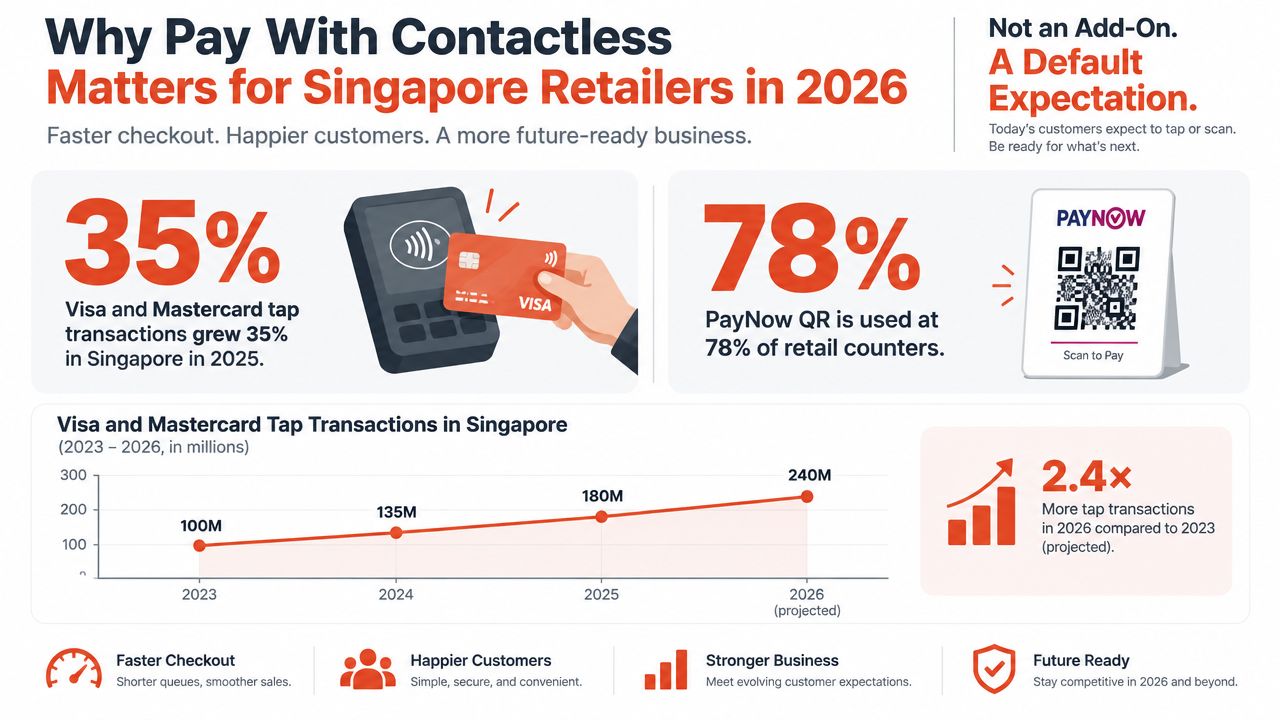
A tap transaction needs to feel like the natural first choice. Staff shouldn't ask, “Card or cash?” before the terminal displays a contactless prompt, and customers shouldn't need to explain whether they're using a physical card, iPhone, watch, or another wallet. The terminal should make the next action obvious.
Singapore's adoption history supports that approach. In 2019, Visa reported that 83% of consumers were using contactless cards more frequently than two years earlier, while only 9% preferred cash. Mobile contactless usage reached 56% of consumers in 2020, and contactless card payment became the country's most preferred payment method in 2021, at 31%, ahead of online cards at 23% and cash at 15% Visa's Singapore contactless adoption timeline.
A slow counter costs more than a few extra seconds. It interrupts the queue, makes staff repeat instructions, and gives customers a reason to switch to another payment method or abandon a small add-on purchase. Merchants still need to evaluate merchant discount rates and settlement terms, but the operational question is simpler: does the payment setup preserve the speed customers expect?
A contactless rollout should therefore include:
PwC reported digital-payments adoption at 92.0% in 2025, while SGQR had been adopted by more than 210,000 merchants and covered over 90% of merchants in Singapore PwC's Singapore payments overview. That combination means “contactless” should be treated as part of a broader acceptance design, not an isolated terminal setting.
Merchants considering instalment or deferred-payment options should also assess how those services fit the counter flow. A practical resource on sustainable tech with BNPL can help teams evaluate the wider technology and responsible-payment context without confusing it with ordinary card tap acceptance.
A merchant can't deliver reliable tap payments with a terminal that merely has an NFC symbol printed on its casing. The device, acquiring setup, connectivity, and operating procedures all need to work together before the first customer presents a card.
The minimum counter arrangement should include:
The device needs a clear position at the counter. Don't bury the NFC reader behind a display stand, receipt printer, or acrylic sign. Customers should be able to present a card or phone without reaching across the cashier.
The acquiring or payment-provider application will typically require a UEN, a local bank account for settlement, business details, outlet information, and an appropriate merchant category code. The selected acquirer or payment gateway should confirm support for the rails the business needs, including NETS, PayNow, Visa, Mastercard, UnionPay, and relevant mobile wallets such as Apple Pay.
A good onboarding check also asks how refunds, voids, end-of-day batches, chargebacks, and settlement reports are handled. Acceptance without reconciliation is only half a payment system.
Practical rule: A terminal is ready for launch only when a live test payment, reversal, receipt, and settlement record have all been verified.
The implementation should enable contactless as the default entry point rather than making staff select it manually. The operator should also review cashback and tip toggles, update the MCC, install current firmware, confirm receipt settings, and test the terminal's sleep and network-recovery behaviour.
A PAX-based deployment from Sambapay is a realistic example of how an SME can organise hardware, onboarding, configuration, and activation within a short go-live window. Merchants can review the Sambapay contactless payment terminal setup when comparing device and acceptance requirements.
Connectivity planning matters beyond payments. A store that offers customer internet access should separate guest traffic from POS traffic, and teams reviewing implementing guest WiFi can use that distinction when planning the counter network.
At a Tiong Bahru bakery, a cashier keys in S$6.50 for a pastry and coffee. The PAX screen displays the amount, then presents the available instruction, such as INSERT, SWIPE or TAP. The customer holds an iPhone near the reader with a Visa card stored in Apple Pay.
Face ID authenticates the customer on the phone. The wallet then presents tokenised payment credentials through NFC, rather than exposing the physical card number. The terminal passes the transaction through the acquiring route, receives an approval response, and displays or prints the receipt.
The exact wording varies by terminal application, but the operational sequence is consistent:
A domestic tap can complete in under three seconds, including customer authentication, when the terminal has a stable connection and the payment instrument is ready. A customer shouldn't be told to remove a phone from a case immediately unless the first read fails, because unnecessary handling slows an otherwise simple transaction.
The customer should hold the device still rather than waving it across the reader. If the terminal asks for a second tap, staff should say, “Please hold it over the contactless symbol again,” then wait for the approval or decline message.
Four short beeps can indicate approval on a configured PAX workflow, while a long error tone generally signals that the transaction needs attention. Staff must rely on the screen message and receipt status, not sound alone, because tones can vary by application and firmware.
An online-authorised transaction receives approval from the issuer through the acquiring connection. An offline-approved transaction may be accepted within the applicable offline floor limit and later submitted according to the terminal and scheme rules. That distinction affects risk handling, so operators shouldn't treat every audible approval as proof that the same authorisation path was used.
A Singapore terminal works best when acceptance is designed in layers rather than reduced to “Visa enabled” or “NFC enabled”. Each rail has different customer expectations, settlement treatment, and failure modes.
International card schemes include Visa payWave, Mastercard Contactless, American Express, UnionPay QuickPass, and other schemes enabled by the merchant agreement. These are useful for local cardholders, corporate buyers, and visitors who expect to use the card or wallet already in their phone.
Mobile wallets include Apple Pay, Google Pay, Samsung Pay, Garmin Pay, and Huawei Pay. The phone or watch may present a scheme token, so staff shouldn't assume the wallet behaves exactly like the underlying physical card in every risk or verification scenario.
Domestic and local payment rails include NETS, GrabPay, FavePay, Atome, and Singtel Dash. PayNow-linked wallets and QR payments follow a different customer journey from NFC card-token transactions. They may settle through local transfer or wallet arrangements rather than the card-scheme settlement path, which makes reconciliation and refund handling especially important.
NETS raised its contactless transaction limit to S$200 from 16 July 2025, according to recent market commentary coverage of Singapore's prepaid-card and digital-wallet market. The change gives customers more room to use contactless for everyday purchases, but it doesn't make every NETS transaction identical.
A kopitiam, hawker stall, convenience store, salon, or clinic should still test higher-value transactions, PIN prompts, reversals, and fallback to chip-and-PIN. Contactless penetration is high, yet customers continue to split usage between cards, wallets, transport, retail, and ride-hailing. The payment instrument and issuer decision still determine the actual outcome.
| Method | Type | Typical Limit (S$) | Settlement | Merchant Relevance |
|---|---|---|---|---|
| Visa payWave | Contactless card scheme | Issuer and terminal rules apply | Card acquiring | Broad local and visitor acceptance |
| Mastercard Contactless | Contactless card scheme | Issuer and terminal rules apply | Card acquiring | Important for physical cards and wallets |
| NETS Contactless | Domestic card rail | 200 contactless transaction limit from 16 July 2025 | NETS arrangement | Relevant to local everyday purchases |
| Apple Pay and Google Pay | Mobile wallet | Underlying issuer and verification rules apply | Scheme or wallet-linked acquiring | Fast phone and watch checkout |
| PayNow QR | Domestic QR rail | Merchant and bank rules apply | Bank-transfer rail | Essential fallback and local acceptance |
| GrabPay and FavePay | Digital wallets | Wallet-provider rules apply | Wallet-provider settlement | Useful where customers already hold balances |
A dual-network setup usually gives a merchant more resilience than a single-acquirer configuration, but it can add onboarding and reconciliation complexity. On a Sambapay PAX terminal, the operator should check the device settings menu and payment application profile to confirm that contactless is enabled for every contracted scheme, rather than assuming the NFC reader activates all networks automatically. Merchants comparing phone-wallet acceptance can review Apple Pay in Singapore as part of that acceptance check.
Contactless security begins with the difference between a card's PAN, its primary account number, and a transaction token. A mobile wallet can generate a device-linked token for payment, so the underlying card number needn't travel through the same checkout path as a manually keyed card number.
The terminal still applies the issuer's risk controls. A transaction may pass without a PIN, request a cardholder verification method, or require the customer to insert the card. The applicable floor limit, issuer decision, terminal configuration, and transaction context all matter.
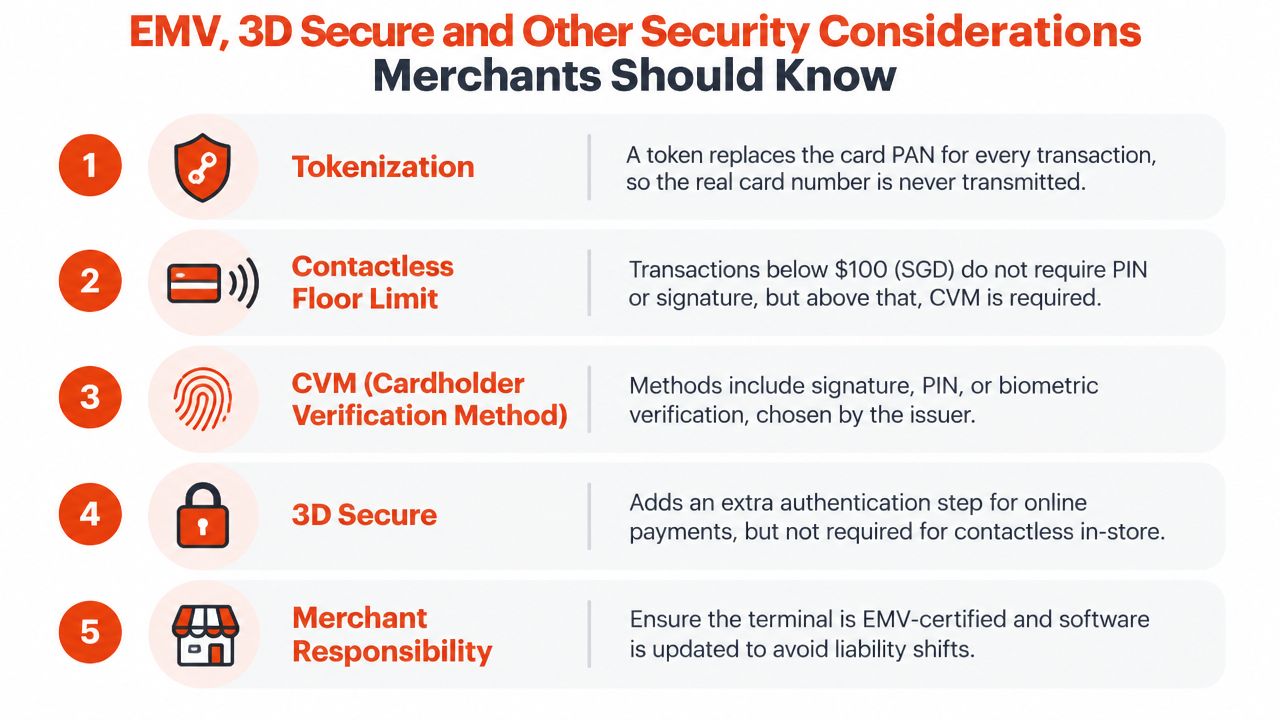
3D Secure is designed for card-not-present payments, such as an online checkout where the customer enters card details in a browser or app. It isn't a requirement for an ordinary in-store contactless tap, and staff should never ask a customer to disclose an OTP during a terminal transaction.
For an in-store decline, the correct response is to follow the terminal's approved fallback, usually another tap, chip-and-PIN, or a different payment method. Staff must not key the card number into the terminal as an improvised workaround.
MAS guidance on payment tokenisation and Singapore Police advisories on card fraud should form part of the merchant's internal training materials. The practical message is simple: contactless reduces exposure to the physical card number in many flows, but it doesn't remove the need for controlled devices, sound fallback procedures, and careful staff behaviour.
Merchants handling card payments can also review pay with credit card guidance when documenting acceptance and security procedures across their outlets.
Many contactless failures begin with the employee, not the NFC reader. A cashier who points vaguely at the terminal, asks for a card before entering the amount, or tells a customer to “try anything” creates confusion that no firmware update can fix.
The staff script should be short and consistent:
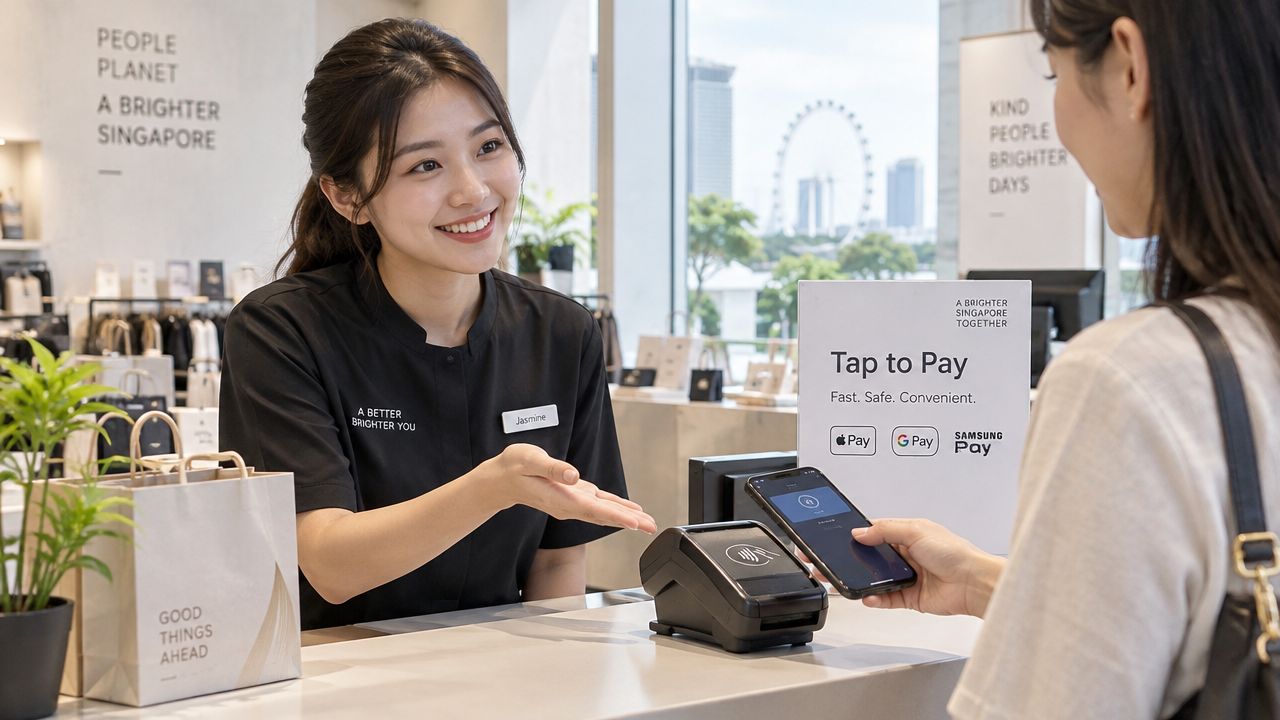
Place the contactless decal at eye level on the terminal, where the customer naturally looks after the cashier enters the amount. Put the PayNow QR beside the terminal, not behind it, and remove old “We do not accept NETS Contactless” stickers after the acceptance profile changes.
Corporate purchasing cards may require itemised receipts, so the POS should support the receipt format that business customers need. A customer asking for cashback should be told whether the merchant offers that function. Staff shouldn't promise cashback because the card itself supports it.
Foreign cards without contactless should go through the chip-and-PIN path. A phone in a thick case may read intermittently, particularly when the customer presents it at an angle. The cashier can ask the customer to hold the device closer to the reader or remove the case only after a normal presentation fails.
Short role-play sessions are more useful than a long policy document. Merchants can use VideoLearningAI customer service training as a reference when building scenario-based coaching for frontline teams.
Counter standard: Staff should explain the next action, never blame the customer's card or device, and never invent a fallback that the terminal hasn't approved.
The escalation script should be: “The terminal shows error code [code] on [date and time], for [amount], using [rail], after [number of attempts].”
A useful troubleshooting process starts by identifying the failure category. Staff shouldn't reboot the terminal immediately or ask every customer to switch payment methods before checking what the screen reports.
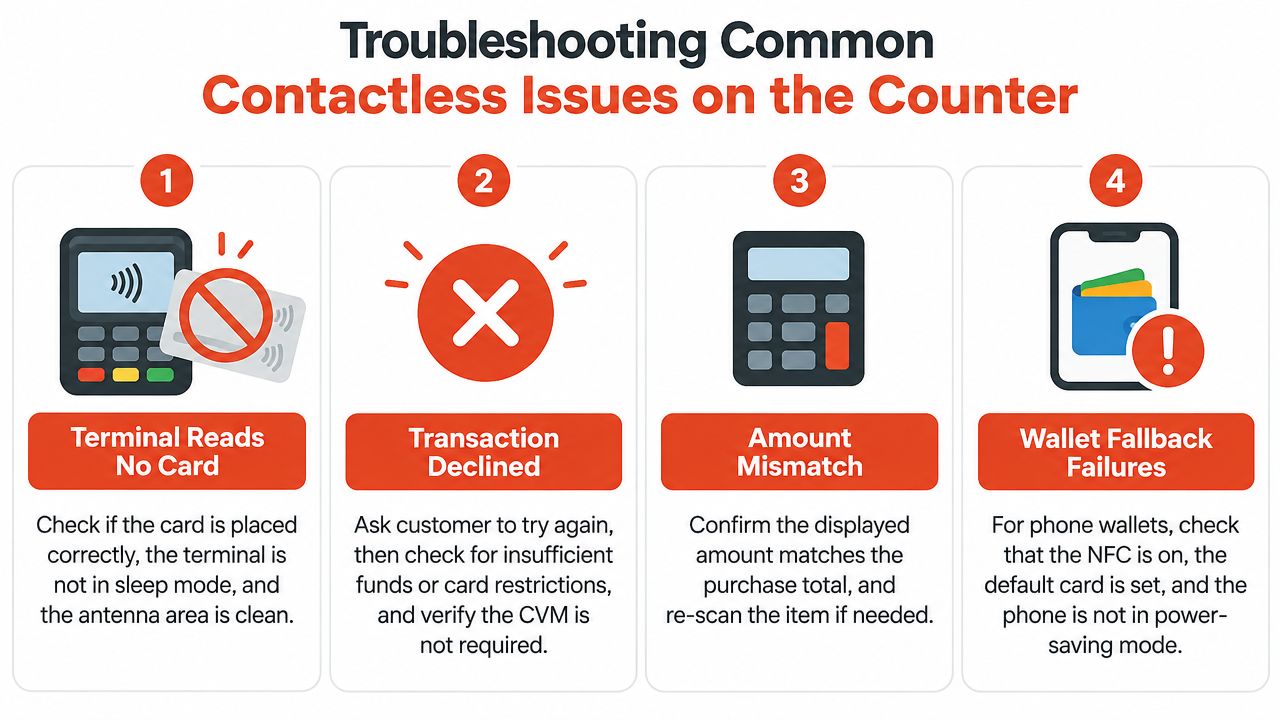
First, check that the terminal isn't in sleep mode and that the contactless symbol is visible on the active screen. Ask the customer to present the card or device flat over the antenna area and keep it still. Remove nearby cards from the wallet or cardholder, then retry once.
If the reader still doesn't respond, inspect the NFC area for dirt, damage, or an obstructed counter fixture. Confirm the terminal shows a network connection before switching to chip-and-PIN or another accepted method.
A decline can come from the issuer, the payment rail, the merchant configuration, or a verification requirement. Staff should read the exact message, ask the customer to retry once, and then offer insertion with PIN if the terminal prompts for it.
For NETS or scheme transactions, confirm that the relevant acceptance profile is active and that the value hasn't triggered a limit or card restriction. Don't tell the customer that the card is faulty when the terminal only reports “declined”.
Stop before approval. Compare the terminal amount with the POS order total, especially when the cashier has edited an item, applied a discount, or added a tip. If the values differ, cancel the transaction, correct the order, and start again rather than relying on a later refund.
For a phone wallet, check that NFC is enabled, the intended default card is selected, and the phone has completed its authentication step. A customer may close the wallet or lock the device before presenting it, which leaves the terminal waiting for a valid tap.
PayNow and other QR flows need their own check. Confirm that the customer has scanned the correct merchant code, completed the payment, and retained the confirmation screen before staff release the goods. A QR scan alone isn't proof of settlement.
Every escalation should include:
Support script: “This outlet's terminal [identifier] failed at [time] for [amount]. The customer used [instrument], the screen showed [exact code], and [fallback result] occurred.”
That record lets the acquirer or terminal vendor distinguish a simple re-present from a disabled scheme, connectivity fault, incorrect floor-limit configuration, or hardware issue.
Sambapay provides Singapore SMEs with PAX-based POS terminals for contactless cards and selected wallets, including Apple Pay and Google Pay, alongside merchant onboarding, settlement support, and local troubleshooting. Visit Sambapay to review a contactless acceptance setup suited to the outlet's payment mix and counter workflow.