
A customer is holding an iPhone over the card terminal at a neighbourhood café. The cashier has entered the amount, the customer authenticates with Face ID, and the terminal either approves the tap or displays a decline. For the shop owner, the important question isn't whether Apple Pay looks convenient. It's whether the terminal, acquiring setup, card scheme and issuing bank can process that particular tokenised card.
That distinction matters in Singapore. Apple Pay is a customer-facing wallet, but the payment still travels through established card rails. A modern terminal alone doesn't guarantee acceptance, and a customer's compatible iPhone doesn't guarantee that the card in Apple Wallet is eligible. This guide explains the practical side of Apple Pay Singapore, from the wallet's local history to terminal readiness, settlement, fees and staff procedures.
At a busy Tiong Bahru café, a customer might order a kopi set, hold an iPhone near the terminal and leave without taking out a physical card. The visible action is simple, but Apple Pay isn't a separate closed-loop payment network. It's a tokenised NFC wallet that uses the underlying Visa, Mastercard or American Express card already connected to the customer's Wallet app.
Singapore's rollout shows why issuer participation matters. Apple Pay launched locally on 19 April 2016, initially for American Express cardholders, with support for DBS, UOB and Standard Chartered scheduled to follow. By May 2016, Visa and Mastercard credit and debit cards from Singapore's five major banks had joined, with coverage widely reported at about 83% of the country's credit and debit cards by that stage, as reported by Channel NewsAsia's coverage of the Singapore launch.
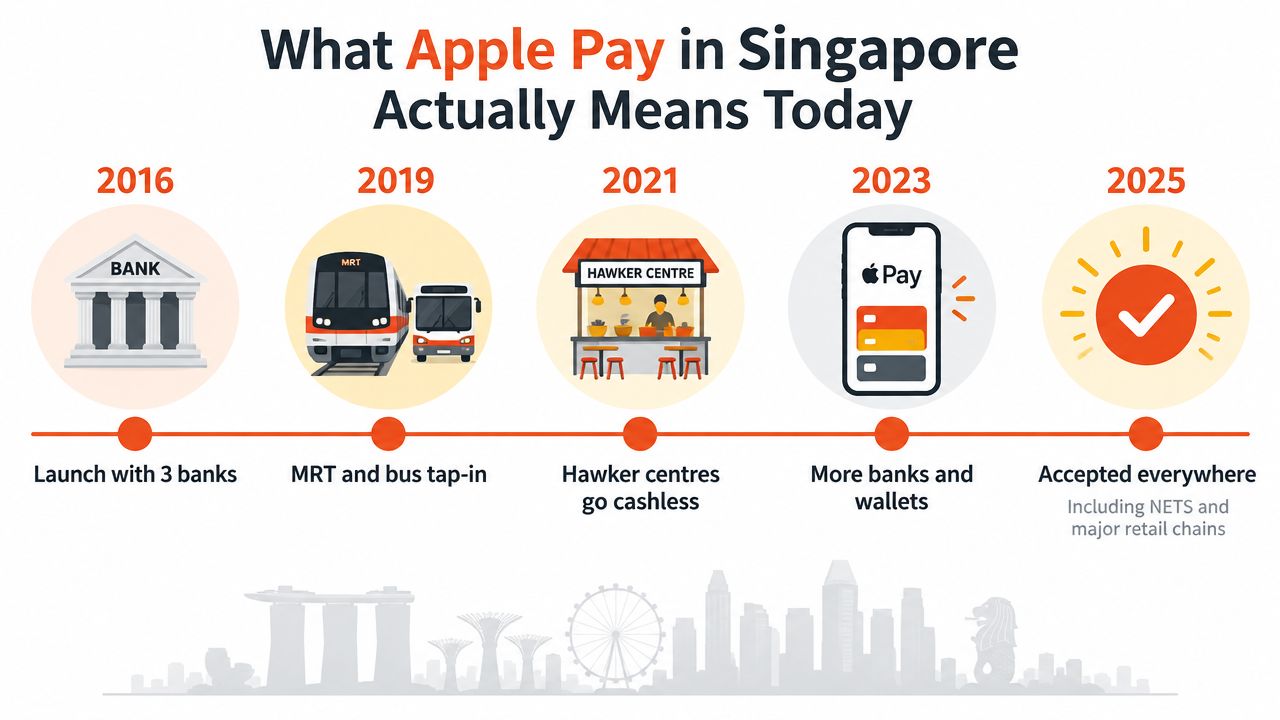
For merchants, that rapid move from a narrow American Express launch to broad bank support is more useful than the launch date itself. It shows that Apple Pay's reach depends on the local issuing ecosystem. A customer may own an iPhone that supports Apple Pay, but the tap still depends on whether the linked card can be provisioned and whether the merchant accepts the relevant card scheme.
Practical rule: Treat Apple Pay as another way for a customer to present an eligible card, not as a replacement for card acceptance.
By 2026, Apple's official Singapore support listing included DBS, POSB, OCBC, UOB, Standard Chartered, HSBC, Citibank, Maybank, CIMB and other issuers. It also listed newer financial platforms such as Airwallex, Wise and Xfers, showing that the local ecosystem now extends beyond traditional banks. Merchants assessing broader cashless acceptance can also review this guide to cashless payment options in Singapore.
A separate Singapore-focused report from late 2016 found that 26% of cardholders were already using a mobile digital wallet, with Apple Pay identified as the most popular choice among those wallets. The practical takeaway is clear: Apple Pay isn't a fringe feature at the counter, but its success still rests on the card and terminal underneath it.
The payment starts before the customer taps. The cashier keys the total into a contactless-capable terminal, and that terminal creates an NFC field that waits for a compatible device or card. The customer brings the iPhone or Apple Watch close enough for the device and terminal to communicate.
The transaction then follows a controlled sequence:
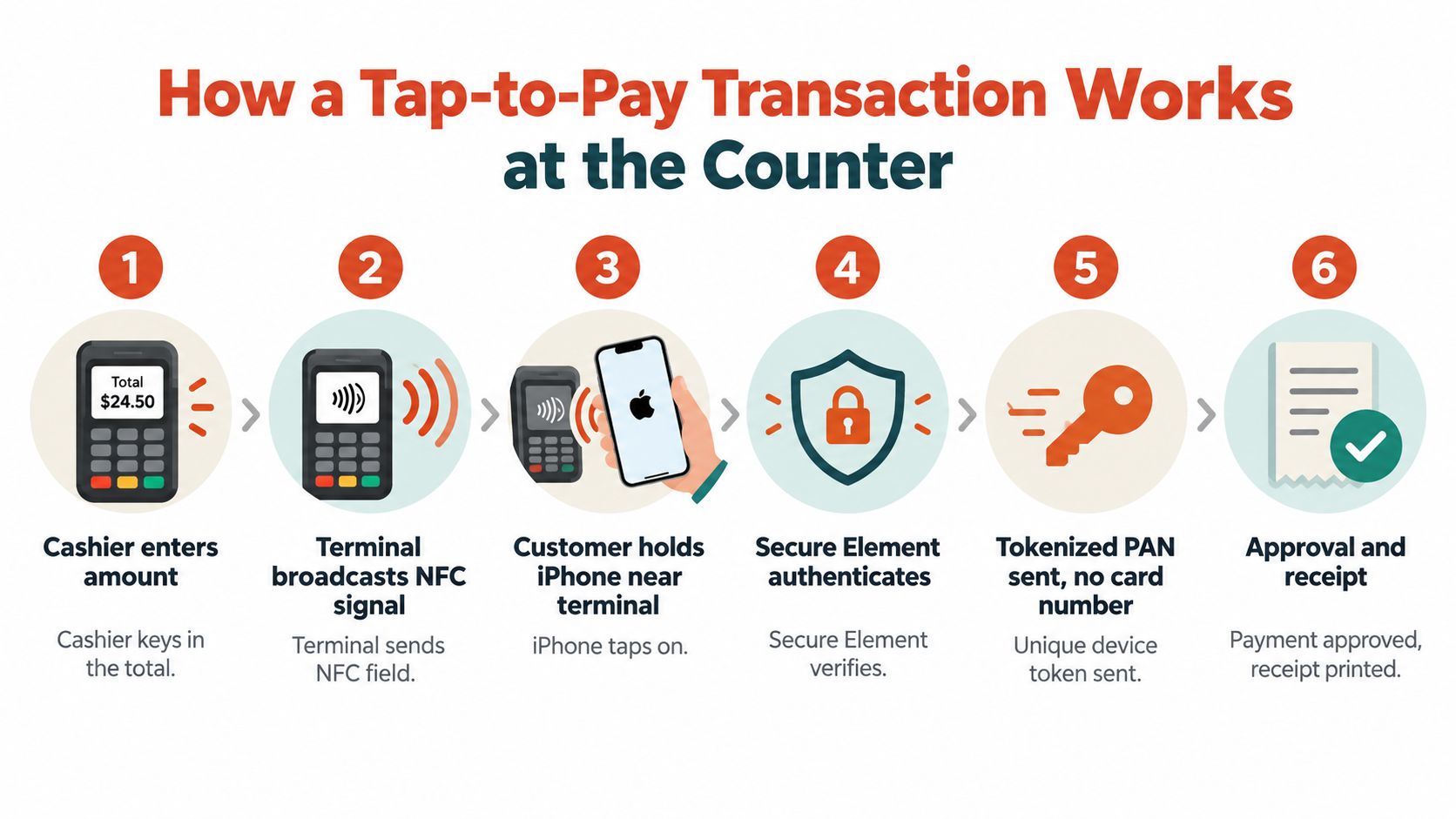
Apple describes this architecture in its guidance on Apple Pay security and privacy. The Device Account Number replaces the primary account number at the point of sale, while the dynamic code is specific to the transaction. That means the merchant's terminal doesn't receive the physical card number during the tap.
Tokenisation and authentication solve different problems. Tokenisation limits the card data exposed to the merchant environment, while Face ID, Touch ID or a passcode helps confirm that the person holding the device is authorised to use the card. If a customer's phone is lost, the presence of the phone alone shouldn't be enough to authorise an ordinary payment.
A successful Apple Pay transaction still behaves like a card-present sale for the merchant. The acquirer receives the authorisation, records the transaction and settles it according to the merchant agreement. Businesses reviewing their hardware can compare their current setup with a contactless payment terminal for Singapore merchants.
The following video gives customers and frontline staff a visual explanation of the tap process:
A merchant doesn't approve “Apple Pay” in isolation. The terminal and acquirer approve the underlying card scheme, while Apple supplies the device token and authentication layer. That is why a terminal can accept one Apple Pay card and decline another if the relevant card network or issuer arrangement isn't active.
Apple's Singapore support roster includes major issuers such as DBS, POSB, OCBC, UOB, Standard Chartered, HSBC and Citibank, alongside other participating banks and financial platforms. Eligibility can vary by issuer, card type and scheme, so customers need to confirm that their particular card can be added to Wallet. Apple's official Singapore Apple Pay participating banks and card issuers provide the current reference point.
| Issuer | Card schemes supported on Apple Pay | Credit | Debit |
|---|---|---|---|
| DBS and POSB | Visa and Mastercard, where eligible | Supported for eligible cards | Supported for eligible cards |
| OCBC | Eligible card schemes, including its Vantage suite where supported | Supported for eligible cards | Supported for eligible cards |
| UOB | Eligible Visa and Mastercard products | Supported for eligible cards | Supported for eligible cards |
| Standard Chartered | Eligible card schemes | Supported for eligible cards | Supported for eligible cards |
| HSBC | Eligible card schemes | Supported for eligible cards | Supported for eligible cards |
| Citibank | Eligible card schemes | Supported for eligible cards | Supported for eligible cards |
| American Express | American Express | Supported for eligible locally issued personal and corporate cards | Product eligibility varies |
The table is a merchant-facing framework, not a substitute for checking each product. A customer with an unsupported card won't receive a usable token in Wallet, even if the iPhone itself is fully compatible.
A shop's acquiring account must be configured for the card brands customers are likely to present. Visa payWave, Mastercard Contactless and American Express contactless acceptance are separate scheme capabilities, even though the customer experiences each through the same Wallet interface.
Cashiers can often identify the scheme from the card artwork shown in the customer's Wallet or from the customer's physical card. That doesn't replace acquirer confirmation, but it helps staff explain a decline accurately instead of assuming that every Apple Pay failure means the terminal is faulty.
Merchants that already accept physical Visa, Mastercard or American Express cards may have much of the necessary infrastructure in place. They still need the acquirer to confirm that contactless wallet tokens are enabled and routed correctly. Businesses comparing card acceptance arrangements can also review options for paying with credit card acceptance in Singapore.
At the counter, customers choose between several different payment experiences. Apple Pay and Google Pay usually present a card through NFC, while GrabPay and PayNow commonly use wallet or QR-based flows. A physical contactless Visa or Mastercard uses the card scheme directly, without the extra device token layer.
The distinction is most useful when a merchant considers settlement rail, authentication and operating cost, rather than asking which logo should appear on the terminal.
| Payment Method | Settlement Rail | Customer Authentication | Typical Merchant Cost | Best Fit in SG |
|---|---|---|---|---|
| Apple Pay | Underlying Visa, Mastercard or American Express scheme | Face ID, Touch ID or passcode | Card acquiring arrangement | Contactless retail, F&B and customers carrying eligible cards |
| GrabPay | Grab wallet infrastructure and its linked merchant arrangement | Grab app security controls | Merchant agreement with the wallet or processor | Customers already using Grab for rides, food and wallet spending |
| Google Pay | Underlying eligible card scheme when used for contactless payments | Device authentication | Card acquiring arrangement | Android customers using supported cards and devices |
| PayNow | Bank-linked account and QR payment infrastructure | Bank app authentication | Depends on the merchant's PayNow arrangement | QR-led everyday payments and account-to-account transfers |
| Contactless card | Visa, Mastercard or American Express scheme | Card and terminal rules | Card acquiring arrangement | Broad card acceptance without a mobile device |
In-store survey data supports Apple Pay's relevance, but also shows why a merchant shouldn't depend on one wallet. A Singapore consumer survey reported Apple Pay as the most-used in-store digital wallet at 22%, ahead of GrabPay and Google Pay at 12% each, as reported by Fintech News Singapore's digital wallet coverage. A separate local survey found that 26% of cardholders used a mobile digital wallet, which points to meaningful adoption without suggesting that every customer uses the same method.
Apple Pay suits customers who already carry an eligible card in Wallet and prefer a quick, device-authenticated tap. It can be especially practical for supermarkets, fashion retailers, cafés and other businesses where contactless checkout is already familiar.
GrabPay can be relevant when a customer's spending is tied to the Grab ecosystem. PayNow works differently, because the funds come from a bank-linked account rather than a card scheme. That can make it attractive for QR-led transactions, but it also creates a separate reconciliation and refund workflow.
For most Singapore SMEs, the sensible approach is acceptance by customer behaviour. NFC card and wallet payments cover one group, while PayNow QR and other local wallets cover another. The terminal and merchant account should make the distinction clear in reporting so finance staff can match each payment to its settlement source.
A customer can hold a compatible iPhone over a terminal and still receive a decline. The first check is hardware: the terminal must support NFC contactless acceptance. Apple Pay doesn't turn an old magnetic-stripe terminal into a contactless device.
The acquirer also needs to process the tokenised credentials for the card scheme involved. Since Apple Pay represents Visa, Mastercard or American Express cards, the merchant should ask which contactless kernels and schemes the terminal supports. The relevant capabilities can include Visa payWave, Mastercard Contactless and American Express Expresspay.
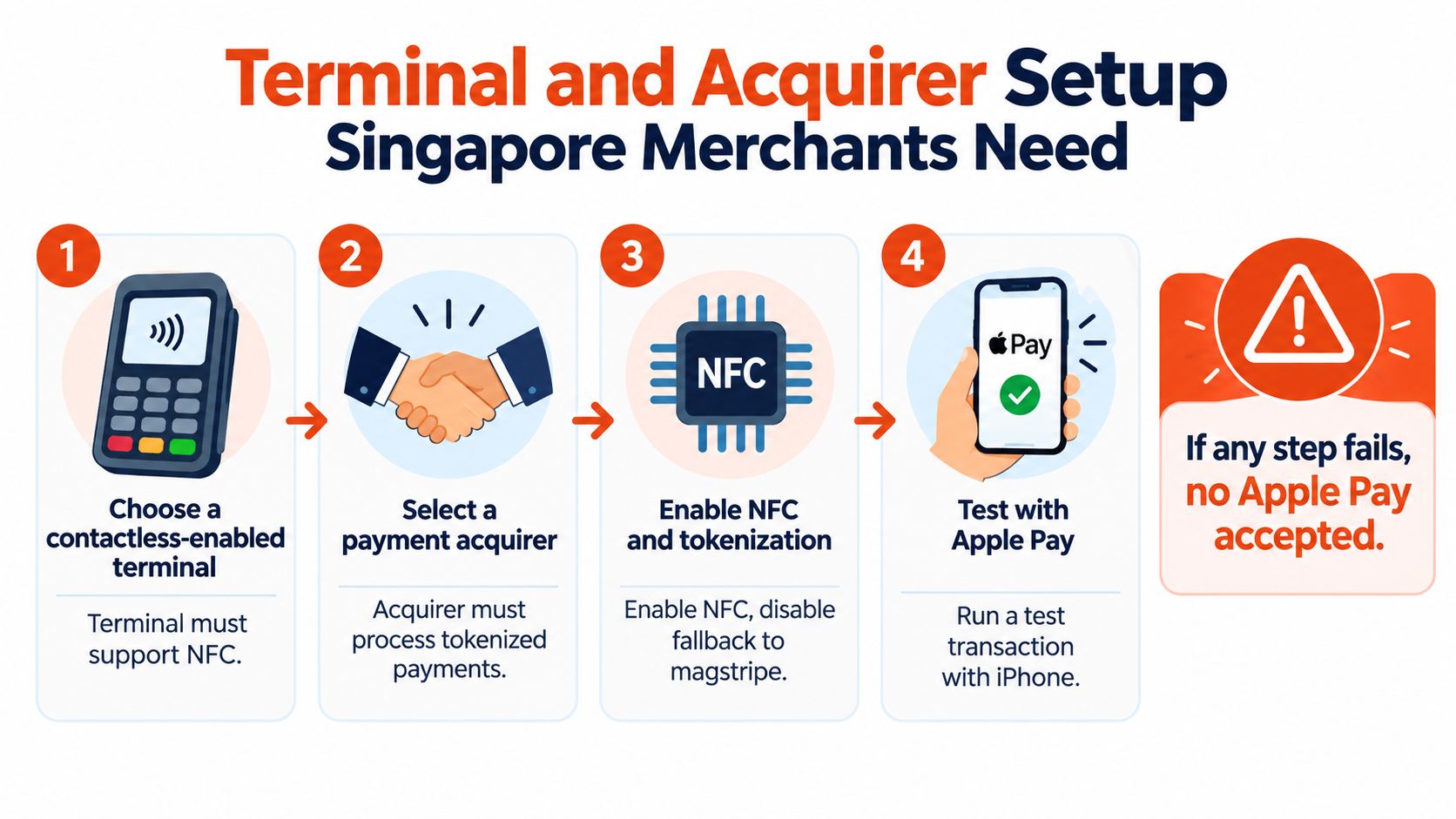
Many newer terminals already include the required contactless capability, but a merchant shouldn't assume that the feature is active. A kopi tiam may still use an older standalone device, while a boutique may have separate terminals for different acquiring relationships. In a split setup, one terminal might accept contactless cards while another is configured only for a limited set of payment types.
Counter diagnosis: If a physical contactless card works but Apple Pay declines, the acquirer should check tokenised wallet routing, scheme settings and merchant configuration before replacing the terminal.
Staff should also know where to position the device. Customers generally present the top area of an iPhone or the display area of an Apple Watch near the contactless reader, rather than pressing the device against the screen or keypad. A failed tap can come from authentication, distance, a locked or unsupported card, terminal settings or connectivity, so the fallback should be calm and specific.
Apple Pay payments normally enter the merchant's card-acquiring flow because the wallet presents an eligible card scheme. The merchant therefore shouldn't expect Apple Pay funds to appear as a separate instant wallet balance. The transaction is authorised at the counter, recorded by the acquirer and paid out according to the merchant agreement.
The fee normally combines several elements:
A blended rate combines those components into a simpler merchant-facing price. Interchange-plus pricing separates them, which can make the statement more detailed but may help a business understand why costs change. Premium or rewards cards can produce different effective economics from basic debit cards, so the headline rate shouldn't be treated as a guaranteed cost for every Apple Pay transaction.
No verified data in the supplied brief establishes a universal Singapore MDR range, so merchants should request a written quote instead of relying on a generic percentage. The right comparison includes the complete pricing model, chargeback treatment, refund handling, terminal charges and any account-level fees.
Local acquiring arrangements may offer settlement from as early as T+1, depending on the merchant agreement and operating requirements, as described in Sambapay's publisher information. Other arrangements may use a later working-day cycle. PayNow QR can follow a different account-to-account settlement path, so comparing its timing directly with card acquiring requires checking the specific merchant setup.
A merchant should reconcile three records: the POS receipt, the acquirer transaction report and the bank credit. The transaction may be labelled by card scheme or wallet indicator rather than “Apple Pay”, depending on the processor's reporting format.
Chargebacks also follow the scheme-backed card process rather than a closed-loop wallet process. That means the merchant needs a clear refund policy, retained receipts and staff records showing what was sold and when. A tokenised transaction protects the physical card number, but it doesn't remove the merchant's responsibility to handle disputes and refunds correctly.
A small Singapore merchant can organise Apple Pay acceptance without a technical team by treating onboarding as an operations exercise. The owner needs confirmation from the acquirer, a tested terminal, staff instructions and a reconciliation process that distinguishes approved payments from failed attempts.
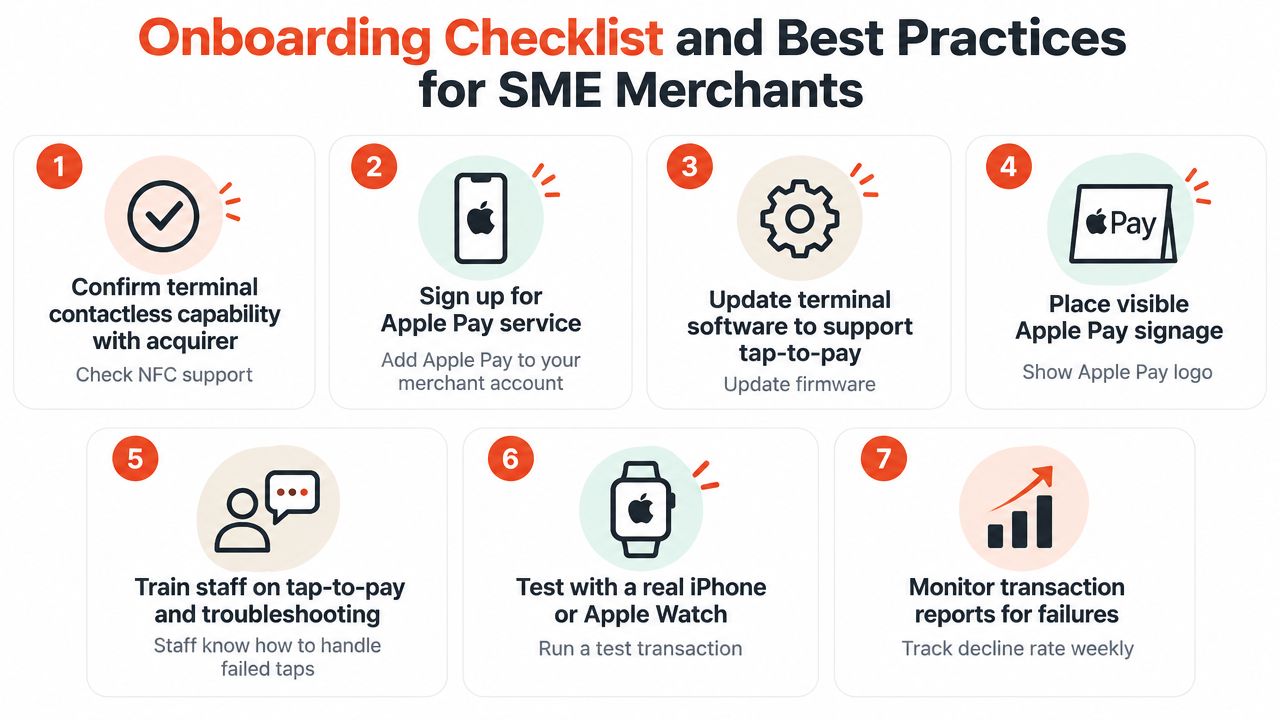
Cashiers should avoid saying that “Apple Pay is down” after a single failed tap. A better script is: “The terminal didn't approve that tap. Please authenticate again and hold the top of the phone near the contactless symbol, or use another accepted payment method.” That wording helps the customer troubleshoot without exposing sensitive card information.
A neighbourhood café may need the simplest workflow possible, while a boutique or clinic may need more detailed tender labels for accounting. The POS receipt should show enough information for the finance team to match the sale with the acquirer report, without printing the full card number.
Merchants that want to connect payment acceptance with customer-facing Wallet content can review this practical merchant guide to wallet passes. That resource addresses the loyalty and pass side, while the terminal and acquirer remain responsible for processing the payment itself.
Sambapay provides Singapore SMEs with Android POS terminals, card acceptance across major schemes and selected wallets including Apple Pay, plus settlement options from as early as T+1 under the merchant agreement. Visit Sambapay to discuss terminal readiness, acquiring setup and transparent blended pricing for a Singapore retail, F&B, clinic, salon or fitness business.