
The dinner rush starts the same way in too many Singapore restaurants. The queue builds, the waiter is trying to split a table, the kitchen is waiting on a modifier, and the card terminal keeps working while the front-of-house team fights a slower problem, the POS flow itself. That's why the best POS system for restaurant operations in Singapore is never just about taking payment, it's about whether service still holds together when the room is full and the phones keep buzzing.
Singapore operators already live in a market where payment choice is highly digital. In 2023, 45.1% of household expenditure on Food and Beverage Serving Services was paid via e-payment, up from 23.6% in 2017/18, and restaurants, cafes, and pubs reached an e-payment share of 69.1% in 2023, up from 49.4% in 2017/18, according to PwC Singapore's payments review (PwC Singapore payments state of play). That makes card and wallet acceptance table stakes, but it also means the key question is whether the POS helps the team move faster, stay accurate, and recover cleanly when things go wrong.
A polished terminal at the counter can give a false sense of readiness. Payment may be fast, but if the order still has to be keyed again for the kitchen, if table status is wrong, or if a server must chase a manager for every void, the restaurant still loses time where it matters most. The POS becomes part of the labour system, not just the billing device.
It shapes whether the kitchen gets the right ticket in the right sequence, whether modifiers survive the handoff, and whether the host can see if a table is seated, ordered, or ready for payment. It also affects how cleanly a shift ends. End-of-day reconciliation gets messy quickly when discounts, voids, and partial payments are spread across workarounds instead of one consistent workflow.
Practical rule: if the POS can accept payment but cannot protect table turnover, it is only solving the last 30 seconds of the guest journey.
Singapore's payments market makes this more obvious, not less. PwC Singapore reported 92.0% digital payments adoption in 2025, and in 2024 card payments still dominated POS transaction value at SGD 148.91 billion, split across credit cards at SGD 54.54 billion, debit cards at SGD 28.52 billion, and e-money at SGD 2.52 billion (SBR on Singapore SME payments). That scale tells operators checkout needs to be reliable, but it also shows why the POS must support service discipline across the whole shift. Cashless payment is no longer the hard part.
A system that helps a floor manager reduce handover mistakes, protect the kitchen queue, and shorten settlement friction does more commercial work than a payment-ready terminal ever could. That is the standard worth using.
The right shortlist starts with the operating model, not the brand name. A fast-casual counter, a busy pub, and a multi-location delivery brand all need different levels of table handling, kitchen routing, and back-office control. The best choice depends on where the pain sits during service.
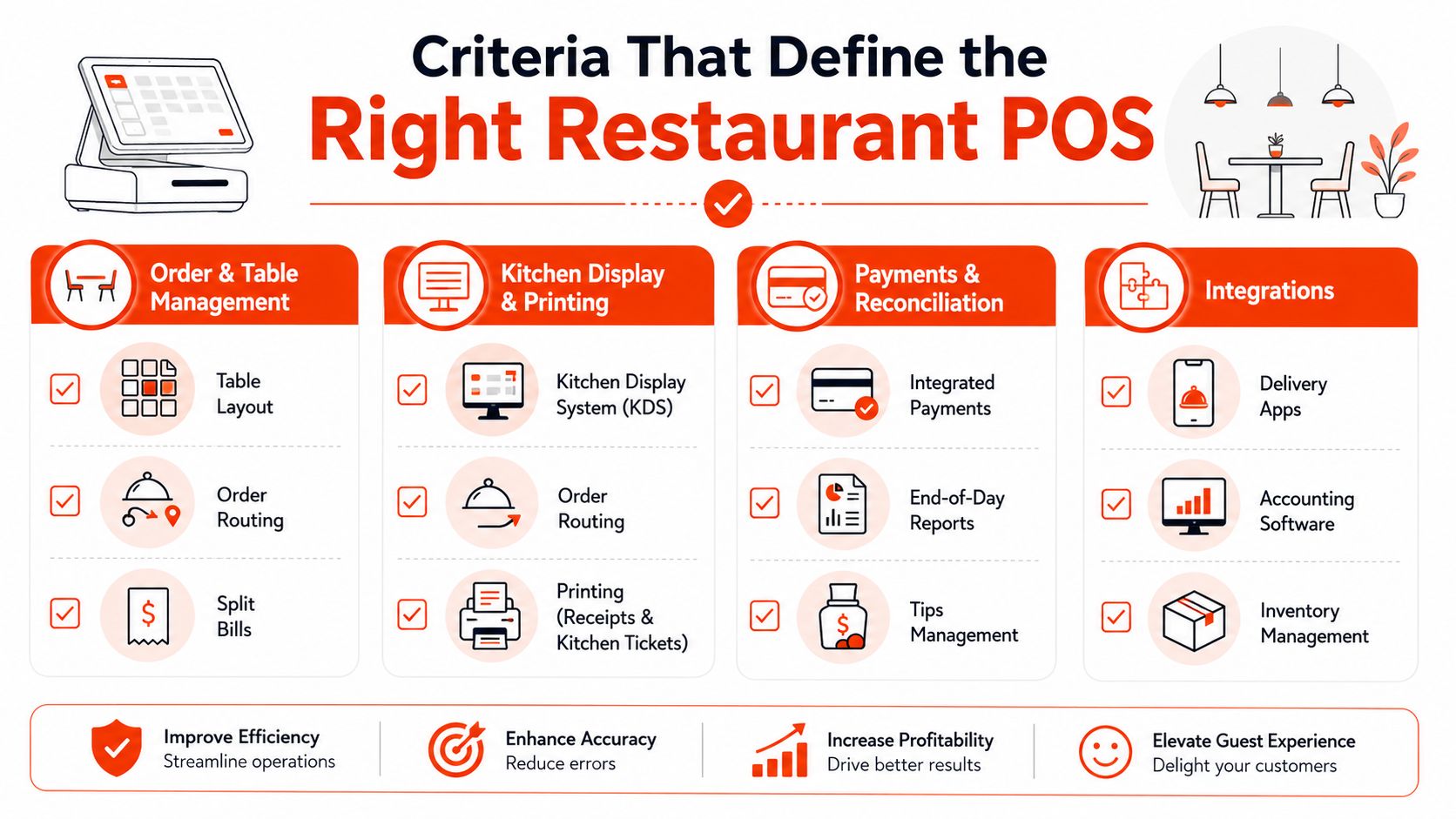
The right weighting changes by concept. A hawker-style counter may care most about speed and payment stability, while a table-service restaurant needs stronger table logic and reconciliation.
Singapore-focused guidance also points to compliance and resilience as essential. Expert material on restaurant POS in Singapore highlights automatic GST calculation, GST-registered invoice generation, monthly GST reporting, and offline capability that syncs once connectivity returns (klikit on Singapore POS compliance and offline use). Those are not nice extras in a Singapore F&B context, they're operational guardrails.
The cleanest vendor conversations start with this question, what breaks first under pressure, the order flow, the kitchen routing, the payments, or the support response? The answer tells you which criteria deserve the most weight.
Different POS approaches solve different problems, and the trade-off usually shows up in service speed, staff training, and how much the operator has to manage manually. A full-stack restaurant POS can reduce switching between systems, while a lighter setup can keep costs and training simpler. The catch is that simpler systems often push complexity back onto staff.
| Approach | Ordering & Tables | Kitchen Integration | Payments | Resilience & Offline | Pricing Transparency | Implementation Demand |
|---|---|---|---|---|---|---|
| Full-stack restaurant POS | Strong table flow, modifiers, and service logic | Usually deep, with routing and reporting | Often broad card and wallet support | Typically better if designed for hospitality | Can be clear, but some bundles hide extras | Higher, because menus and workflows need setup |
| iPad-based hospitality systems | Good for modern front-of-house use | Commonly integrated, but depth varies | Flexible if payment stack is native | Depends on device, network, and app design | Often subscription-led and easier to compare | Moderate, with staff training and device planning |
| Modular POS with payment terminal add-on | Adequate for basic ordering | Can be limited unless kitchen tools are added | Payment is usually strong, since it's separate | Can keep taking payments if the terminal is stable | Hardware and software can be priced separately | Moderate to high, because modules must fit together |
| Traditional ECR-style setups | Basic ordering and billing | Usually weak | Payment often sits outside the core workflow | Can be dependable for simple use cases | Upfront pricing can look straightforward | Lower at start, but limited for growth |
Singapore operators comparing systems should also look at ecosystem fit. A useful external reference on best POS system with loyalty program helps frame how POS choices often expand into retention, not just transactions. Loyalty matters more when the POS already captures clean guest and order data.
The internal comparison some operators already use for Android-centric setups is worth a look too, especially when the business wants a hardware path that stays close to the payment terminal layer. The key point is that the hardware shape should follow the service model, not the other way round, which is why systems like an Android POS approach can suit some floor plans better than heavier, custom-built stacks.
One commercial reality is easy to miss. The cheapest-looking setup can become the most expensive once it starts requiring manual entry, extra devices, or bolt-on modules. The right choice is the one that matches how orders travel through the room, not the one with the neatest brochure.
Friday dinner rush shows the gap between a POS that looks clean in a demo and one that holds service together. A host seats four tables at once, two guests ask for split bills, a QR order goes straight in, and a delivery ticket arrives at the same time. If the system cannot route those actions cleanly, the pass slows down fast.
Order entry has to be quick. Servers need to handle modifiers without bouncing between screens or forcing the kitchen to read handwritten notes. If the POS supports QR ordering or kiosk flow, those tickets should enter the same queue, not require a separate reconciliation step.
Kitchen handoff decides whether the room stays calm or starts backing up. Printers can still suit simple setups, but a kitchen display system usually works better when menus change often, because tickets stay visible and editable. For delivery-heavy restaurants, consolidating aggregator orders onto one screen reduces re-entry, and operators running smaller formats like cafés or coffee shops may also find our tablet ordering system guide useful when comparing simplified ordering setups.
Payments need to close the loop without adding friction. In Singapore, that means support for PayNow, NETS, cards, and the wallet mix the restaurant sees at counter or table. Cash still matters, but the test is whether staff can handle partial payments, refunds, tips, and voids without leaving the terminal and building a manual workaround.
If a manager has to approve every exception by walking across the floor, the POS is creating labour cost in real time.
Commercially, the closing shift shows the difference most clearly. Clean reconciliation saves managers from chasing reports across devices and logs. A messy process makes end-of-service drag on after the meal is over.
For operators comparing payment hardware as part of that flow, a practical in-store option is a credit card payment setup that supports counter and table-side acceptance without breaking the guest interaction or sending staff to hunt for a separate device. That matters most when service is tight and the handoff has to stay within one rhythm.
The bottom line is simple. POS workflow is a chain, and every weak link adds a pause. The systems that work in Singapore are the ones that keep that chain short when the room is full.
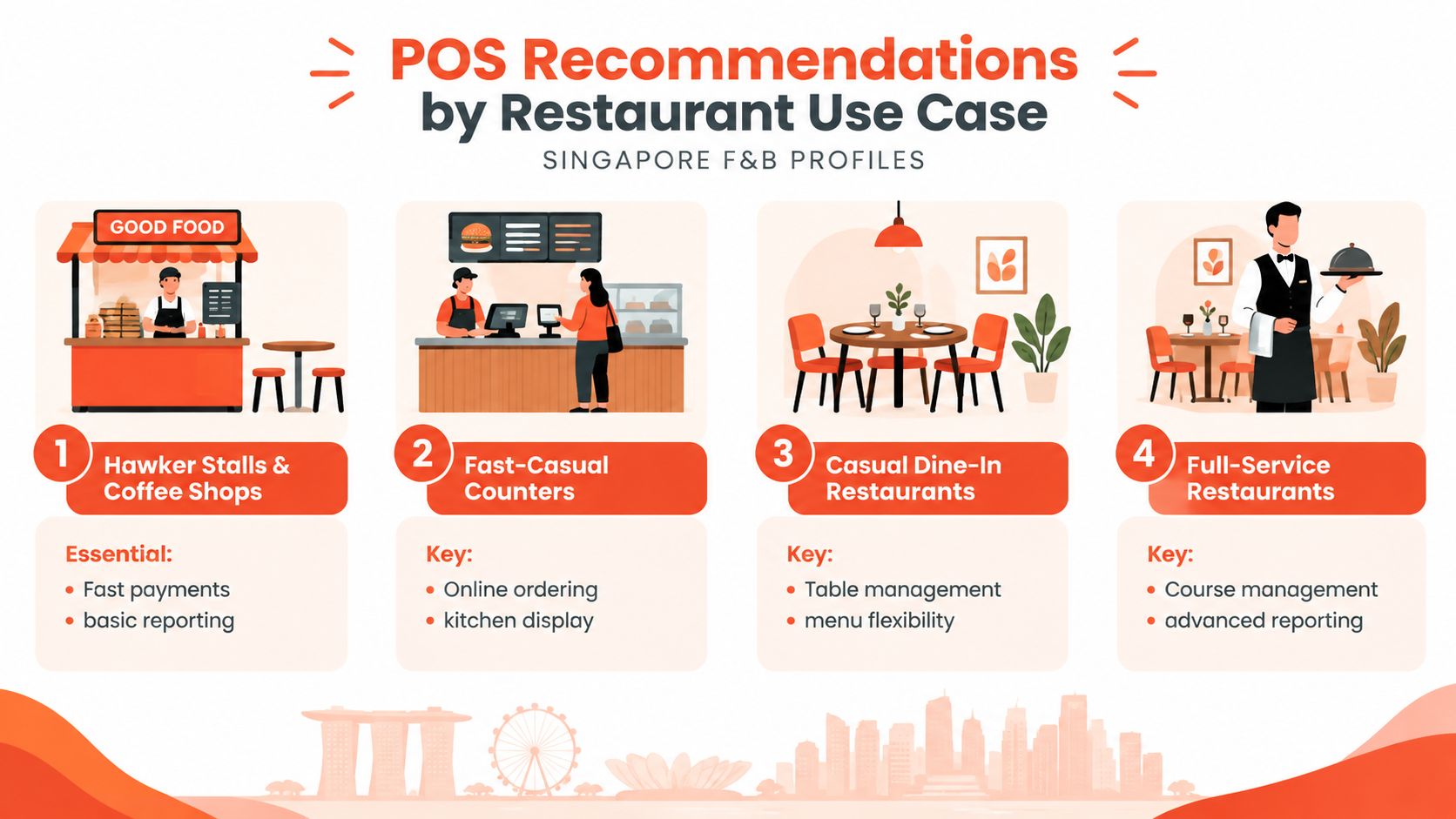
A restaurant POS should match the way the outlet runs during peak service. A kopi tiam needs fast billing and lean reporting. A cloud kitchen needs clear order routing and dependable label printing. A full-service restaurant needs table control and better visibility across the floor.
These formats usually value speed over deep menu logic. A simple interface, quick payment acceptance, and straightforward end-of-day reporting are often enough. Extra features can get in the way if the team only needs to move orders fast.
Fast-casual operations need clean menu updates and immediate kitchen handoff. Online ordering and a display that keeps the make line aligned with the counter matter more here than elaborate table mapping. Teams running busy counters often want customer data that feeds review or retention workflows, and the Google reviews tool from RecensioAI becomes useful once the transaction layer is stable.
These businesses need better table management, split bill handling, and a menu structure that can change without confusing staff. The team should be able to move from seating to ordering to payment without checking three screens. A system that makes table states obvious usually saves more time than one that only looks polished.
Bars and pubs need strong tab management, quick void handling, and reliable reconciliation because service is often spread across multiple closes. Support for card, wallet, and cash still matters, but the main gain is reducing queue time when guests want to settle and leave. A POS that keeps tabs visible and closes them cleanly will usually work better than one with more decorative features.
These operators should prioritise aggregator flow, ticket integrity, and label printing. Menu changes need to sync across sites quickly, and each order has to reach the right production point. A system that works well in one outlet can become a liability once menu duplication and order volume spread across multiple kitchens. For smaller café-style operations comparing simpler setups, this coffee shop POS guide gives a useful reference point.
For operators comparing stacks by format, the useful question is not which system has the longest feature list. It is which one fits the operating reality without paying for functions that do not move the line.
POS quotes in Singapore often look simple until the extras appear. Hardware bundles, subscriptions, payment processing, installation, training, and contract terms all shape the true cost. The visible fee is only part of the equation, especially once the system is live.
| Factor | Traditional On-Premise POS | Cloud-Based POS | Hybrid POS |
|---|---|---|---|
| Hardware ownership | Usually upfront purchase | Often bundled or leased | Mixed, depending on setup |
| Software cost | Often licence-based | Usually subscription-based | Can combine both models |
| Payment relationship | May sit apart from software | Often integrated into the platform | Varies by provider |
| Downtime handling | Can depend on local setup | Usually depends on internet and offline mode | Can be stronger if fallback is designed well |
| Change management | Harder to modify after install | Easier to update remotely | Balanced, but can be more complex |
| Support path | Often local and device-specific | Often centralised with vendor tooling | Depends on who owns each layer |
The main reliability question is not whether the system works on a good day. It's how quickly the restaurant can keep selling when a printer fails, a connection drops, or a device freezes. Offline mode, network fallback, and visible escalation paths matter because they decide whether the shift keeps moving or stalls.
Support model matters just as much. Some operators prefer a local reseller they can message directly during service, while others want a formal hotline and structured service levels. Both can work, but the restaurant needs to know who is responsible when the problem starts on the floor.
Ask a vendor to name the recovery process before signing, not after the first outage.
Commercial terms deserve a close read too. Exit clauses, data portability, and price escalation triggers can matter more than a small monthly discount. If support ends once installation is done, the restaurant is taking on more operational risk than the sales deck suggests.
Sambapay sits in the payment layer of that decision, with smart Android POS terminals, card acceptance, selected digital wallet support, and local Singapore assistance for merchants that want in-store payment continuity rather than a broad software suite. That type of setup can suit restaurants that already have their ordering workflow settled and mainly need dependable acceptance at the counter or table.
The cleanest selection process starts with the busiest hour, not the quietest demo. A vendor should be judged against the restaurant's actual pressure points, peak order volume, table turnover, menu complexity, and payment mix. That combination tells the operator what matters most.
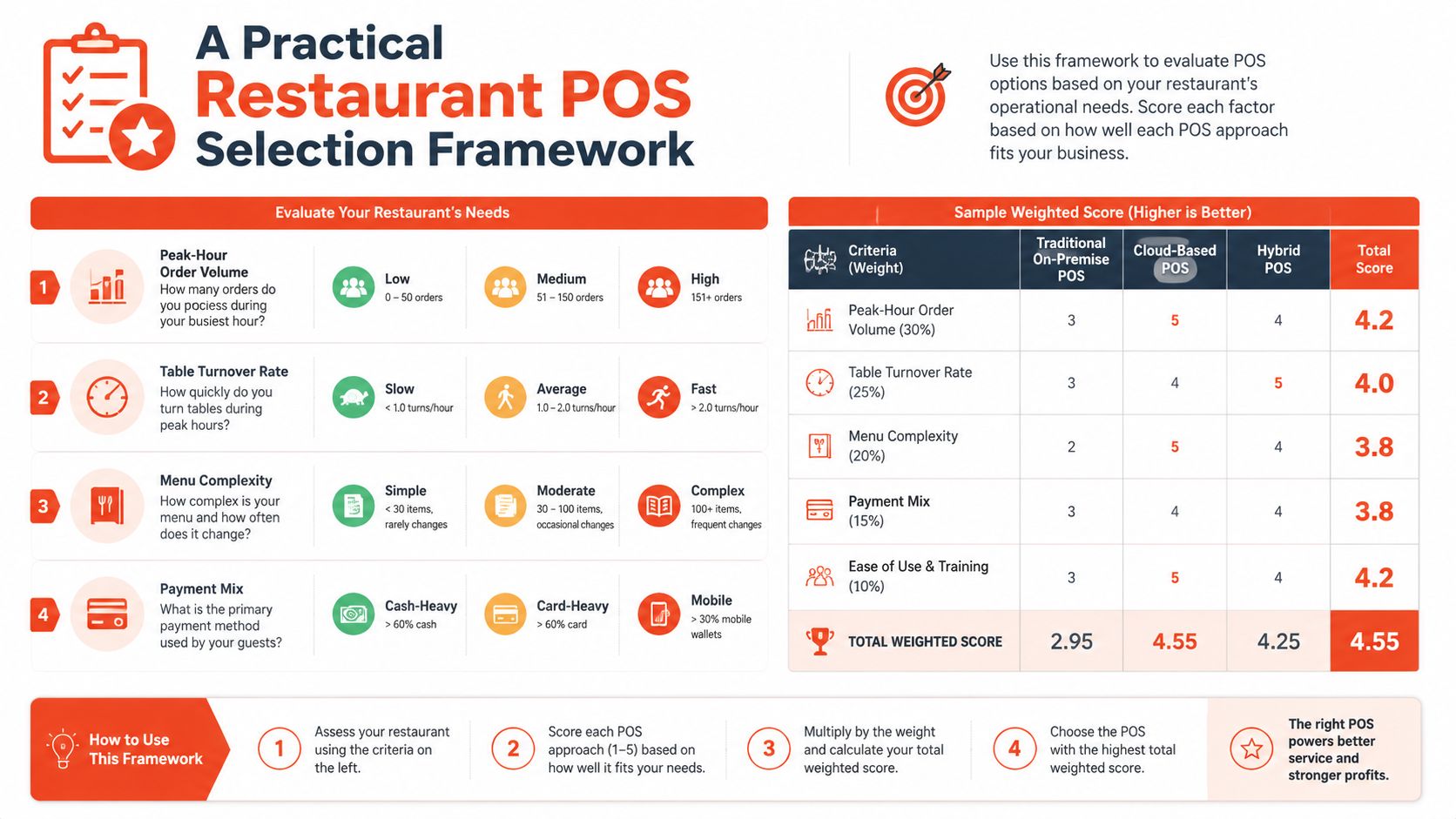
A live trial during an actual service window matters more than a polished showroom demo. Staff behaviour changes under pressure, and that is when weak routing, awkward tablet layouts, and slow void handling show up. Two references from comparable operators help, but only if they run a similar service style and ticket flow.
The quote should spell out hardware, software, payment fees, training, and exit terms in one place. If those pieces are split across multiple documents, the restaurant is already at risk of paying more than it expected. Service-level commitments should also cover response time and data ownership, because those are the things that matter after go-live.
For Singapore operators, the strongest shortlist usually comes from matching the system to the service model first, then checking whether pricing and support still make sense. That order keeps the decision practical instead of theoretical.
If the current setup is slowing down orders, complicating settlements, or making every outage feel like a crisis, Sambapay can help with in-store card acceptance, Android POS terminals, and local support built for Singapore merchants. Visit Sambapay to review how its payment setup fits a restaurant that wants steadier checkout flow and a clearer path from order to settlement.