
At lunch hour in a neighbourhood kopitiam, the queue moves fast until a customer lifts her phone and says she wants to PayNow. The cashier glances at a faded terminal, hesitates, and starts apologising while a supervisor hunts for a workaround. Three customers drift off before the sale is saved. That's the cost of a weak PayNow merchant Singapore setup, it isn't the sticker on the counter, it's the lost sale, the messy reconciliation, and the awkward moment when staff can't tell whether the money has landed.
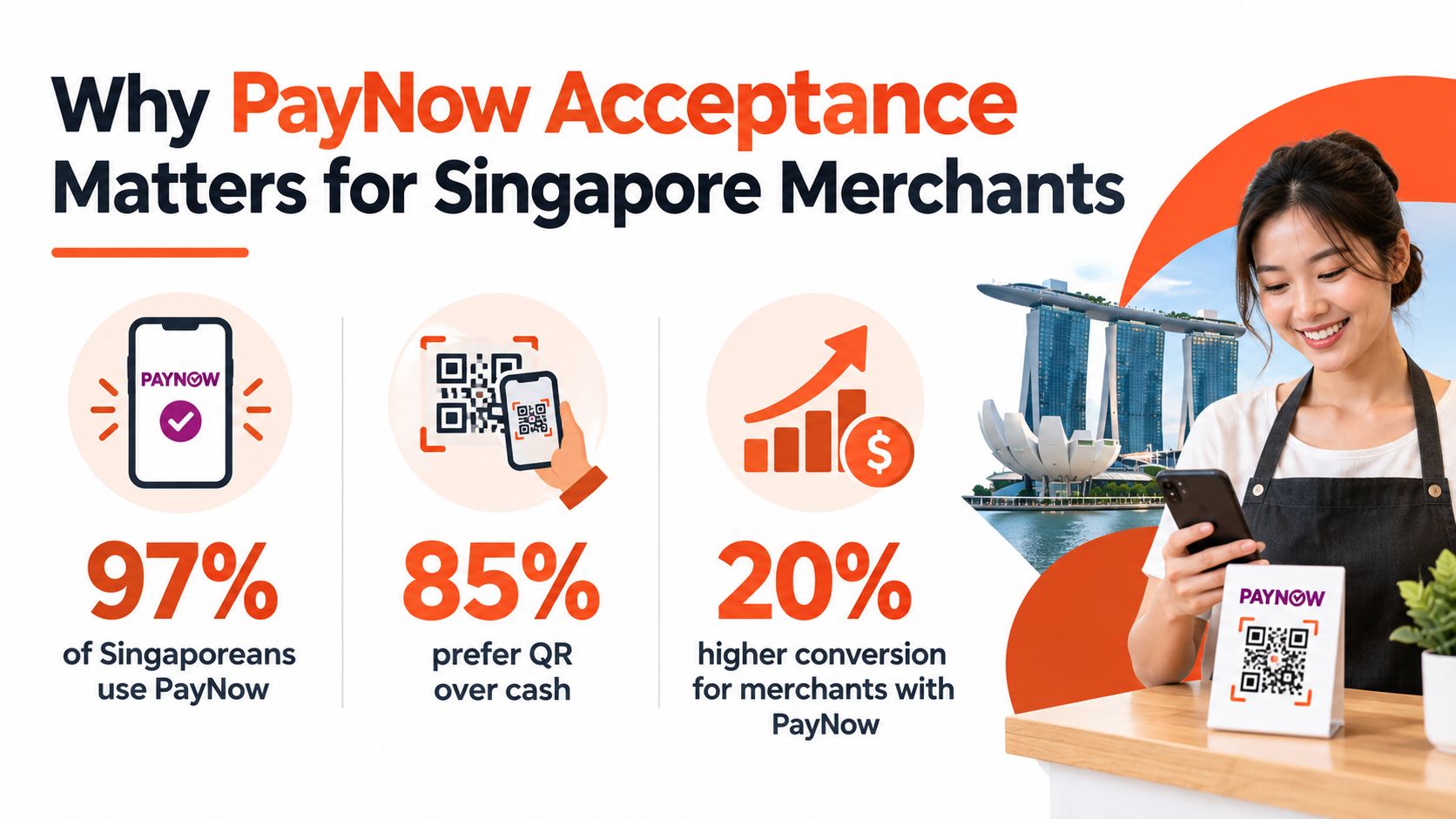
For Singapore merchants, PayNow acceptance is now an operational decision, not a branding choice. PayNow is already part of daily life for more than 9 in 10 Singaporeans and around 350,000 business entities, and in 2025 it processed about SGD 154 billion in consumer payments and SGD 147 billion in business payments, plus SGD 371 million in cross-border value across live corridors MAS PayNow Generation 2 report. That scale matters because it means customers already expect the option. What separates a good merchant setup from a bad one is whether the QR at the counter settles cleanly, shows up in the right report, and can be traced when the bookkeeper asks questions.
If the counter only looks digital but the back office still runs on guesswork, the merchant has bought a problem. Clean settlement and clean reconciliation are the point. For a practical checklist on keeping payment flows secure at the point of sale, it helps to compare the payment stack with secure contactless solutions for you.
A PayNow QR at the counter is not just a sticker. It decides how fast the sale clears, how cleanly the money lands, and how much time the back office wastes matching transactions later. For a shop owner, that is the key question.
The merchant who gets PayNow right is buying less admin, fewer disputes, and faster handover between cashier and bookkeeper. The merchant who gets it wrong ends up with payments that look accepted on the surface but still need manual checking before goods go out.
If staff have to pause and ask finance before releasing the order, the payment setup is already slowing the line.
PayNow's scale makes that mistake more costly. PayNow Corporate had over 115,000 UEN registrations by 2019, which MAS said was about half of active businesses after adjusting for inactive entities and sole proprietorships PwC Singapore payments report. Monthly usage also grew fast, from about 150,000 transactions worth roughly S$24 million in the first month after launch to more than 5 million transactions worth above S$1 billion per month two years later. That is standard merchant infrastructure, not a nice-to-have feature.
Some merchants accept PayNow and still create friction at the counter. The QR works, but the settlement path is messy, refunds are hard to trace, or the daily report does not line up with the bank credit. In that setup, the QR is doing marketing work while operations absorb the pain.
PayNow should be treated as a settlement and reconciliation choice first, and a customer convenience second. Direct bank onboarding suits merchants that want a simple path to settlement through their bank and can live with tighter bank-led reporting. MPI or payment-provider onboarding suits merchants that need more control over reporting, multiple payment methods, or a cleaner link between the counter and their wider payment stack. If you are still building the checkout flow, use secure contactless solutions for you as a reference point for the kind of operational discipline you need.
The trade-off is straightforward. Pick the setup that matches how your cashiers work, how your books are closed, and how much reconciliation help your team really needs.
A merchant can't start accepting PayNow in Singapore just because the counter has space for a sticker. The business needs a Singapore-registered entity with a UEN and a local SGD business bank account that can receive settlement. That's the essential base, because PayNow payouts don't go into random overseas or multi-currency setups.
The fastest way to avoid delays is to line up the right paperwork before anyone submits a form. That means the legal entity name, the UEN, bank account details, signatory identification, and business contact details all need to match. If the entity name on the bank record and the registration record don't line up, the onboarding team will usually send the file back.
Keep the name on the application identical to the name on the business registration and bank account. Small mismatches create stupid delays.
Some business types qualify more easily than others, but the key test is whether the merchant has a registered Singapore entity and a bank account that can receive SGD settlement. A hawker stall, clinic, salon, or retail shop with a physical address usually fits more neatly than a vague online-only setup with no local footprint.
| PayNow Merchant Prerequisites at a Glance | What You Need | Where to Get It |
|---|---|---|
| Business identity | Registered Singapore entity with a UEN | ACRA BizFile |
| Banking setup | Active SGD business bank account | A Singapore-licensed bank |
| Legal details | Registered entity name and business particulars | ACRA records |
| Signatory verification | NRIC or passport for the authorised signatory | Company records |
| Contact details | Working business email and mobile number | Business owner or operations team |
| Trading location | Storefront or registered business address | Lease, stall licence, or company address |
For merchants who want a broader payments setup beyond a single QR flow, the onboarding logic often sits alongside a wider merchant account discussion, such as the structure described in this Singapore merchant account overview. The point is simple, get eligibility right first, then choose the rail.
A merchant usually has two sensible routes. The first is direct bank onboarding, where a business already banking with DBS, OCBC, UOB, or another participating bank enables PayNow on its existing account. The second is to go through a payment provider or MPI, which can package PayNow inside a broader POS or gateway setup.
Direct bank onboarding fits merchants who want the simplest balance-sheet story. Settlement lands in the current business account, reporting sits inside the bank portal, and the setup can feel cleaner for a firm that already keeps tight internal controls. The trade-off is that the process tends to be slower, compliance checks can be heavier, and support at the counter is often limited when something breaks during peak service.
Payment-provider onboarding suits merchants who care more about speed and visibility at the till. A provider can combine PayNow with a modern Android POS terminal, dynamic QR, card acceptance, and a single dashboard for daily reconciliation. The trade-off is obvious, there are usually per-transaction fees and a separate payout cycle to manage.
| Factor | Direct Bank Onboarding | Payment Provider / MPI |
|---|---|---|
| Setup speed | Slower, usually more paperwork | Faster, often much quicker to go live |
| Settlement | Into the existing business bank account | Often via the provider's payout cycle |
| Fees | Often lower or zero on the PayNow side | Usually per-transaction fees apply |
| Reporting | Bank portal and statements | Unified dashboard across payment methods |
| Support | Bank support, often less operational at the counter | More hands-on merchant support |
| Best fit | Small firms wanting simpler settlement | SMEs wanting one screen for multiple methods |
The right choice depends on the shop's day-to-day reality. A small operator with light volume and one bank relationship may prefer direct onboarding. A retailer, café, clinic, or salon with busier counters usually values the better reconciliation and support layer more than the cheapest setup on paper.
For merchants building automated service flows, a separate stack may also need payment events to talk to customer chat tools, which is where a guide like how to connect WhatsApp bots to payment can be relevant. That's useful when the merchant wants payment confirmation to trigger a service action, not just a receipt.
Work begins after onboarding approval. A merchant needs to decide whether the counter will use a static QR or a dynamic QR, then place it where customers can scan without fuss. A static QR is tied to the PayNow identifier, usually the UEN-linked merchant ID. It's cheap and simple, but the staff must reconcile each incoming payment against the right sale manually.
Dynamic QR is better for a busy counter. The amount and reference can be generated per transaction, which makes it far easier to match payment to order number or invoice. That matters when customers pay for different basket sizes, partial deposits, or timed services, because the cashier can see the exact amount and avoid chasing missing references later.
SGQR bundling is the other practical choice. If the merchant wants one neat sticker that can hold PayNow, cards, and other schemes in the same visible spot, SGQR keeps the counter surface less cluttered. That matters in tight spaces where every extra standee becomes visual noise.
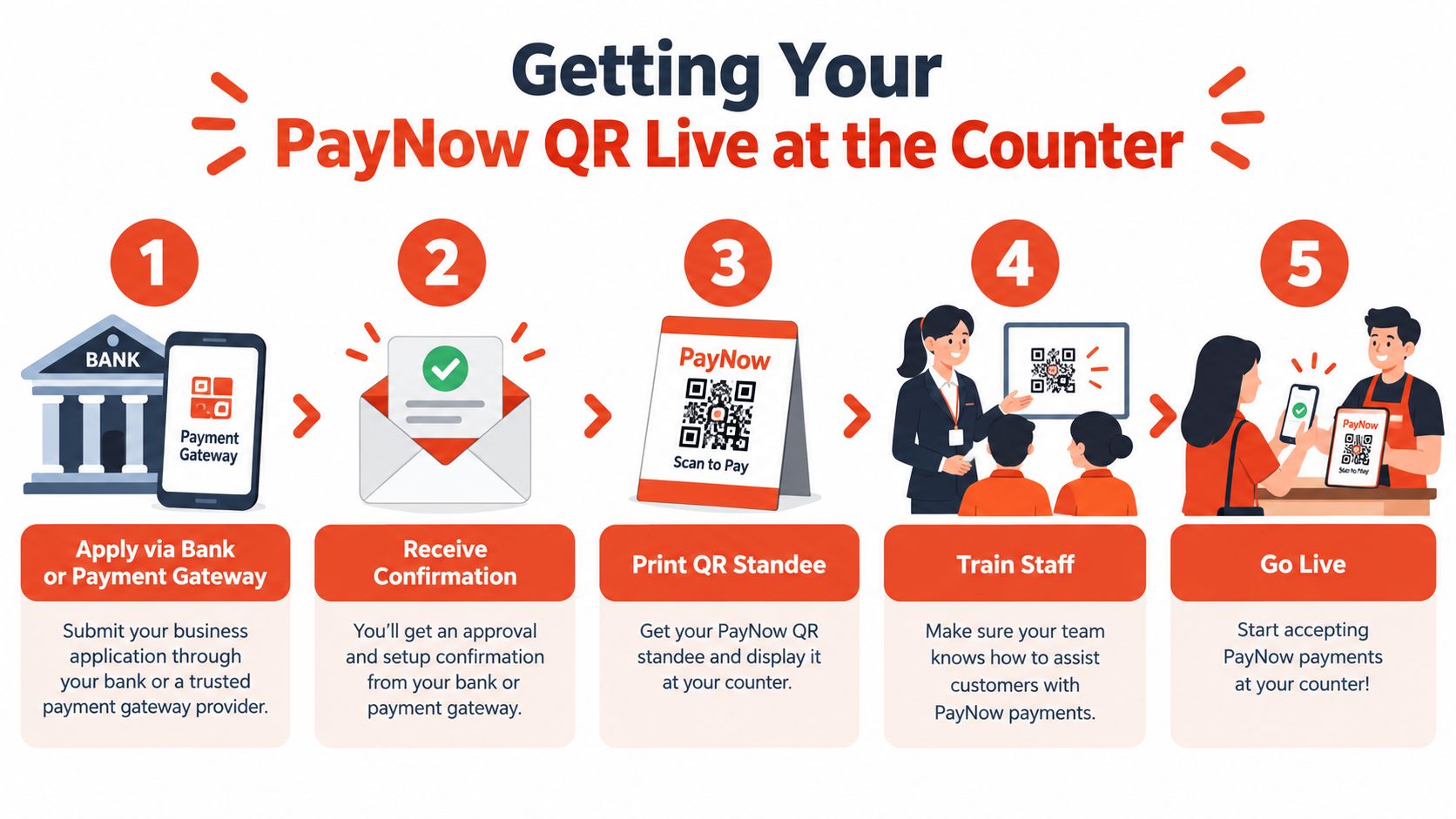
A clean setup usually includes a standee at eye level, a printed A5 version as backup, and a digital display on the POS screen if the merchant is using a modern terminal. The cashier should prompt the customer to enter a clear reference, such as an invoice or order number, so the bank record and the sales record match later.
Good habit: if the reference is missing, staff should treat the payment as unconfirmed until it is matched, not assumed to be correct.
Merchants using a smart Android POS can usually display the QR on-screen and update the amount without reprinting stickers every time. That suits counters with changing totals and reduces manual entry mistakes. If the business expects repeat orders or fixed-price items, static QR can still work well as long as reconciliation discipline is strong.
PayNow is often marketed as cheap, and sometimes that's true. But merchants need to look at the full pricing stack, not just the headline promise. The cost can sit in the transaction fee, a monthly platform charge, and any minimum commitment attached to the provider agreement.
Direct bank PayNow Corporate setups can be very light on transaction cost, especially when the merchant is only using the bank's own acceptance flow. The trade-off is that the bank may not give the merchant the same dashboard, POS integration, or counter support that a payment provider can. Once a provider sits in the middle, pricing usually moves to a merchant discount rate model or a per-transaction fee, and the bill changes with volume.
| Cost component | Direct bank (PayNow Corporate) | Payment provider / aggregator | MPI route |
|---|---|---|---|
| Transaction fee | Often zero or very low | Usually charged per transaction | Usually charged per transaction |
| Monthly platform fee | Often none | Some providers charge it | Some providers charge it |
| Minimum commitment | Less common | Possible | Possible |
| Settlement visibility | Bank statement based | Dashboard plus payout report | Dashboard plus payout report |
| Admin effort | Lower setup cost, more manual checking | Better automation, more fee layers | Better automation, more fee layers |
A rough way to think about it is simple. A low-ticket kopi order can tolerate a small fee if the payment is instant and the staff don't spend time reconciling cash. A higher-ticket boutique sale can absorb a fee more easily if the merchant gets better reporting, faster confirmation, and fewer payment disputes.
The merchant should also watch for indirect costs. Failed payment retries, refund handling, and payout delays through an intermediary wallet or aggregator can eat time without being obvious. For merchants already comparing card settlement workflows, the payout logic often looks similar to the card side described in this settlement overview, even if the payment rail itself is different.
If the provider quote is unclear, ask three blunt questions. What is the fee per transaction, is there a monthly charge, and what happens when a payment needs to be reversed or refunded? If those answers are not written down, the pricing is not transparent enough.
The sale doesn't end when the customer scans the QR. Money still has to travel through the payment rail, land in the merchant account, and be matched against the day's orders. For direct bank onboarding, settlement is typically T+1. Many providers offer same-day or next-business-day payout cycles, but merchants should still check the actual contract and dashboard behaviour, not the marketing copy.
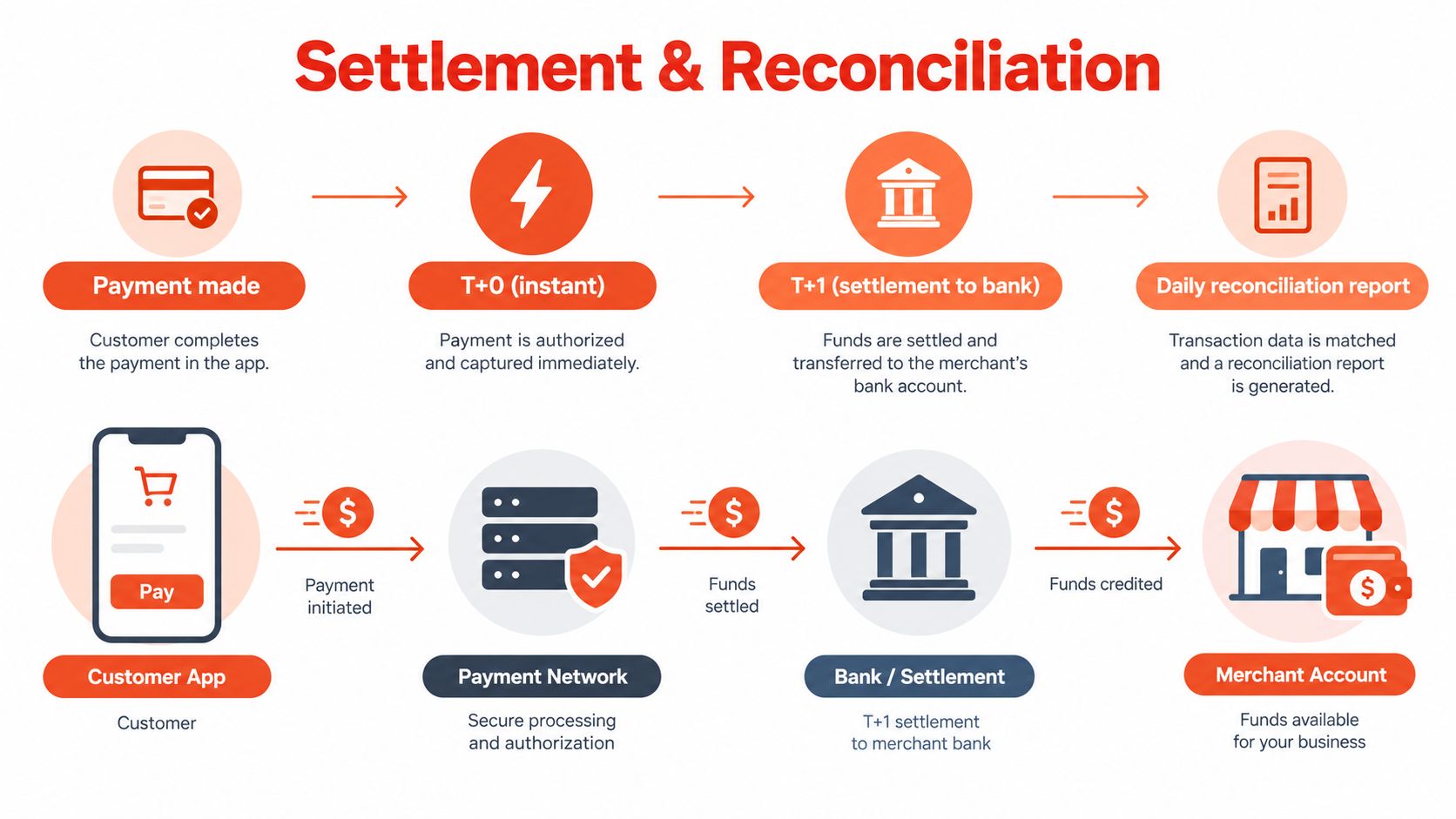
The merchant or bookkeeper should export the PayNow transaction list from the banking portal or provider dashboard, then match each line against the order number or reference entered by the customer. That sounds basic, but it's where most small businesses lose time. One missed reference can lead to a delayed dispatch, a double-entry error, or a credit that sits unassigned until the month-end close.
Refunds are another reality check. PayNow doesn't behave like a card network with a built-in push-back style refund path, so merchants usually fall back to bank transfer, reversal requests if available, or store credit. That's why it pays to set a clear refund policy before the first live transaction, not after the first dispute.
Reconciliation is boring until one payment goes missing. Then it becomes the most important job in the room.
For bookkeeping, the merchant should tag PayNow income clearly in the accounting software, keep the transaction logs, and stay disciplined about GST treatment if GST-registered. Record-keeping matters because the payment trail needs to survive internal reviews, tax checks, and ordinary human mistakes. A practical reconciliation habit, such as the one outlined in this bank reconciliation guide, gives the finance team a straightforward way to spot unmatched receipts before they become month-end noise.
The best PayNow setup is usually the one staff can use without thinking. That means the QR is placed where customers can see it, the reference flow is simple, and the cashier knows exactly when to release the goods. If a business makes staff guess, the business has already built friction into the sale.
Train the counter team to confirm the payment notification before handing over stock, printing a receipt, or closing the order. Place the QR where glare won't wash it out, and keep a backup copy nearby in case the standee gets damaged. Treat the merchant QR like cash, because anyone who copies it can circulate it if the business is careless about where it's displayed.
A merchant should also watch for red flags. Unrecognised providers, hidden fees, and over-reliance on one static QR for high-value transactions all create avoidable risk. Dynamic QR is safer when the basket size changes often, because the amount check acts as a second layer of control.
If a shop uses a provider-led setup, solutions like Sambapay can combine in-store payment acceptance with POS hardware and merchant support, while other providers take different approaches to onboarding and settlement. The right decision still depends on the merchant's volume, location, and back-office tolerance for manual reconciliation.
Sambapay helps Singapore merchants set up in-store payment acceptance with modern POS hardware, transparent merchant terms, and local support for day-to-day operations. For shop owners who want a practical way to handle PayNow alongside card acceptance and settlement planning, visit Sambapay and compare the setup against the counter's operational flow.