
A customer reaches the counter, opens DBS PayLah!, scans the QR code, and asks whether the shop accepts PayNow. A staff member sees several stickers beside the cash register and isn't sure which one to point at. The customer hesitates, the queue slows, and the merchant still has to work out later which account received the money.
This is the practical problem behind the PayNow and PayLah! difference. Customers see apps and brands, but merchants need to understand acceptance, routing, settlement, and reconciliation. PayNow is Singapore's national real-time payment rail. PayLah! is DBS Bank's consumer wallet and app, which can use PayNow for transfers while also offering wallet-specific functions.
| Merchant question | PayNow via SGQR | PayLah! |
|---|---|---|
| What is it? | Singapore's national real-time transfer rail, built on FAST | DBS Bank's consumer wallet and app |
| Customer reach | Customers from participating banks and payment apps using PayNow | PayLah! users, including those using PayNow transfers |
| Merchant setup | Usually linked through a UEN or SGQR arrangement | Wallet-specific acceptance may depend on DBS merchant arrangements |
| Main strength | Broad bank-to-bank interoperability | App features, lifestyle functions, and rewards |
| Settlement focus | Direct transfer workflow and merchant account reconciliation | DBS wallet merchant settlement process for wallet-specific transactions |
| Operational priority | Coverage and simple reconciliation | Wallet-led customer behaviour and promotional appeal |
A café customer doesn't usually think in payment rails. They think, “Can this shop take PayLah!?” The staff member, meanwhile, is looking at a QR display and trying to determine whether the customer should scan it with PayLah!, a banking app, or another wallet.
That mismatch creates avoidable friction. A merchant may assume that a PayNow QR only works for customers using a conventional bank app, while a customer may assume that a PayLah! logo is required before the payment can proceed. In many everyday cases, the customer can scan a suitable SGQR display with PayLah! and transfer through PayNow. The visible app and the underlying transaction route aren't always the same thing.
The customer sees a branded interface, an account balance, promotional messages, and a familiar payment button. DBS describes PayLah! as an app that supports PayNow QR and is available to users with a FAST bank account. That makes PayLah! feel like a complete payment system from the consumer's perspective, even though PayNow may handle the transfer underneath.
The merchant sees something different. The important questions are:
Those questions matter more than the logo printed on the counter.
Practical rule: Staff should ask customers to scan the merchant's approved SGQR or PayNow display first, rather than directing them towards a particular app sticker.
Problems usually appear when a merchant prints separate QR codes without a clear operating reason. Staff then need to remember which code belongs to which provider, customers need to choose between similar-looking options, and the back office may receive transaction records across different dashboards.
A unified acceptance setup reduces that decision-making at the counter. The customer chooses the app, while the merchant controls the approved acceptance channel and settlement account. This doesn't mean every PayLah!-specific transaction is automatically covered. In-app purchases or wallet-directory transactions can follow a separate merchant arrangement.
For most physical shops, the immediate operational question isn't “PayNow or PayLah!?” It is “Can the merchant's QR and terminal accept the customer's route, and can the finance team identify the resulting payment without manual guesswork?”
PayNow and PayLah! sit at different layers of Singapore's payments environment. The simplest analogy is public transport. PayNow is the rail network, connecting participating banks through FAST. PayLah! is a branded passenger app, giving a DBS customer a wallet-led way to initiate payments and use additional in-app services.
MAS describes PayNow as a central addressing scheme built on FAST. It allows users to send Singapore dollar funds using identifiers such as a recipient's NRIC, phone number, or UEN, as explained in the Monetary Authority of Singapore's PayNow overview. PayLah!, by contrast, is a DBS consumer wallet that can support PayNow QR payments.
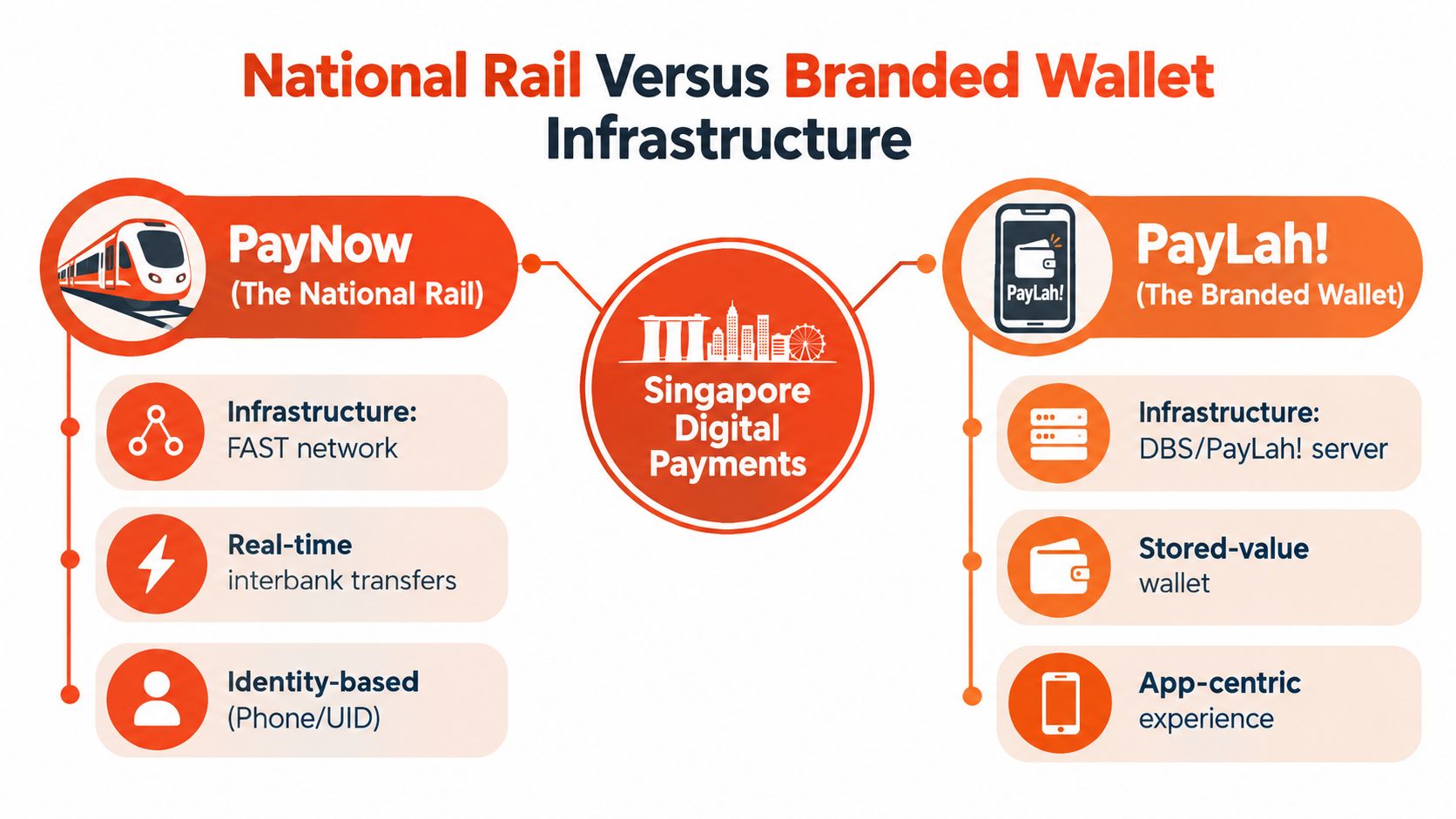
A PayNow merchant setup can receive payments from customers using different participating banks. When a PayLah! customer transfers through PayNow, the merchant doesn't need to create a second national payment rail. The customer uses PayLah! as the interface, while the payment follows the PayNow route associated with the merchant's approved QR or UEN.
That is why the apparent choice between the two can be misleading. For basic in-store transfers, a business accepting PayNow through SGQR may already capture PayLah! users who use PayNow. The merchant's real decision concerns coverage, settlement, and reporting, not whether every consumer app deserves its own sticker.
MAS reported that more than 65% of Singaporeans aged 20 to 75 were registered for PayNow in 2019 in its discussion of e-payment adoption. Industry reporting cited more than 11 million PayNow registrations nationwide by 2026, showing how broad the network has become, though registration isn't the same as active usage. The network's early growth also illustrates its role. MAS reported that PayNow transactions rose from about 150,000 transactions worth S$24 million in the first month to more than 5 million transactions and over S$1 billion in monthly value two years later in its parliamentary reply on adoption.
PayLah! can offer more than a transfer screen. Its app-led experience may include lifestyle functions, QR interactions, and promotions. A customer may therefore want to use PayLah! even when the merchant's core requirement is to receive a PayNow transfer.
That distinction is especially important for businesses considering a Singapore cashless payment setup. A PayNow QR can cover the network transfer, but it doesn't automatically activate every PayLah!-specific merchant-directory or in-app purchase flow. Those may depend on a separate DBS merchant relationship, commercial terms, and settlement workflow.
The correct architecture for most physical merchants is therefore layered:
Treating those layers separately prevents a common mistake, which is assuming that a consumer wallet brand and a national payment rail are interchangeable.
Merchant acceptance looks straightforward at the counter, but the back-office path can differ considerably. A business needs to know whether the customer is making a bank-to-bank PayNow transfer or completing a wallet-specific transaction under a provider's merchant agreement.
The distinction affects more than the QR image. It can change how the merchant onboards, where funds appear, how refunds are handled, and which report the finance team checks during daily close.
| Feature | National Rail via SGQR | Branded Bank Wallet |
|---|---|---|
| Acceptance model | Merchant receives transfers through PayNow-linked identifiers or an approved SGQR arrangement | Merchant accepts wallet transactions under the wallet provider's merchant setup |
| Customer reach | Broad participation across local banks and supported PayNow interfaces | Primarily customers using the specific wallet experience |
| Setup requirement | UEN, approved QR, bank account, and provider onboarding where applicable | Separate wallet merchant arrangement may apply |
| Hardware | Can operate through printed SGQR or an integrated POS terminal | May require wallet-enabled QR acceptance or provider integration |
| Settlement workflow | Funds and transaction references follow the PayNow or acquiring provider arrangement | DBS or wallet-provider merchant settlement rules apply to wallet-specific flows |
| Reconciliation | Often simpler when all QR payments map to one merchant account and report | Can require a separate dashboard or settlement report |
| Refund handling | Depends on the merchant provider and transfer workflow | Depends on the wallet merchant agreement and transaction type |
| Best operational fit | Businesses prioritising broad local coverage and straightforward bank reconciliation | Businesses that deliberately want wallet-led functions or promotions |
A basic PayNow acceptance route can be simple, but simplicity depends on how the QR is managed. A static printed code may suit a small stall with low order complexity. A retail shop, café, clinic, or salon may need a dynamic QR linked to the order amount and terminal workflow to reduce keying errors.
A branded wallet arrangement may add another relationship to manage. That can be worthwhile when the wallet's customer features or promotions matter to the business, but it shouldn't be added merely because customers use the app to access PayNow.
PayNow transfers can be easier to reconcile when they point to a defined merchant UEN or account and appear in a consolidated transaction report. Wallet-specific transactions can follow the wallet provider's own settlement process, with separate references, timing, and deductions. A merchant should never assume that a payment displayed as successful on the customer's phone has the same settlement treatment as every other QR transaction.
For daily operations, the finance team should match:
Settlement should be designed before the QR is printed. A fast checkout still creates administrative work if staff can't match payments to orders.
Transaction limits can depend on the customer's bank, wallet status, provider rules, and merchant arrangement. The available research indicates that PayLah! has app-specific transfer limits, while PayNow spans multiple banks. Merchants shouldn't promise customers that every payment will clear just because the QR is displayed.
Providers should also explain whether the advertised rate includes all processing charges, terminal costs, settlement fees, and support arrangements. A low headline fee may not produce the lowest operating cost if the merchant then pays for several devices, separate dashboards, or manual reconciliation.
A unified QR setup should make the counter easier to operate, not turn it into a display of competing stickers. The objective is simple: one approved acceptance point, clear routing, and a settlement report that staff can understand daily.
The first step is to confirm the account that should receive PayNow-linked payments. For a company, that often means validating the UEN, legal business name, bank account, and settlement contact. The provider should also confirm whether the QR is static, dynamic, or generated by the POS system.
A static QR can work for straightforward counter sales, but staff may need to enter the amount manually or ask the customer to do so. A terminal-generated QR can connect the order value to the payment request, which helps reduce disputes caused by incorrect amounts.
A modern Android POS terminal can display a unified QR while also supporting card payments and selected wallets. The merchant should test the full sequence, not just the scan:
The point is to remove interpretation from the checkout. Staff shouldn't have to decide whether a customer is using PayNow or PayLah! after the scan has already started.
Multiple printed QR codes create three risks. Customers may scan the wrong code, staff may give inconsistent instructions, and the merchant may need to reconcile separate payment reports. A unified display keeps the customer decision inside the app and leaves the merchant with one controlled acceptance workflow.
Retailers running promotional QR campaigns should also consider how the QR experience connects with customer engagement, attribution, and campaign design. A practical guide to QR code campaigns for SaaS can help teams think through QR use beyond payment collection, although payment QR codes should remain clearly separated from marketing destinations.
Before removing legacy stickers or changing the terminal, the merchant should run controlled tests across the payment routes customers use. The test should confirm the received amount, notification behaviour, receipt details, settlement destination, and refund process.
The PayNow QR code setup guide can help merchants review the acceptance requirements and identify questions for their provider. The provider should also document what happens during connectivity issues, duplicate scans, delayed confirmations, and customer claims that a payment was completed when the terminal shows no confirmation.
The national rail and the branded wallet may overlap at the transfer level, but consumers don't choose payment methods based only on infrastructure. They respond to the experience in front of them, including rewards, app familiarity, convenience, and the amount they need to pay.
The national transfer network typically has much lower processing fees but doesn't offer consumer promotions or cashback, while the branded wallet can use rewards and lifestyle perks to influence basket conversion, as described in The Straits Times' comparison of payment methods. That creates a commercial trade-off for merchants. PayNow may be efficient for receiving funds, while PayLah! may be the route a customer prefers when a promotion is attached to the wallet experience.
A customer buying coffee or a small retail item may already have PayLah! open, especially if a wallet promotion applies. The branded interface reduces the need to switch apps, and the customer may perceive a direct benefit from using it.
That benefit can affect how the customer responds at the counter. If staff insist on a particular app when the merchant's unified QR accepts the customer's preferred route, checkout becomes slower without improving coverage. If staff explain the accepted QR clearly and allow the customer to choose, the payment decision stays with the person who bears the reward and convenience trade-off.
A merchant's POS design should therefore support both the payment route and the customer motivation. A single QR can provide the route, while the wallet can provide the incentive.
Wallet and transfer limits matter more for clinics, salons, furniture retailers, and other businesses with larger invoices than for low-value food purchases. A customer may have enough money in a linked bank account but still face a wallet-specific limit or verification requirement.
Staff shouldn't diagnose the customer's account at the counter. They should provide an alternative accepted method, such as card or another supported transfer route, and avoid repeated failed scans. A clear fallback keeps the queue moving and gives the merchant a better chance of completing the sale.
Training should cover actual phrases and actions rather than a list of brand names:
For businesses considering a broader Singapore e-wallet acceptance approach, the useful question isn't which wallet has the most attractive promotion. It is whether the promotion brings customers to the business without creating a fragmented settlement process.
For most brick-and-mortar SMEs, the practical answer isn't to choose PayNow or PayLah! as competing replacements. It is to accept PayNow through a controlled, unified setup and add wallet-specific acceptance only when the commercial benefit justifies the extra workflow.
A café with frequent low-value transactions usually needs speed, clear staff instructions, and reliable confirmation. A retail shop may care more about customer choice and promotional behaviour. A clinic or salon needs stronger controls around higher-value payments, customer receipts, refunds, and limits.
Cafés and quick-service outlets should prioritise a short scan-to-confirm process. A single QR on the terminal or counter reduces questions, while card acceptance gives customers an immediate fallback when an app fails.
Retailers and boutiques should evaluate whether wallet promotions affect customer decisions in their category. If promotions matter, the merchant can support the relevant wallet route without allowing promotional reporting to fragment the main settlement process.
Clinics and salons should focus on payment limits, invoice references, refunds, and end-of-day matching. Staff need a defined escalation path for failed or delayed transfers, especially when the customer has already left the treatment room or service area.
Gyms and fitness studios often need recurring billing or membership records alongside counter payments. The payment provider should explain how QR transactions connect to the membership or booking system before launch.
A merchant should compare the complete commercial arrangement, not just a per-transaction headline. The review should include processing fees, terminal rental, accessories, settlement timing, refund costs, support, and any separate wallet agreement.
The strongest operating model is usually the one that gives the business:
Sambapay provides Singapore SMEs with smart Android POS terminals, PayNow acceptance, card processing, selected digital wallet support, and settlement options from as early as T+1 depending on the merchant agreement and operational requirements. It is one option for businesses that want to combine in-store payment acceptance with a defined terminal and settlement workflow.
A terminal audit can start with four checks. First, confirm whether one approved QR can accept PayNow-linked payments from the bank apps and wallet interfaces customers use. Second, verify that the terminal records the order amount and produces a usable transaction reference.
Third, review the settlement schedule against the business's cash-flow needs. The provider should state when funds are credited, which report confirms settlement, and how fees or adjustments appear. Fourth, ask how staff should process refunds, duplicate payments, failed confirmations, and transactions completed after a connectivity delay.
The final check is staff readiness. Every cashier should know which QR to display, how to verify a successful payment, when not to ask for a second scan, and where to find the settlement or transaction record. Firmware, network connectivity, receipt settings, and fallback card acceptance should be tested during a quiet operating period rather than during the lunch or dinner rush.
Sambapay helps Singapore SMEs combine PayNow, card payments, and selected digital wallets on modern POS terminals with transparent blended pricing and local support. Visit Sambapay to review a unified in-store payment setup that reduces QR confusion and gives the team a clearer settlement workflow.